Looks nice, but as Hawkeye kind of inferred - try boarding an airplane with that thing and you’ll see more of the inside of Gitmo than you want :hairy:
Still, I’m impressed by the compactness of the thing!
J
Looks nice, but as Hawkeye kind of inferred - try boarding an airplane with that thing and you’ll see more of the inside of Gitmo than you want :hairy:
Still, I’m impressed by the compactness of the thing!
J
Hi guys,
I was sent to this thread, as I think I’m looking for something like this. Please pardon my newbie ignorance-I have experience building audio gear - preamps, compressors, tube amps, etc, but I’m still pretty new with this type of stuff.
I built a Megadrum, and I use it to convert audio signals to Midifrom marimbas where I put piezos in the keys. Right now, the megadrum is feeding my computer via USB and I am using Reason synth sounds.
I’d like to build an onboard hardware sample solution on each marimba and ditch the computer. I was sent here, but I’m confused if the specs I need would work if I build this.
My soprano marimba has 21 keys. I want to sample each key with at least 4 layers of velocity:
21 x 4 = 84 samples
I then would like to be able to store at least four patches of sounds. So will this sampler let me store 336 stereo (stereo isn’t essential, but would be nice) samples at 44.1/16 bit if each sample were an average of one second (some would be longer, but most would be shorter.
I only need I think 6 notes of polyphony at the most (we only use two mallets at a time).
Can I switch between the four banks of sound with the push of a button?
Sorry again about coming in with so many questions. I’ve read over the thread, and I’m afraid I just don’t know enough yet to answer these questions…
PS: if you’re interested in seeing what I’m talking about in action, here’s a live video from a show we were recently playing (using Reason as the sound module).
Hi,
Looks like an interesting application! It should just about be possible but you will need to get your hands dirty in the code. The project’s constraints and tradeoffs are as follows:
polyphony. This depends upon CPU speed (usually fixed at 120MHz if it’s the LPC board) but also the speed of your SDcard, the length of the samples and your sampling rate (the code is set for 44.1 but other guys here use lower). By default you can get 8 notes polyphony on long samples but with shorter you could get 10,12 or more
number of samples. By default this is 64 per sample bank (ie the number you want to play right now) so it could be possible to increase it - it depends how much memory is used on the processor. The memory is used to cache the cluster positions on the SDcard, and the longer the samples the more clusters - so trading off sample length (or lower bit rate) and you could increase the number of samples. I think you could easily go to 84 samples with no changes except the define at the top of the code which is set to 64
velocity split. Currently the code only does amplitude modulation of the samples depending on velocity input. It should not be too hard to modify the midi receive routines to map to 4 sample sets depending on velocity, but you will have to add this code. I would recommend you build a 21 sample bank at your first velocity then add an offset for each velocity layer. The rest of the voice assignment code and sound output should work ok. You will have to make sure that if a note off is received then all the velocities are turned off. One thing you could add is to modify the bank file parsing to read in a start and end velocity for each sample (velocity layer) which would make it easier to create sound sets.
Finally, the project only currently supports mono samples. This is purely because SD cards are slow and the polyphony discussed about would be halved if using stereo sounds (though with short samples you may stretch to 5 or 6 notes polyphony with a fast SD card). You could though perhaps do something novel like only reading mono samples but mixing seperate left and right outputs and output lower note ranges on the left and upper on the right if that’s useful ?
On the point about changing sound banks - yes it already responds to midi program change and i also have a rotary switch on the J10 port which directly allows selecting up to 9 sound banks at the turn of a switch.
Note that if you want to ditch the laptop, then you’ll need megadrum to output real 5 pin DIN midi rather than a USB interface (as the LPC code here doesn’t run the USB port in host mode). This should be trivial for you.
Good luck!
Hi guys,
I was sent to this thread, as I think I’m looking for something like this. Please pardon my newbie ignorance-I have experience building audio gear - preamps, compressors, tube amps, etc, but I’m still pretty new with this type of stuff.
I built a Megadrum, and I use it to convert audio signals to Midifrom marimbas where I put piezos in the keys. Right now, the megadrum is feeding my computer via USB and I am using Reason synth sounds.
I’d like to build an onboard hardware sample solution on each marimba and ditch the computer. I was sent here, but I’m confused if the specs I need would work if I build this.
My soprano marimba has 21 keys. I want to sample each key with at least 4 layers of velocity:
21 x 4 = 84 samples
I then would like to be able to store at least four patches of sounds. So will this sampler let me store 336 stereo (stereo isn’t essential, but would be nice) samples at 44.1/16 bit if each sample were an average of one second (some would be longer, but most would be shorter.
I only need I think 6 notes of polyphony at the most (we only use two mallets at a time).
Can I switch between the four banks of sound with the push of a button?
Sorry again about coming in with so many questions. I’ve read over the thread, and I’m afraid I just don’t know enough yet to answer these questions…
PS: if you’re interested in seeing what I’m talking about in action, here’s a live video from a show we were recently playing (using Reason as the sound module).
Great. Thanks for the thorough reply! I haven’t yet done enough research on the components-to be sure I understand-so the currently loaded samples in the bank get loaded into memory on the processor? Are you having to read from the SD card during performance other than when changing banks? Does that only take a few secons or a few minutes? Just making sure this will work for us on stage…Have you measured latency? Regarding stereo, maybe I can modify the code to have half the polyphony and send two samples for every hit…
Hi, the player reads directly from the SDcard during playing and doesn’t buffer in RAM - the processor only has 64kB! This actually works well but due to the speed of the card the polyphony is limited.
When you change bank, it pre reads the positions of the sample data on the card (just the positions, not the actual data) which takes about 1 second - possibly faster depending on number of samples in the bank.
Latency is fixed which at 44.1k is 5.2ms
Cheers
Great. Thanks for the thorough reply! I haven’t yet done enough research on the components-to be sure I understand-so the currently loaded samples in the bank get loaded into memory on the processor? Are you having to read from the SD card during performance other than when changing banks? Does that only take a few secons or a few minutes? Just making sure this will work for us on stage…Have you measured latency? Regarding stereo, maybe I can modify the code to have half the polyphony and send two samples for every hit…
Awesome!
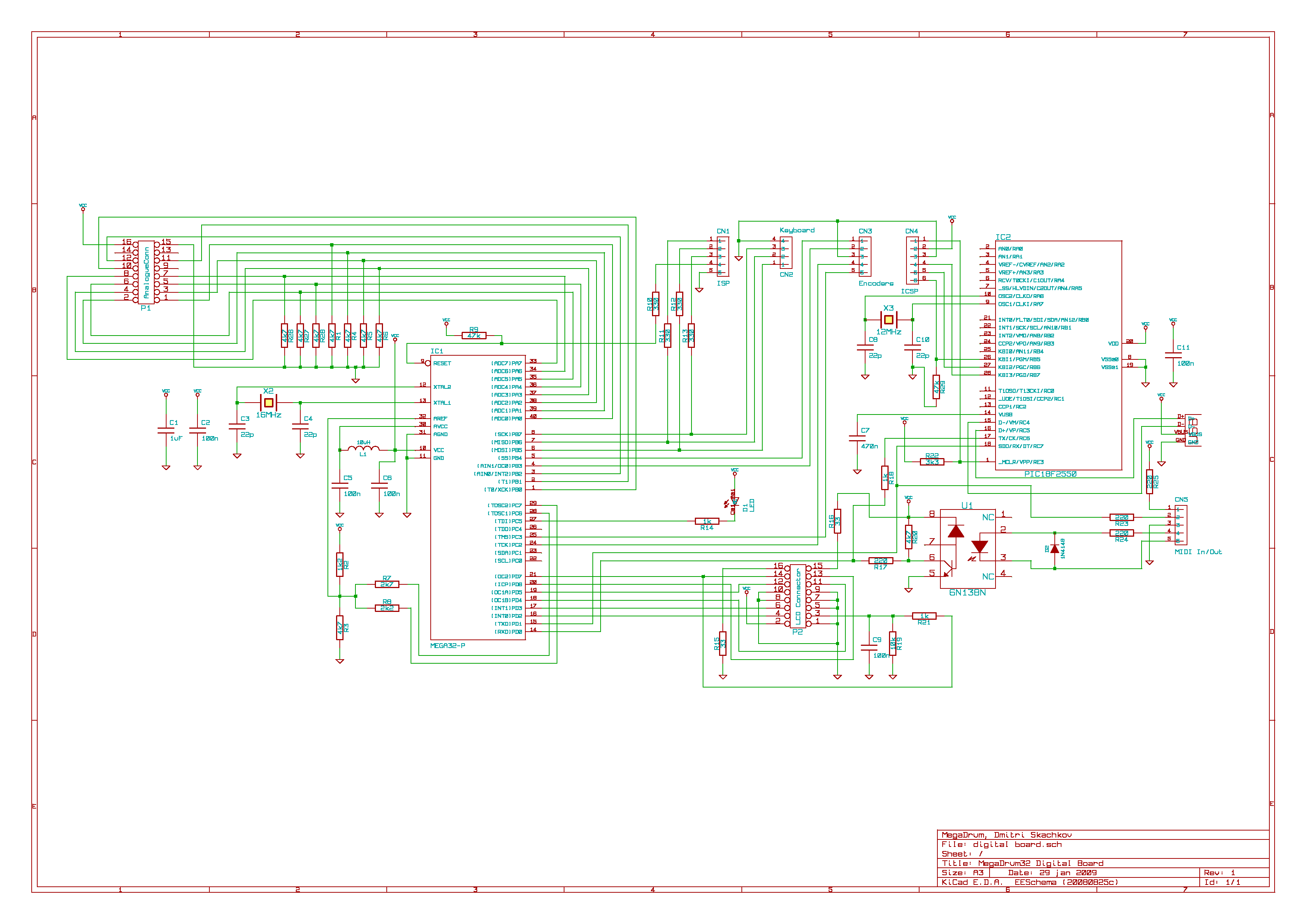
Lee, you mentioned you are using a minimal setup for the processor. Do you have a link to the minimal setup? This will live in the instrument, so the less I need, the better. I have 5V coming off of the megadrum (schematic), and I can tie in to the MIDI coming directly out of the atmega and 6N138N.
Read the section just below half way down this page: http://www.ucapps.de/mbhp_core_lpc17.html (the schematic for the full LPC based board is around there too - the minimal bit is just the obvious parts of the USB connector, power regulator and capacitors, plus a jumper for the boot hold)
And then look at the links on the top of the wiki page here for the DAC and SD card connectors: http://www.midibox.org/dokuwiki/doku.php?id=midibox_sd_card_sample_player
Awesome!
Lee, you mentioned you are using a minimal setup for the processor. Do you have a link to the minimal setup? This will live in the instrument, so the less I need, the better. I have 5V coming off of the megadrum (schematic), and I can tie in to the MIDI coming directly out of the atmega and 6N138N.
Hi everyone,
Just a quickie to mention that the player’s been featured on Hackday today: here
I did a write up on my site that’s also got a bit of history and other info: here
Hope everyone’s doing good!
Cheers
Lee
Congratulations! 
Your report is also nice to read!
Could you please add a link to your project page: http://www.midibox.org/dokuwiki/doku.php?id=midibox_sd_card_sample_player
Best Regards, Thorsten.
Done! I got brain ache trying to remember all the details from a few months back… 
Thanks again for all your help that made it a success and fun to work on rather than a frustration!
Congratulations!
Your report is also nice to read!
Could you please add a link to your project page: http://www.midibox.org/dokuwiki/doku.php?id=midibox_sd_card_sample_player
Best Regards, Thorsten.
Hey,
just wondering: would it be (theoretically) possible to merge this player with another application, e.g. the new MidiBox KB?
I have an old Solton Keyboard I want to “midibox”, and having this player would make it a nice little sample keyboard. Would be great if this would only use one LPC17, but don’t know it this would work at all… I guess polyphony could suffer.
cheers,
Lars
Hi Lars,
It might work if you have tha coding skillz
but, i wouldn´t do it, a core + lpc costs much less than the time that would be necessary for it, and you can wire it up all within the keyboard, so nobody sees that there´s two cores involved
Bye,
Peter
Hi Peter,
yes, I guess you’re absolutely right, since I just started programming, and this would be more than copy/paste a few lines…
To get the project started I just bought a TDA1543 on ebay yesterday, but it will arrive at my place in “20-30 business days” .. dooh.
BTW, a killer feature would be a loop mode for longer samples (to play sustained notes, chords, pads, organs…). right now it’s more like a Mellotron (“samples” stop after a few seconds), but this could also be nice. Maybe I make a MIni-Mellotron .. 
Hi,
Nice to see someone else is making one!
To answer the question on looping samples - as you know the code doesn’t support it at the moment. It is possible to add this fairly easily, but the reason I didn’t is that the player reads 512 byte sectors from the SD card, and we can usually have time to read about 8 (1 per voice) before time runs out in filling the buffer for the DAC. If a loop re-trigger happened (ie the sample being read finished and we needed to start from the beginning / loop start position again) then we’d have to read another sector containing the loop start data. This would reduce the polyphony - maybe not terribly.
I suppose it depends on whether looping is more important with reduced polyphony vs maximum polyphony. My app was essentially a melodeon emulation (diatonic accordion) which tend to run out of puff on the bellows anyway!
If I get time over the weekend I might have a play with looping and report back…
Cheers
Lee
Hi Peter,
yes, I guess you’re absolutely right, since I just started programming, and this would be more than copy/paste a few lines…
To get the project started I just bought a TDA1543 on ebay yesterday, but it will arrive at my place in “20-30 business days” .. dooh.
BTW, a killer feature would be a loop mode for longer samples (to play sustained notes, chords, pads, organs…). right now it’s more like a Mellotron (“samples” stop after a few seconds), but this could also be nice. Maybe I make a MIni-Mellotron ..
Hi Lee,
that would be great! Unfortunately I can’t test / help until I have my audio DAC.
But I’ll watch this thread closely…

Cheers!
Hmm, ok i’ve had a brief play with some test code today.
I’ve got looping working, but for some reason it’s not looping cleanly - ie there’s a ‘jump’ in the waveform.
TK! - I probably need your help again
I’ve attached a zip file with the files for the test. There is a 1 second long triangle wave sound bank I created, which should loop perfectly (it’s 200Hz, 1 second so a perfect loop).
The test code is extremely limited so far in that it’s hardcoded to assume a loop from the end position of a sample to the start position of a sample (should be easy to make as flexible as we need later once the basics are working).
I’ve created a copy of the SD card sector read function to expect a specified number of bytes (rather than the standard function which is hard coded to 512 bytes). I created a copy for ease rather than potentially breaking other apps that use the function.
What should happen is that the loop occurs at byte number 88200 (the full file length) after reading 172 full 512 byte sectors (so it’s read up to 88064 bytes before a loop condition occurs), my code reports correctly:
[7640.171] Looping sample 0, end position is 88200, start position is 0, current position is 88064
So what should happen is that it reads 88200-88064 samples (136 bytes) from the end of the sample, and then goes back to position 0 and reads 512-136 = 376 bytes from the start to complete the buffer fill of 512 bytes.
What’s actually happening is that it’s looping (and goes on indefinitely) but there’s a loud click on the loop showing that something is not happy. I’m not sure whether it’s the read length not working correctly or whether there’s an issue once looped of the sectors being unaligned with the number of bytes to read (as following a loop not aligned to 512 byte sectors, each read will overlap sectors)… I’m sure it’s solvable but I’d be interested in some insight from TK!!!
Progress, of sorts!
Lee
Hi,
Nice to see someone else is making one!
To answer the question on looping samples - as you know the code doesn’t support it at the moment. It is possible to add this fairly easily, but the reason I didn’t is that the player reads 512 byte sectors from the SD card, and we can usually have time to read about 8 (1 per voice) before time runs out in filling the buffer for the DAC. If a loop re-trigger happened (ie the sample being read finished and we needed to start from the beginning / loop start position again) then we’d have to read another sector containing the loop start data. This would reduce the polyphony - maybe not terribly.
I suppose it depends on whether looping is more important with reduced polyphony vs maximum polyphony. My app was essentially a melodeon emulation (diatonic accordion) which tend to run out of puff on the bellows anyway!
If I get time over the weekend I might have a play with looping and report back…
Cheers
Lee
[testing loop.zip](< base_url >/applications/core/interface/file/attachment.php?id=9820)
Having had more of a think I believe that the problem is:
Reading less than 512 bytes from the end of a sample works fine (the remaining bytes in the sector just aren’t read in)
Reading from the start of a sample (or any other sector start position) is ok, as again the read just reads in a set number of bytes
Following this, all other 512 byte reads need to start part way through a sector, and then read part of the next sector. This isn’t catered for at the moment (the SD card sector read routine aligns to a sector start). It is possible to sort this out (essentially will need an offset and bytes to read into a new function to do it), but it is really going to degrade the performance of the player as ALL reads following a loop will need 2 sector reads… Hmm…
I’m interesting in seeing this through to the end, but I suspect given the limits on SD card read speed we might end up with a really limited polyphony…
Perhaps it is better to just allow for longer samples (ie increase the cluster position buffering) to allow people to create really long looped samples offline (and use the cheap SD storage) or take a radical fork to the project and cache really short samples in RAM… Funnily enough as we discussed months ago on the thread!
Cheers
Lee
Lee! This is Awesome! Let the acrobatic sample reconstructions begin.
+1 on long preprocessed samples on a “big computer”, sd storage capacity usually is not the issue (you get an 8gb card with every bought sixpack of beer :-))
Many greetings!
Peter
Lee,
thanks for a great project, just finished mine. I am sure it will be most useful.
To anyone else considering building one, be aware that the TDA1543A is different to the TDA1543.
I used a TDA1543A, wrong!
It works great now I have a TDA1543.
Tim.