First of all a big compliment to the designer of this sample player. You did a great job!
I was searching for a simple way to trigger samples with a external midi signaal. This looks perfect for it.
But I soon discovered that the used ucontroller-board is not available in Holland. Ordering in a foreign
country isn’t a that big problem but they seem not to be in stock at many places. I certainly succeed in the
near future to get one in my hands But looking at the scheme did me wondering the following. Is the all board
absolutely needed. Thus does the design use features of the used expresso-board or only of the used controller. So in short is it possible that a redesign of it would only use the programmed controller and not the whole board? I did already make boards with this small smd footprint. Not easy but possible with diy tools. I certainly would put a dc-dc converter on it too. So that all of it would be powered from 2 times AA or AAA. In order to get the size of the
housing down.
I think it’s a challenge to give this a try if possible! But I’m new to this concerning the used controller and board. So I need opinion on this.
Second question is: I can’t download the full dir. at the given link? Only file after file download succeeds? Is this normal or is something overseen by me?
Keep this great project going. Thanks for sharing it. And for all the answers that maybe are given.
It sounds like an awful amount of work to rebuild the LPC, and i’m unsure whether you could avoid building what comes prebuilt (especially as you need the JTAG USB interface initially to flash the MIOS32 bootloader onto the board). How come you can’t order a board from Sweden (which is where embedded artists ship from) - that’s what I did to get some boards in the UK? It’s not expensive at all.
As for your SVN troubles, I’ll let the other guys answer here. Have you set up your SVN as per the guides, rather than just using the web interface?
Cheers
Lee
First of all a big compliment to the designer of this sample player. You did a great job!
I was searching for a simple way to trigger samples with a external midi signaal. This looks perfect for it.
But I soon discovered that the used ucontroller-board is not available in Holland. Ordering in a foreign
country isn’t a that big problem but they seem not to be in stock at many places. I certainly succeed in the
near future to get one in my hands But looking at the scheme did me wondering the following. Is the all board
absolutely needed. Thus does the design use features of the used expresso-board or only of the used controller. So in short is it possible that a redesign of it would only use the programmed controller and not the whole board? I did already make boards with this small smd footprint. Not easy but possible with diy tools. I certainly would put a dc-dc converter on it too. So that all of it would be powered from 2 times AA or AAA. In order to get the size of the
housing down.
I think it’s a challenge to give this a try if possible! But I’m new to this concerning the used controller and board. So I need opinion on this.
Second question is: I can’t download the full dir. at the given link? Only file after file download succeeds? Is this normal or is something overseen by me?
Keep this great project going. Thanks for sharing it. And for all the answers that maybe are given.
It’s not so much that in order to use the LPC1769 processor you need a bootloader per se, but rather to use the Midibox (MIOS32) environment that TK and the contributors have built up does require this route. Without it, you’d have to start from scratch on all the supporting libraries and thousands of hours of development time that has been built up.
Best of luck!
Thanks Lee for the quick respons. I’ll consider it all.
A rebuild is certainly a lot of work and as I only need one or two to get the sounds I need for
my project. The fastest way (and cheapest also at the end I think) will be using the board. Although
it’s sounds strange to me (not because of your remark but in general)that these controllers only can be
programmed by bootloading the .hex But as already said I’m new to this ucontrollers! Pic and AVR are
more common to me.
I’ll first try to get one in my hands of those boards BTW downloading was attempted by me trough
That makes things clear! It was long time ago that I was on the midibox community. In those days it only had to do with using the SID seperatly I think? But things have changed. Your design took my attention again.
Another question. Is it right that you use a microcard adapter as connector and thus using a micro sd card? Which is a clever solution! Or did I understand/see that false? I was wandering if you also tried a full sd card in that case. My experience is that certain mini/micro cards get very slow under certain circumstances. Even very expensive ones! A full size card has totally other behaviour in the same situation. Till now I didn’t discover why. But maybe it can solve the problem of cheap cards? (just using a full size cheap card) And full size sd-card connectors are not that expensive.
Last post till I really start the project and if building problems are discovered
No problem…
It’s not so much that in order to use the LPC1769 processor you need a bootloader per se, but rather to use the Midibox (MIOS32) environment that TK and the contributors have built up does require this route. Without it, you’d have to start from scratch on all the supporting libraries and thousands of hours of development time that has been built up.
Yes it’s using a microSD to full size SD adaptor as the socket (wasn’t my idea, but it’s a good one!). It’s possible you might find a full sized SD card that’s slightly faster than a microSD, but I didn’t test this…
That makes things clear! It was long time ago that I was on the midibox community. In those days it only had to do with using the SID seperatly I think? But things have changed. Your design took my attention again.
Another question. Is it right that you use a microcard adapter as connector and thus using a micro sd card? Which is a clever solution! Or did I understand/see that false? I was wandering if you also tried a full sd card in that case. My experience is that certain mini/micro cards get very slow under certain circumstances. Even very expensive ones! A full size card has totally other behaviour in the same situation. Till now I didn’t discover why. But maybe it can solve the problem of cheap cards? (just using a full size cheap card) And full size sd-card connectors are not that expensive.
Last post till I really start the project and if building problems are discovered
Anyone who can give a little help? svn downloading the files gives me trouble. Websvn doesn’t work and after installing Tortoise I still get errors.
svn is clearly as it shows not my thing till now What’s wrong? I’ve created a folder and check it out in Tortoise. After that I put down the svn link given
I too have problems downloading the project.hex, I don’t know how to use a program to download SVN stuff, if that even is an expression that makes sense Is there a reason why there is no idiot-downloadable version like there is for e.g. MBsid..?
So I tried just copy-pasting the project.hex from /trunk/apps/synthesizers/SD card sample player/release/LPC1769/ into a text file, saving it as project.hex, and uploading it to the board with MIOS studio - I don’t know if it was a good idea, but at least the smoke that drives all electronics didn’t come out Nothing else happened either, though.
As the extension .hex suggests, this is NOT a text file. Text files will not work. Hence, if you copy its content into a text file and only change its extension to .hex, it will remain a text file and continue to not work. Try the “Save link as…” option in your browser, from the page linking to the file.
As the extension .hex suggests, this is NOT a text file. Text files will not work. Hence, if you copy its content into a text file and only change its extension to .hex, it will remain a text file and continue to not work. Try the “Save link as…” option in your browser, from the page linking to the file.
Hi,
at least hex and text almost rhyme
but choosing ‘Save link as’ on the project.hex file gives the link to be saved as “filedetails.php”. I guess there is no way around using Subversion to download the hex from the location given in the project wiki page.
If I read it correctly, though, the hex in the release folder hasn’t been changed for 270 days, so on a layman basis it would seem it’s not under feverish development, and hence it *might* seem that making a plain-and-simple downloadable hex available (like there is one for MIOS32 bootloader) would be a one-off affair..? Be that as it may, naturally I’m not in a position to demand anything from anyone in this respect, so if the developers of the project have no time, then they have no time - fair enough.
This is what a programmer friend told me to do and what I did in Ubuntu 12.04.
sudo apt-get install subversion
Then, in terminal, cd into target folder and run
svn co svn://svnmios.midibox.org/mios32/trunk/apps/synthesizers/SD\ card\ sample\ player/release/LPC1769/
Now you have LPC1769/ in your target folder.
For some reason or another I had a feeling I would need to install apache2 first, but I don’t know if that was necessary because I didn’t try svn on the command line before I installed it. Anyway, should that be necessary, type:
sudo apt-get install apache2
I wasn’t really sure what I was doing but it worked, which is good enough for me.
You don’t need apache for SVN. You should remove the package, afaik Ubuntu starts daemons automatically as soon as you install a package, and you really don’t want to have a web server running on your computer all the time
I know you’re not familiar with the STM32 Core but I was curious. Could I wire up a rotary switch like yours or a few buttons on J5a/b/c of the STM32 to do the program changes? Maybe TK would know better. I’ve got an LPC Esspresso board coming shortly so I’ll upgrade my sampler when that gets here BUT I do have this STM32 board just laying around… I don’t like haveing to switch between banks via program change. I’d rather use buttons or a rotary switch. Thanks for any info!
Hi Lee, thanks for building this project, it’s awesome. Can you tell me which roraty encoder you’ve used ? Also in the description the audio amplifier it’s not detailed. Can you post schematics for the finished board please ?
The sample player is now also working on the STM32F4DISCOVERY board, which is probably the cheapest solution for this project, because it has an on-board Audio DAC!
NOTE: I changed the MIDI channel assignment, now “midichannel 1” really assigns to the first MIDI channel, and not to channel 2 (previously it was counted from 0, which wasn’t obvious)
I have a problem getting the Sample Player to work with the new STM32F4. I uploaded the project.hex and connected my sdcard with some samples, and they seem to load fine, BUT I can’t hear anything?!
When I connect my headphones I can hear a bit of white noise after the application is loaded, so that tells me that the audio out is (somehow?) initialized.
My hardware config:
just the STM32F4-Discovery (no MBHP_CORE_STM32F4) with the additional jumper cable for 5V and an sdcard-reader directly connected
I tried two different sdcards, one 4gb with FAT32 (I know I should use FAT16) and one 4GB with 2x2GB FAT16 partitions
I know that these samples worked with a LPC17 based core
I tried uploading MB_NG and it also seems to work fine, also with the sdcard file browser
I connected the Audio-Out to headphones and to a mixer line-input as well, still nothing
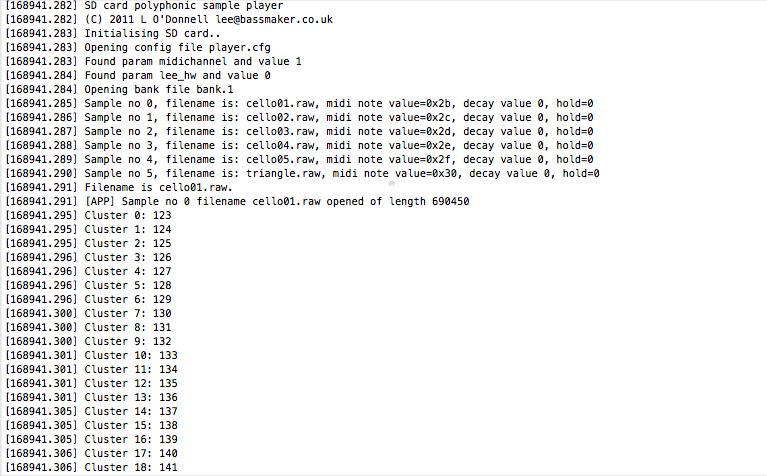
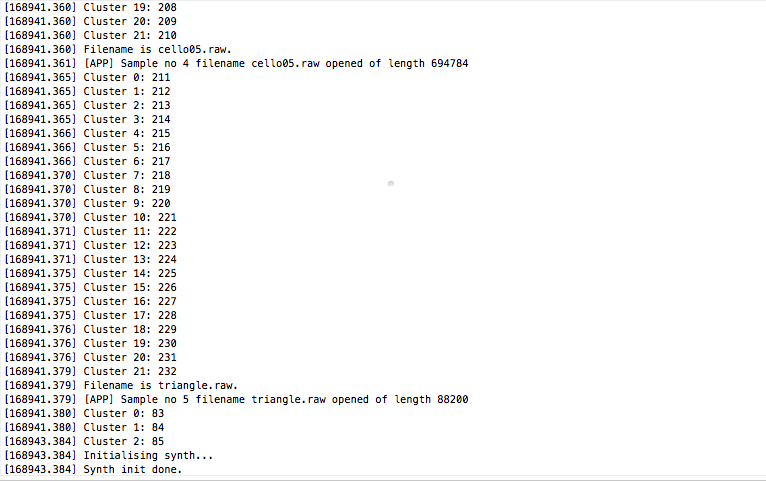
according to MIOS Studio terminal output, everything is configured and loads up fine (see screenshots)
What I am doing wrong?
(If anybody wants to try my sdcard-files, they are here)
 But looking at the scheme did me wondering the following. Is the all board