SD card polyphonic sample player

Hi Jim,

I’ve just committed a new version which supports reading a config file in from the SD card. You can set the midi channel to anything you like now (if the config file doesn’t exist etc it defaults to 1). Merry Christmas! :santa:

Hello igi - thanks for the comments. Could you explain a little further how you would want the gate and trigger to work with the sample playback?

Thanks

Lee

Hi Lee!

Thanks for interest. :rolleyes:

On every note on retrigger the TRIGGER and GATE on.

GATE is on until any note is on.

Something like this:

note on:

>trigger on (pulse a few ms )

>gate on

note off:

>gate off

For example:

>note on(36)= trigger on + gate on

>note on(37)= trigger on

>note off(36) = nothing

>note off(37) = gate off

Thanks and best regards, IGI

Gate and trigger should work on any free pins of LPC core.

Lee, you are King!

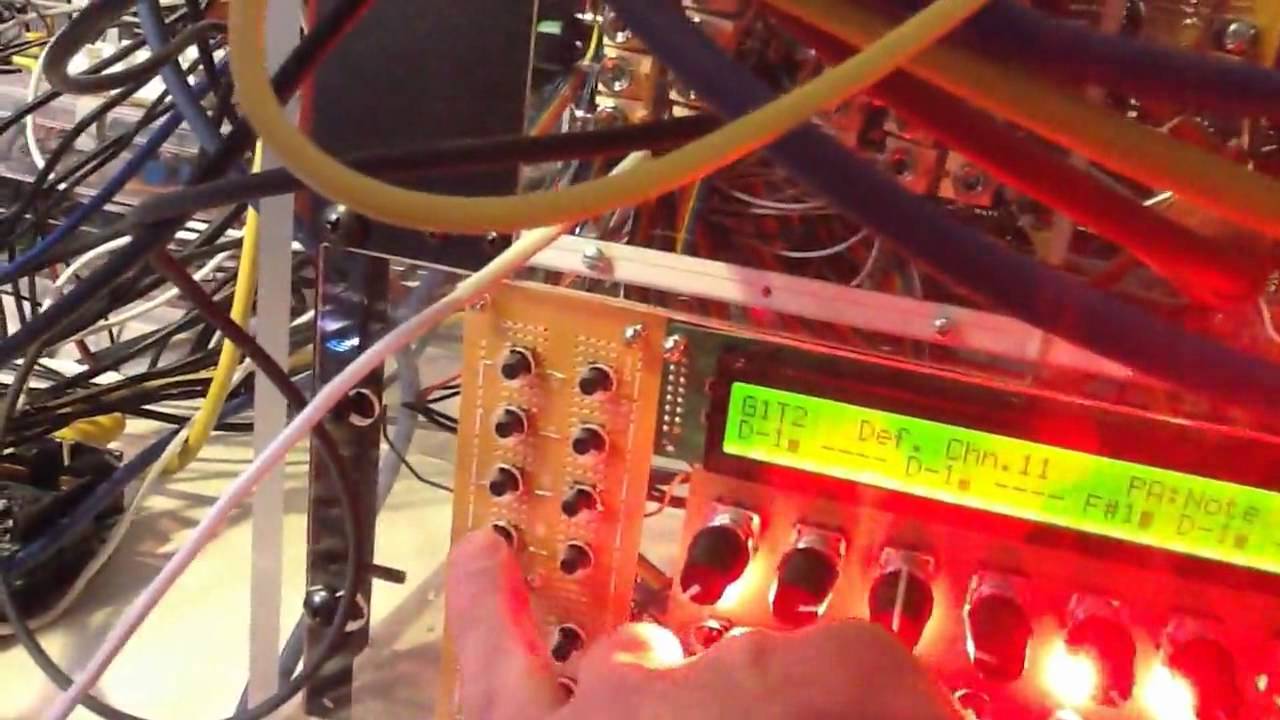
Check out this first demo:

That’s totally bloody awesome! Thanks for posting the video. Your build looks great, and I’d very much like to get lost in your room, lol!! :drool:

Hey Lee,

I finally had the chance to give this a go. Thanks for all the work you’ve done! I haven’t even come close to getting this far with my project! I’m using an STM32 core instead of the LPC core seeing as all I have is the STM. I seem to have run into some issues. I posted the debug message I got at startup after I uploaded the project.hex. Here it is:

[126248.098] Initialising SD card..

[126248.100] Opening config file player.cfg

[126248.100] [disk_initialize] error while checking for SD Card (status 0)

[126248.102] [disk_read] error while reading sector 0

[126248.104] [FILE] Failed to open root directory - error status: 1

[126248.104] Failed to open config file.

[126248.106] Opening bank file bank.1

[126248.106] [disk_initialize] error while checking for SD Card (status 0)

[126248.108] [disk_read] error while reading sector 0

[126248.108] [disk_initialize] error while checking for SD Card (status 0)

[126248.110] [disk_read] error while reading sector 0

[126248.110] [FILE] Failed to open root directory - error status: 1

[126248.112] Failed to open bank file.

[126248.114] Initialising synth...

[126248.114] Synth init done.

The SD card is formatted as FAT. I’m using a 1GB sd card, not sdhc or anything… I’m not sure if the issue is the fact that I’m using the STM32 or what is exactly going on… I know for a fact that the SD card reader and the core are talking as I’ve tested it all with the ‘usb_mass_storage_device’ app. Maybe the STM32 accesses the SD card in a different way? Any help is much appreciated!

Hi, thanks for trying! It’s a difficult one for me to comment on, as I don’t have an STM core… There is one thing I’m wondering about, and that is how fast the SD card is being clocked. In order to maximise the transfer speed, I set the following in mios32_config.h:

#define MIOS32_SDCARD_SPI_PRESCALER MIOS32_SPI_PRESCALER_4

This makes it 30MHz for the LPC17 core (from the default clock divider of /8 which is 15MHz). However having checked the default speed for STM32 in the SD card modules, is is already at the divide by 4 speed - so I don’t believe it can be the cause of the problem.

It could be another reason why the initialisation of the SD card is failing - anyone else out there able to help?

If you have your toolchain up, perhaps try recompiling the app with this after the current initialisation:

After this:

DEBUG_MSG(“Initialising SD card..”);

MIOS32_SDCARD_PowerOn();

Add:

MIOS32_SDCARD_Init(0);

This is how the card is initialised in the SD card troubleshooting example, so might help potentially. Like I say though, I don’t have the STM32 to test it.

On another note, as the STM32 is slower you may get quite a bit less polyphony, so as the LPCs are cheap I’d recommend moving to this platform anyway if possible.

Cheers

Hey Lee,

I finally had the chance to give this a go. Thanks for all the work you’ve done! I haven’t even come close to getting this far with my project! I’m using an STM32 core instead of the LPC core seeing as all I have is the STM. I seem to have run into some issues. I posted the debug message I got at startup after I uploaded the project.hex. Here it is:

[126248.098] Initialising SD card..

[126248.100] Opening config file player.cfg

[126248.100] [disk_initialize] error while checking for SD Card (status 0)

[126248.102] [disk_read] error while reading sector 0

[126248.104] [FILE] Failed to open root directory - error status: 1

[126248.104] Failed to open config file.

[126248.106] Opening bank file bank.1

[126248.106] [disk_initialize] error while checking for SD Card (status 0)

[126248.108] [disk_read] error while reading sector 0

[126248.108] [disk_initialize] error while checking for SD Card (status 0)

[126248.110] [disk_read] error while reading sector 0

[126248.110] [FILE] Failed to open root directory - error status: 1

[126248.112] Failed to open bank file.

[126248.114] Initialising synth…

[126248.114] Synth init done.

The SD card is formatted as FAT. I’m using a 1GB sd card, not sdhc or anything… I’m not sure if the issue is the fact that I’m using the STM32 or what is exactly going on… I know for a fact that the SD card reader and the core are talking as I’ve tested it all with the ‘usb_mass_storage_device’ app. Maybe the STM32 accesses the SD card in a different way? Any help is much appreciated!

Sorry that we’re no further forward on this, I have posted for debug help in the programmer’s forum for someone with an STM32, but no takers so far…

It took some minutes to debug this, but with some changes it’s working now on the good old MBHP_CORE_STM32 module! :slight_smile:

In mios32_config.h the SRIO port was re-assigned to J16 (for STM32 only), because J8/9 is used for I2S output.

Since J16 is allocated for SD Card, and since there is no other alternative available, SRIO is now disabled for STM32.

If you will ever create a control surface for this nice little synth, it would not work for STM32. But I think that this is acceptable…

Another issue was located in APP_Init(): The “SDCARD_PowerOn” sequence was only executed once, but the STM32 core needs some retries.

I don’t want to spend too much effort into this (could be related to initial pin values after power-on), but it works after I added a “MIOS32_SDCARD_CheckAvailable()” loop, which internally calls SDCARD_PowerOn as well…

This is the intended power-up sequence anyhow (polling for SD Card), therefore we should let it like it is.

The changes are in the repository now.

I deleted the precompiled project.hex from the server, because the danger is too high that we are playing ping-pong with different binaries…

Btw.: max. polyphony on STM32 is 4 instead of 8 samples (sometimes 5 can be played in parallel…)

Best Regards, Thorsten.

Thanks so much for your responses guys! When I get home, I’ll test this out! Thanks for the debugging TK! I owe you a beer!

Awesome, thanks TK! It needed some previous experience of SD card fun on STM32! :smile:

Is it ok if I re-upload a new hex file? Some of the guys like magneticstripper have had success with just the hex and a bank/config file, rather than needing a compile toolchain setting up?

Thanks again, you’re a legend!

It took some minutes to debug this, but with some changes it’s working now on the good old MBHP_CORE_STM32 module! :slight_smile:

In mios32_config.h the SRIO port was re-assigned to J16 (for STM32 only), because J8/9 is used for I2S output.

Since J16 is allocated for SD Card, and since there is no other alternative available, SRIO is now disabled for STM32.

If you will ever create a control surface for this nice little synth, it would not work for STM32. But I think that this is acceptable…

Another issue was located in APP_Init(): The “SDCARD_PowerOn” sequence was only executed once, but the STM32 core needs some retries.

I don’t want to spend too much effort into this (could be related to initial pin values after power-on), but it works after I added a “MIOS32_SDCARD_CheckAvailable()” loop, which internally calls SDCARD_PowerOn as well…

This is the intended power-up sequence anyhow (polling for SD Card), therefore we should let it like it is.

The changes are in the repository now.

I deleted the precompiled project.hex from the server, because the danger is too high that we are playing ping-pong with different binaries…

Btw.: max. polyphony on STM32 is 4 instead of 8 samples (sometimes 5 can be played in parallel…)

Best Regards, Thorsten.

You’re welcome! :slight_smile:

Please rename the file so that it won’t be overwritten when somebody else compiles the project inside the repository, because the danger is too high that a new (undefined) version will be uploaded on a “svn commit”

Proposal: create a “release/LPC1769” directory, and store the last tested project.hex file there (-> release/LPC1769/project.hex)

Best Regards, Thorsten.

Done!

Buhler - please give the hex file a go in the release directory for STM32 and let us know how you get on. A tip (from help earlier today) - make sure that the config and bank files have Unix style new lines, this has caught a few people out. (TK - ideally we need to fix the FILE_ReadLine to work with DOS type files, but as it just inspects a character at a time it hits the carriage return, and the new line (\n) that follows gets processed as another line - couldn’t think of a 30 second fix for now!).

Thanks everyone, Lee

release/STM32 doesn’t work, please use following settings:

export MIOS32_FAMILY=STM32F10x
export MIOS32_PROCESSOR=STM32F103RE
export MIOS32_BOARD=MBHP_CORE_STM32
export MIOS32_LCD=universal
[/code]


It's also important to execute "make clean" after environment variables have been changed, because there is no dependency check (means: files won't be recompiled)


Or better: create a release script for automated releases (automation is gold! :))


An example can be found here: [http://svnmios.midibox.org/filedetails.php?repname=svn.mios32&path=%2Ftrunk%2Fapps%2Fsequencers%2Fmidibox\_seq\_v4%2Frelease.sh](http://svnmios.midibox.org/filedetails.php?repname=svn.mios32&path=%2Ftrunk%2Fapps%2Fsequencers%2Fmidibox_seq_v4%2Frelease.sh)


(for your case: remove the check that breaks if the release directory already exists)


Concerning FILE\_ReadLine(): I thought that it's already working for DOS style newlines... I won't have the time to check this before christmas


Best Regards, Thorsten.

Whoops! I’d forgotten about that! I’ve rebuilt the STM version with the right environment settings and uploaded. Also taken the opportunity to clarify the project files and moved the examples for the SD card into their own folder!

Magneticstripper: Do you know, i’ve only just noticed that the performance on your video ends when you rip the SD card out of the slot, lol - that is so funny!!!

Hey Lee,

I’ve encountered somewhat of a bug in the bank switching. I plan to have a look at your code today to see if I can find the issue but basically, on a program change to any bank file other than 1, the app loads each sample twice. Here’s the log from the MIOS output:

[687681.600] MIDI Program Change received - Changing bank to 2

[687681.600] Opening new sample bank

[687681.600] Opening bank file bank.2

[687681.602] Sample no 0, filename is: G1FLT.raw, midi note value=0x37, decay value 0, hold=0

[687681.604] Sample no 1, filename is: G1FLT.raw, midi note value=0x37, decay value 0, hold=0

[687681.606] Sample no 2, filename is: G#1FLT.raw, midi note value=0x38, decay value 0, hold=0

[687681.608] Sample no 3, filename is: G#1FLT.raw, midi note value=0x38, decay value 0, hold=0

[687681.610] Sample no 4, filename is: A1FLT.raw, midi note value=0x39, decay value 0, hold=0

[687681.612] Sample no 5, filename is: A1FLT.raw, midi note value=0x39, decay value 0, hold=0

[687681.612] Sample no 6, filename is: A#1FLT.raw, midi note value=0x3a, decay value 0, hold=0

[687681.614] Sample no 7, filename is: A#1FLT.raw, midi note value=0x3a, decay value 0, hold=0

[687681.616] Sample no 8, filename is: B1FLT.raw, midi note value=0x3b, decay value 0, hold=0

[687681.618] Sample no 9, filename is: B1FLT.raw, midi note value=0x3b, decay value 0, hold=0

[687681.620] Sample no 10, filename is: C2FLT.raw, midi note value=0x3c, decay value 0, hold=0

[687681.622] Sample no 11, filename is: C2FLT.raw, midi note value=0x3c, decay value 0, hold=0

[687681.624] Sample no 12, filename is: C#2FLT.raw, midi note value=0x3d, decay value 0, hold=0

[687681.626] Sample no 13, filename is: C#2FLT.raw, midi note value=0x3d, decay value 0, hold=0

[687681.628] Sample no 14, filename is: D2FLT.raw, midi note value=0x3e, decay value 0, hold=0

[687681.630] Sample no 15, filename is: D2FLT.raw, midi note value=0x3e, decay value 0, hold=0

[687681.632] Sample no 16, filename is: D#2FLT.raw, midi note value=0x3f, decay value 0, hold=0

[687681.634] Sample no 17, filename is: D#2FLT.raw, midi note value=0x3f, decay value 0, hold=0

[687681.636] Sample no 18, filename is: E2FLT.raw, midi note value=0x40, decay value 0, hold=0

[687681.638] Sample no 19, filename is: E2FLT.raw, midi note value=0x40, decay value 0, hold=0

[687681.640] Sample no 20, filename is: F2FLT.raw, midi note value=0x41, decay value 0, hold=0

[687681.642] Sample no 21, filename is: F2FLT.raw, midi note value=0x41, decay value 0, hold=0

[687681.644] Sample no 22, filename is: F#2FLT.raw, midi note value=0x42, decay value 0, hold=0

[687681.646] Sample no 23, filename is: F#2FLT.raw, midi note value=0x42, decay value 0, hold=0

[687681.648] Sample no 24, filename is: G2FLT.raw, midi note value=0x43, decay value 0, hold=0

[687681.648] Sample no 25, filename is: G2FLT.raw, midi note value=0x43, decay value 0, hold=0

[687681.650] Sample no 26, filename is: G#2FLT.raw, midi note value=0x44, decay value 0, hold=0

[687681.652] Sample no 27, filename is: G#2FLT.raw, midi note value=0x44, decay value 0, hold=0

[687681.654] Sample no 28, filename is: A2FLT.raw, midi note value=0x45, decay value 0, hold=0

[687681.656] Sample no 29, filename is: A2FLT.raw, midi note value=0x45, decay value 0, hold=0

[687681.658] Sample no 30, filename is: A#2FLT.raw, midi note value=0x46, decay value 0, hold=0

[687681.660] Sample no 31, filename is: A#2FLT.raw, midi note value=0x46, decay value 0, hold=0

[687681.662] Sample no 32, filename is: B2FLT.raw, midi note value=0x47, decay value 0, hold=0

[687681.664] Sample no 33, filename is: B2FLT.raw, midi note value=0x47, decay value 0, hold=0

[687681.666] Sample no 34, filename is: C3FLT.raw, midi note value=0x48, decay value 0, hold=0

[687681.668] Sample no 35, filename is: C3FLT.raw, midi note value=0x48, decay value 0, hold=0

[687681.670] Sample no 36, filename is: C#3FLT.raw, midi note value=0x49, decay value 0, hold=0

[687681.672] Sample no 37, filename is: C#3FLT.raw, midi note value=0x49, decay value 0, hold=0

[687681.674] Sample no 38, filename is: D3FLT.raw, midi note value=0x4a, decay value 0, hold=0

[687681.676] Sample no 39, filename is: D3FLT.raw, midi note value=0x4a, decay value 0, hold=0

[687681.678] Sample no 40, filename is: D#3FLT.raw, midi note value=0x4b, decay value 0, hold=0

[687681.680] Sample no 41, filename is: D#3FLT.raw, midi note value=0x4b, decay value 0, hold=0

[687681.682] Sample no 42, filename is: E3FLT.raw, midi note value=0x4c, decay value 0, hold=0

[687681.684] Sample no 43, filename is: E3FLT.raw, midi note value=0x4c, decay value 0, hold=0

[687681.686] Sample no 44, filename is: F3FLT.raw, midi note value=0x4d, decay value 0, hold=0

[687681.686] Sample no 45, filename is: F3FLT.raw, midi note value=0x4d, decay value 0, hold=0

[687681.688] Sample no 46, filename is: F#3FLT.raw, midi note value=0x4e, decay value 0, hold=0

[687681.690] Sample no 47, filename is: F#3FLT.raw, midi note value=0x4e, decay value 0, hold=0

[687681.692] Sample no 48, filename is: G3FLT.raw, midi note value=0x4f, decay value 0, hold=0

[687681.694] Sample no 49, filename is: G3FLT.raw, midi note value=0x4f, decay value 0, hold=0

[687681.696] Sample no 50, filename is: G#3FLT.raw, midi note value=0x50, decay value 0, hold=0

[687681.698] Sample no 51, filename is: G#3FLT.raw, midi note value=0x50, decay value 0, hold=0

[687681.700] Sample no 52, filename is: A3FLT.raw, midi note value=0x51, decay value 0, hold=0

[687681.702] Sample no 53, filename is: A3FLT.raw, midi note value=0x51, decay value 0, hold=0

[687681.704] Sample no 54, filename is: A#3FLT.raw, midi note value=0x52, decay value 0, hold=0

[687681.706] Sample no 55, filename is: A#3FLT.raw, midi note value=0x52, decay value 0, hold=0

[687681.708] Sample no 56, filename is: B3FLT.raw, midi note value=0x53, decay value 0, hold=0

[687681.710] Sample no 57, filename is: B3FLT.raw, midi note value=0x53, decay value 0, hold=0

[687681.712] Sample no 58, filename is: C4FLT.raw, midi note value=0x54, decay value 0, hold=0

[687681.714] Sample no 59, filename is: C4FLT.raw, midi note value=0x54, decay value 0, hold=0

[687681.716] Sample no 60, filename is: C#4FLT.raw, midi note value=0x55, decay value 0, hold=0

[687681.718] Sample no 61, filename is: C#4FLT.raw, midi note value=0x55, decay value 0, hold=0

[687681.720] Sample no 62, filename is: D4FLT.raw, midi note value=0x56, decay value 0, hold=0

[687681.722] Sample no 63, filename is: D4FLT.raw, midi note value=0x56, decay value 0, hold=0

I haven’t figured out why this is happening. I’m not sure if it’s something you’ve encountered before or maybe there’s something other than the code that’s causing the problem. I’ll let you know if I find anything. Thanks again for your work on this project!

Alright, I fixed it. It was my bank.2 file. Not sure why but I copy/pasted my bank.1 file(created on a Mac) while working in windows on something else, then I recreated it on the Mac side. Somehow, the data from the windows side screwed up the app and I had to redo the bank.2 file from scratch on my Mac! Word for the wise, don’t create bank files in Windows! Not even ‘\n’ could save me!

Hi all,

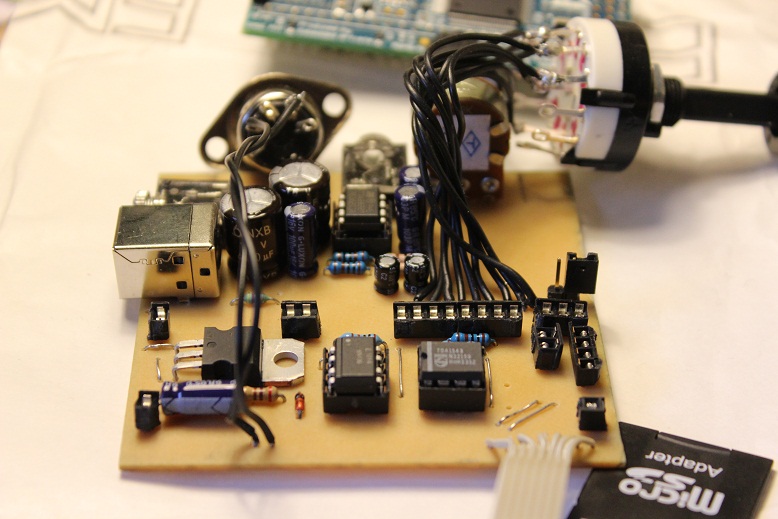
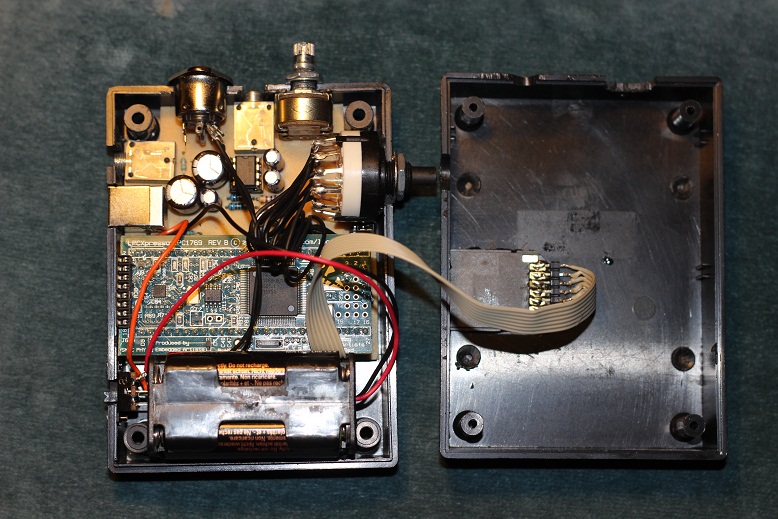
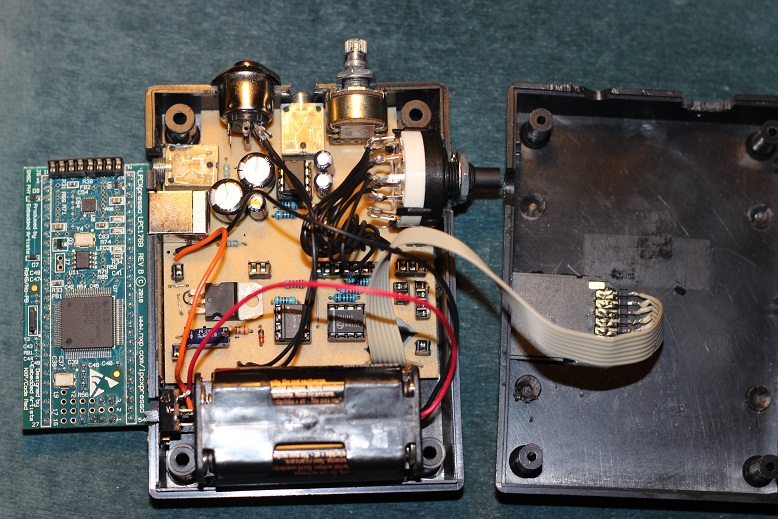
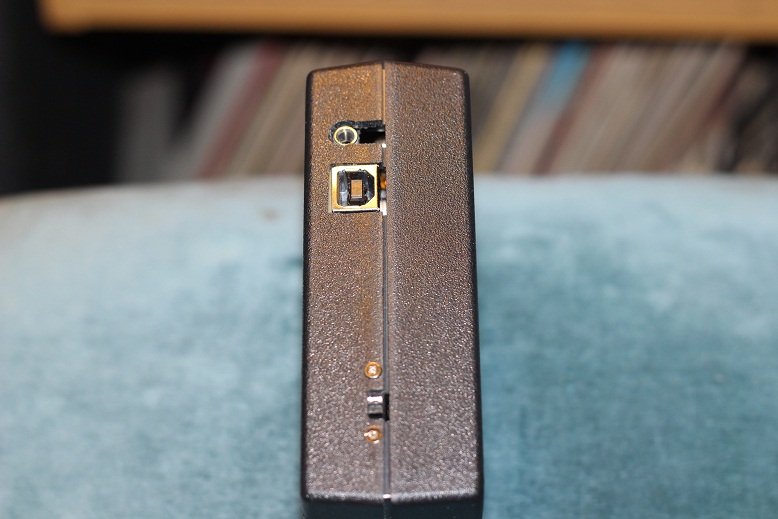
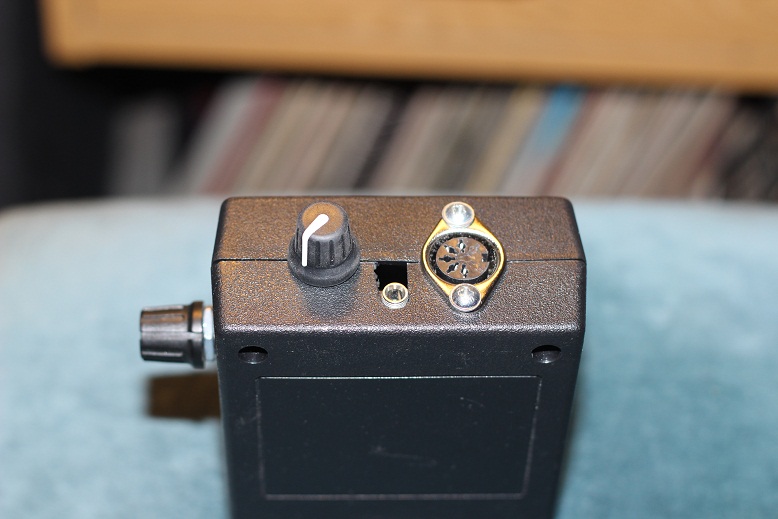
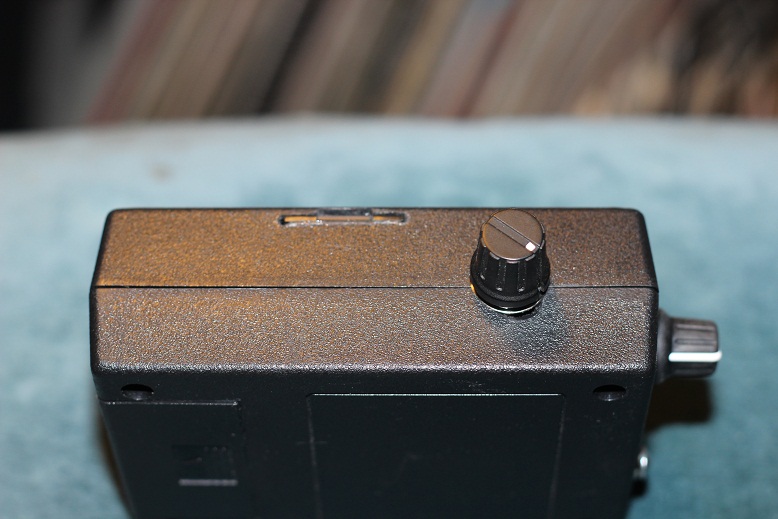
I thought I’d share with you some pics of my pocket (well, large pocket) sample player build. It’s got the regulator, midi interface and DAC under the LPC board to save space, and a headphone amp built in. The microSD is removable from outside, and you can see my ‘quick and dirty’ bank switch (on J10) as well as volume etc.

It runs from 4xAA batteries, with the headphone amp and DAC running from 6V (or whatever it can get, obviously fine on 5V from the USB if you power it from that) and the SD card, midi interface and LPC board from 3.3V. I haven’t tested the battery life, but I’m expecting 8-10 hours.

It was hard to find a case of the approx right size, so the layout isn’t really ideal and it’s not very pretty, but it works, sounds ok and is ultimately very portable!

Cheers

Lee

That is some very nice DIY!

I doubt, that you can take it in the handluggage of an aeroplane, though :slight_smile:

Am waiting for a step-up converter to power the LPC with only 2 rechargable AA batteries, but yours will have a longer battery life-time!

Greets,

Peter

Sounds good, I’d be interested in the results of that, especially battery life and any noise from the conversion. As my board is only single sided, and with the DAC having a common power rail and ground (no digital and analogue) there is some digital noise, but it’s not bad at all to be honest (I’ve heard worse on commercial devices!) :rolleyes:

Oh and in the pics before anyone mentions - there’s no decoupling capacitors as they haven’t arrived yet!! lol

That is some very nice DIY!

I doubt, that you can take it in the handluggage of an aeroplane, though :slight_smile:

Am waiting for a step-up converter to power the LPC with only 2 rechargable AA batteries, but yours will have a longer battery life-time!

Greets,

Peter