So kind of a lot could be managed at same time by multiplexing CS lines (See Latigid Display Line Driver)
Imagine total display surface as one big matrix of pixels . Each X/Y values on SSD1306 screens in UCApps Schematics corresponds to offsets for each screen (eg your offset in the total display matrix)
Also about OLEDs i am wondering about Text- based references natively supported by MIOS ? I’ve seen some working on photo without digging more.
May some peoples experienced with this could answer about ? I’ll try by my side to dig the forum more.
Imagine total display surface as one big matrix of pixels . Each X/Y values on SSD1306 screens in UCApps Schematics corresponds to offsets for each screen (eg your offset in the total display matrix)
Ok, so it works like a oldschool video wall (e. g. 8 single screens == one big screen)? Is it kind of a address (pixel area) for every OLED?
I’d like to know how to draw graphics/fonts on the screens or specific areas of the screens. Where do you define all that?
(here you see, how the mios default fonts are definied - these are bitmap fonts, that are directly converted into C datastructures for use - there is also a converter tool, that allows to create own fonts)
Is mios32_lcd.c instantiated as LCD class or is this only helper functions? The var mios32_lcd_device indicates an ID for each LCD. Do you know where these functions get triggered or (if) class gets instantiated?
Do you know if it is out of the box possible to have virtual LCDs? E. g. split one physical 128x64 LCD in two 128x32 screens?
in the end, everything is possible, if you are not shy to code a bit…
For the mios32_lcd_device stuff, I suspect it is in here (did not have time to look more deeply):
trunk/modules/app_lcd/universal/app_lcd.c
mios32_lcd offers some generic functions, that can be refined in your own source code.
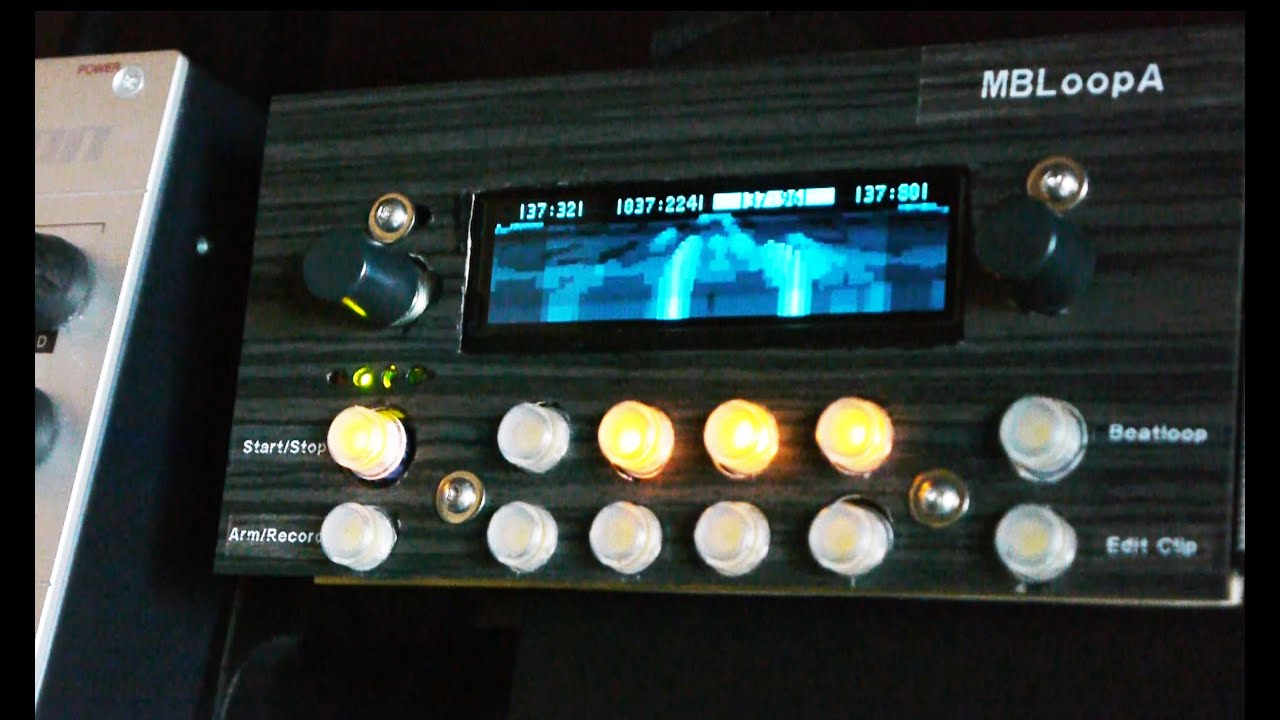
For example in a more complex project handling an extended graphical display (256x64px, 16 shades of blue), demo here:
# application specific LCD driver (selected via makefile variable) include $(MIOS32\_PATH)/modules/app\_lcd/$(LCD)/app\_lcd.mk
… you usually add app_lcd to the makefile as shown above… this is then built and linked from the MIOS module path (trunk/modules/app_lcd). From there, your custom lcd driver (here ssd1322) offers functionality specific to THAT display, based on standard mios callbacks, e.g. APP_LCD_GCursorSet()…
Now, you can first look in there, which functions are already present. If you need something specific, you can always extend in your own source…
If you look into /playground/hawkeye/mbloopa/screen.c/h, you can see some functions I’ve written for this custom project to extend basic functionality - you can do the same. In there you will find for example font rendering with 16 grey levels, logo rendering and stuff… Just feel free to code what you need. The basic MIOS functions offer everything to put standard text/fonts/icons anywhere on the connected mios screens. I don’t see a reason why you should not be able to display two different visuals on a single screen.
Since i’ll probably use Midibox NG i found this file interesting:
apps/controllers/midibox_ng_v1/src/mbng_lcd.c
Should contain all implemented LCD code for NG, right?
To me it looks like it mostly contains cursor based print to display code. Maybe all i need is to customize bitmap fonts and follow that approach. If not sufficient then look at MIOS32_LCD_BitmapPrint function.
In the end i have to get all the hardware stuff to test and play.
Good to see you’re digging the things ! Seems your coding experience will help =)
Keep us tuned when you received the hardware and started the experiments ! Wanna see your work around displays !
Bests,
JK
I’m not a good coder with much experience, but i’m trying
Currently i wonder about different types of OLEDs. I often see 0,96" (128x64) and that 2x40 (for the SEQ) here. The 2x40 seems not graphic but character based, so no custom fonts/graphics, right? Whats up with other sizes/formats graphic OLEDs? E. g. 256x64 or 128x32
Is mixing different types (pixel size/denses) of OLEDs possible when they have the same controller chip (SSD1306) on it or can you really only use one type simultaneously? I know that mixing LCDs and OLEDs is not possible.
I ask because it should fit perfectly in my frontpanel design. I’m not sure how a tiny a 0,96" OLED will look as a SCS/System display.
The 0.96" displays are really nice (hi-res thus sharp pixels) and really cheap. Most also have a carrier board meaning you could mount them easily. The one you found needs an FFC or 0.5mm pitch soldering, so go for the mounted option if you choose this route.
I don’t think that mixing display controllers is possible without special coding (works for example on MBCV).
As far as chaining multiple displays, I know implemented this for the Programma v0.1
My SCS-OLED boards will have a similar arrangement of rows of 4 OLEDs, which can be omitted in place of switches/an encoder.
tried to do my best to centralize infos in the wiki . But much information around , not always simple. Digging is also a part of the game =)
While you give yourself some time to understand things and to wait for answers, you’re on a good path =)
Bests,
JK
The SSD1322 controller works the same behind the display itself . Means connections stays the same , but only what differs is how you handle it trough software.
The concept with OLED is that each display require a specific CS line. Then other lines are serial chained .
I mean multiple SSD1306 connection schem could be also ok for multiple SSD1322 if i don’t mess up myself. But then some coding work needed.
Be aware that graphical display consumes lot more CPU than classical text based displays, that might be the limiting factor in chaining SSD1322 Graphical OLEDs
Bests,
JK