MIDIbox TIA - Atari 2600 Synth

Eptheca is right on a PAL pin 12 is for video carrier, don’t use it! The two voices Aud0/Aud1 are mixed internally and outputted on pin 13.

A0/A1 (pin 31/32) are the LSB adress bus and must be connected to the shift register.

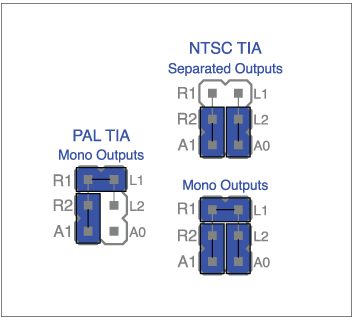
I made a mistake on the schematics, the blue jumper is on A1/R2 for PAL one, sorry.

Hi I’m a newbie here and to electronics in general.  I’ve already been tinkering with old C64’s using mssiah cartridge and soon come synthcart (as it’s simpler for what I want to use them for).  I’m about to go down a similar line with the Atari 2600 but want to ideally play it with a midi keyboard.  Is there anywhere I can buy a Midi box to do this?  Does anyone fancy making me one?  Cheers

it’s all about making one dude! it will be all that more loved when completed with your own hands and much to be learned along the way!

just jump in with a core module and a TIA chip!

Anyone in UK flash me MIOS 1.9 to my PIC as I cannot update using my ‘ancient’ PCB’s and JM module?

I have a spare 2002 SID module PCB in sweet condition for exchange, or some vinyl and tings? maybe a few quid…

Need this desperate to get the TIA firmware up on my core and start making music! it’s all waiting patiently in the 2600 case :wink:
 

I know that Eptheca find an usb flasher on ebay for a good price… Ask him, maybe :wink:

http://www.ebay.com/bhp/usb-microchip-pic-programmer

I got this one

http://www.ebay.com/itm/iCP02v2-USB-Microchip-PIC-dsPIC-EEPROM-ICSP-Programmer-with-PICkit2-MPLAB-SW-/390553998043?pt=LH_DefaultDomain_0&hash=item5aeed512db


I can flash it for you, but I am in Norway (the worlds most expensive country)

postage and time will probably put you off

no worries! cheers for the reply/offer

think i’m just gonna have to get a programmer next chance I can :wink:

hi scrubber,


forget these ebay-pic-programmers! get the pickit2 http://uk.rs-online.com/web/p/processor-microcontroller-development-kits/0381582/ along with the pic itself http://uk.rs-online.com/web/p/microcontrollers/4672126/ and just do it! they even offer an excellent next day delivery service, with the right preparation you can get it up and running by the end of the week and you could buy/program as many pics as you want as well…:slight_smile:


mOnO

yo man! ended up getting the PIC kit and flashed my 18F452 with the new 1.2 bootloader then the 1.9 MIOS via MIDI, and this project is only for the 18F4685!!! crap!!! I can’t win :frowning: spent bare time today debugging my CORE to get that far too :wink:
It’s all swish and layed out inside an Atari 2600 case with the MIDI IN/OUT where the controllers used to be, power socket, and screen under where the carts used to go! perfect fit! its pimped and ready

Is there no way of this working with 18F452? would mean changing hex tho i guess!

if I have to get another PIC chip, no problem, but will it work with my old skool MBHP CORE v2? as it was designed for 18F452?

hmmmmmmmmm!

It’s all swish and layed out inside an Atari 2600 case…


Brilliant!

Please share photos


about the core, I think it’s compatible. You might have to add a resistor, on J4 think, small mod anyway


looking forward to see&hear it

Hi scrubber, Eptheca is right just à resistor is necessary to adapt your core for the 4685. No 452 cause no enougth memory space. Display and CS have to be implemented, no CS on my firmware :wink: And i want to watch your too, yes yes yes!

sweeet! best get the chip ordered and check the wiki for adapting the CORE using the resistor!
yeah man, I added the display with the hope of future developments, plus it came free off my friend who dumped the CORE, JDM burner and a half built SID module with the display at my house that he had in a drawer since 2003/4 :wink:
already have a SID synth made so decided to use the parts for this! and the Atari was free (for parts or not working state) TIA was fine and harvested!
here’s a couple of pics so far (i’ve since finished wiring the MIDI and audio ect)

http://instagram.com/p/mP6uwirPjN/

http://instagram.com/p/mP7E_bLPjs/

thanks for the help!

OK! so…replaced the chip in the CORE v2 with 4685 and its up and running with MIOS! where do I add this resistor to allow the upload of the TIA hex? can’t seem to find any info? also just to clear up, which hex do I want to upload cartridge or base? both?

thanks!!!

I can smell the completion of this tasty project vsoon!

Hi Srubber,

This modification is on the Mb SID V2 page.
Here the information you need:
http://www.ucapps.de/midibox_sid/mbsid_v2_communication.pdf
For the hex, both is impossible :wink: the ‘base’ is the one for you cause you follow the base schematic, ‘cartridge’ if for the cartridge version only…


cheers for the info!
still doesn’t seem to work for me? still getting “no response from the core after 16 retries”

added the resistor and diode, does it matter that I am not powering the core with the J2 pins? I am using J1? they are both tied together anyways..

I haven’t got the TIA module connected to the core as of yet, does that matter, I assumed I can flash through MIOS without? then connect

First layer: Bootloader

1 - flash the PIC with the bootloader. (another Hex file in the MIOS zip)`

Second layer: MIOS

2 - now ready to load the MIOS. in midi with mios studio.

Third layer: FW
3 - test register pinout, with http://www.midibox.org/dokuwiki/lib/exe/fetch.php?media=mbtia_interconnection_test.zip and without the TIA onboard.
4 - test the TIA with http://www.midibox.org/dokuwiki/lib/exe/fetch.php?media=mbtia_testtone.zip, you will hear it.
5 - load the mb TIA base FW.
 

coool!

already had done layer 1 (bootloader)

it is layer 2 (Mios) I am having problems with! it’s not letting me upload the base hex! even with the resistor and diode???

its loaded with bootloader and says ‘Core up and running’ when connect to MIOS

just to be sure, you have already FLASH the pic with the bootloader flile “bootloader_v1_2b_pic18f4685.hex” ? (BURN!)

what does it say when you load “mios_v1_9g_pic18f4685.hex” via midi in mios studio? This hex is necessary before send all other firmware.

The base hex is a third layer!!!
And please just to be sure of your tia base circuit, follow the tests interconnection and testtone steps before the final base firmware load…


remember you’ve got to burn bootloader hex and send TWO hex, the MIOS first and the application firmware after…
yeah man! already done bootloader_v1_2b_pic18f4685.hex via my PIC burner as standard

ahhh right I haven’t done the mios 1.9 hex using MIOS yet!!! 

thanks! let’s see what happens now! 

blam!!!

no! won’t uplaod the mios 1.9 hex either? even with or without the resistor diode???

aaahhhhhhhhhhhhhhhhh!

:no:

just times out after 16 attempts to load the hex


http://instagram.com/p/o862pnrPmO/ screenshot of my mios screen

Connect midi in and out :wink:
Quit mios studio and reopen it. Reconnect your midi interface.
PC or Mac?
Maybe reburn the bootlader and verify your circuit…


You’re now a midibox explorer :wink: