Hey guys..
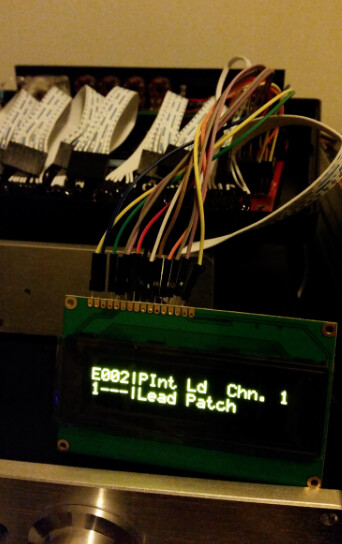
After hunting for days and days and already giving up.. i got the Newhaven OLED Display to work on my MB-6582 
I will shortly write a step by step guide when i have time tomorrow.. Just saying don’t give up the hope.
Hey guys..
After hunting for days and days and already giving up.. i got the Newhaven OLED Display to work on my MB-6582
I will shortly write a step by step guide when i have time tomorrow.. Just saying don’t give up the hope.
Hey, well done! 
Am really interested in your findings and what was necessary to get it running!
Does it involve 4bit-mode, mods on the baseboard or modified timing code in the firmware? That’s where I was with my last OLED, then it burned on me :-/, then I switched to a VFD :-).
Many greets,
Peter
45 minutes ago, Hawkeye said:
Hey, well done!
Am really interested in your findings and what was necessary to get it running!
Does it involve 4bit-mode, mods on the baseboard or modified timing code in the firmware? That’s where I was with my last OLED, then it burned on me :-/, then I switched to a VFD :-).
Many greets,
Peter
How long did it take before the OLED burned up on you?
YES YES YES
I’m like on the edge of my seat
Newhaven OLED NHD-0420DZW-AY5 on MB6582
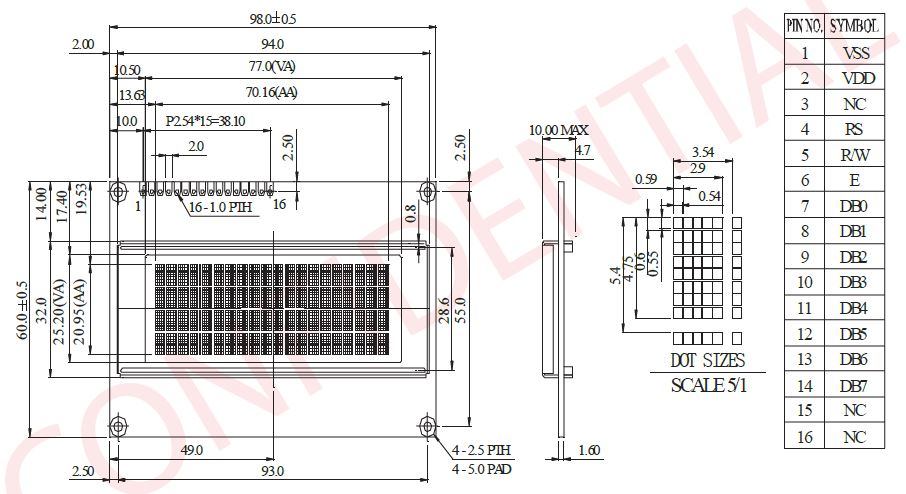
1.) Connect your Newhaven OLED according to the following Pinout
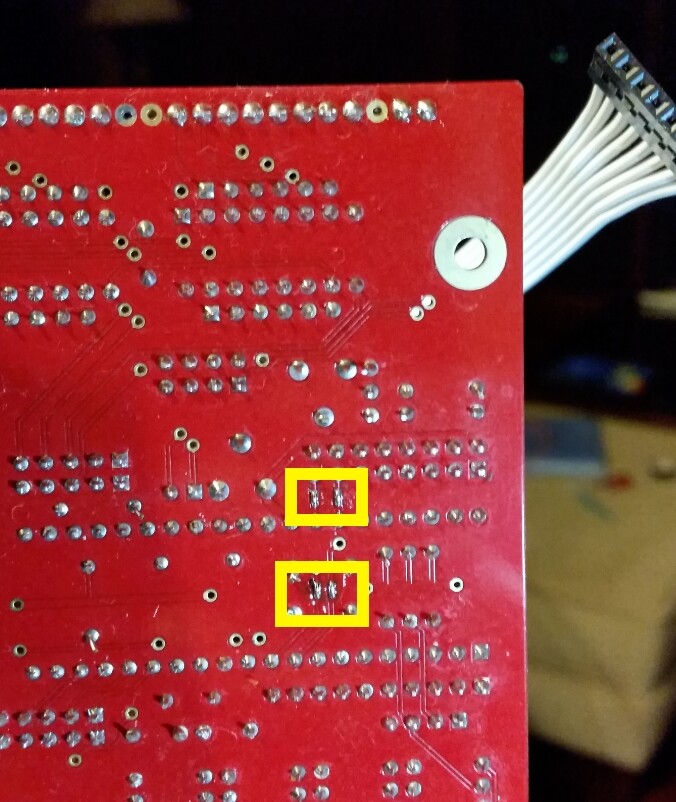
This is represented on the PCB like this:
You will have to solder the 4 small SMD Jumper bridges on the bottom of the PCB
Reassure that you have all the pins right and then proceed to step 2.
2.) Start MIOS Studio and connect your MB6582 to your Midi Interface
Make sure that you have a stable connection - now load the device_id_00_lcd7.hex (supplied by TK from another thread).
Start the upload to the MB6582.
After this upload has been finished select the MB6582 Firmware application again (setup_mb6582.hex) - the attached file is version 2.045pre1
Wait till the upload is finished.
3.) Enjoy your new OLED awesomeness!
is the wiring different for the LCD? what did you figure out that everyone else missed?
I don’t know - the wiring is just as in the above documents - i seriously don’t know why other people couldn’t get it to work
Just follow these steps and it should work. No Magic applied
The driver is probably why, I have not seen that before. Will give it a whirl.
Yes i think it has to do with setting the correct device id to activate the already implemented lcd driver. And the documentation about the jumpers is also not a 100% clear, but actually its very easy i was shocked when the OLED displayed something..
On 3/6/2017 at 9:50 PM, ChinMuzik said:
How long did it take before the OLED burned up on you?
it happened on the same evening/night i tried to get it running, i must have made some silly mistake, it was hanging in free air, might have shorted something… or it was not 5V tolerant :-).
Anyways, good job, iZZE! I hope you get it working, too, Altitude, it has been a while!
Many greetings,
Peter
Its always good to help others out - even if it is with something simple
I also got so much support from the forum back in the days so i am glad to be useful myself once in a while haha.
Greetings,
Patrick
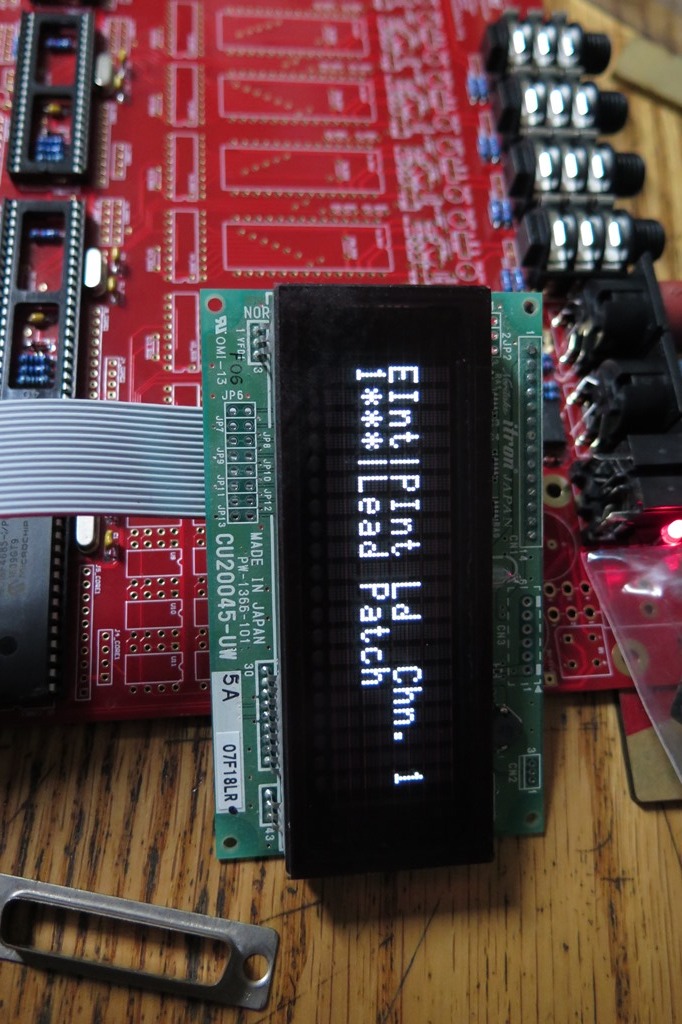
And it works!
The green one is a Raystar btw. It’s come to my attention that ALL of these 20x4 displays are in fact Raystar parts. I have “Newhaven”, “Vishay”, and “raystar” branded (which means a sticker on the back) and they are all identical
Congratulations.. glad you got it working
Also nice small adapter PCB.. made it yourself ? I see you have an almost empty Base PCB running for testing ?
You have one spare too ?
Lol, an entire MB-6582 board just to have a spare Core8.
How much thinner are the OLEDs than LCDs? I just spent $25 on my CrystalFontz MB-6582 LCD because it seemed like the nicest looking green-on-black I could find, but obviously these OLEDs are a class above. I never bothered looking into OLEDs since so many folks had had trouble with them, but now… The only thing that concerns me is how sunken the display would be on an MB-6582 without a kludge of some sort.
2 hours ago, iZZE said:
..
Also nice small adapter PCB.. made it yourself ? I see you have an almost empty Base PCB running for testing ?
You have one spare too ?
Yeah, I shared the brd file for that somewhere, I can repost it here. Never have to wire up another damn MBHP display..
That is my spare board, I ordered a set to work on this issue in particular but now I dont have to I have a big box of VFDs I need to try with this 8 bit driver
1 hour ago, jaytee said:
How much thinner are the OLEDs than LCDs? I just spent $25 on my CrystalFontz MB-6582 LCD because it seemed like the nicest looking green-on-black I could find, but obviously these OLEDs are a class above. I never bothered looking into OLEDs since so many folks had had trouble with them, but now… The only thing that concerns me is how sunken the display would be on an MB-6582 without a kludge of some sort.
About a third as thick.
I am not a fan of those buy display parts, they are over priced and the quality is substandard. Kyocera has brought back some 4x20 parts (black on white/whit on black)
I take one
Great job, everyone! 
Have a great weekend,
Peter