MBBLM on iPad via Lemur

Today I got my first experiences with Lemur for iPad and I must say that this software is really a master piece! :slight_smile:

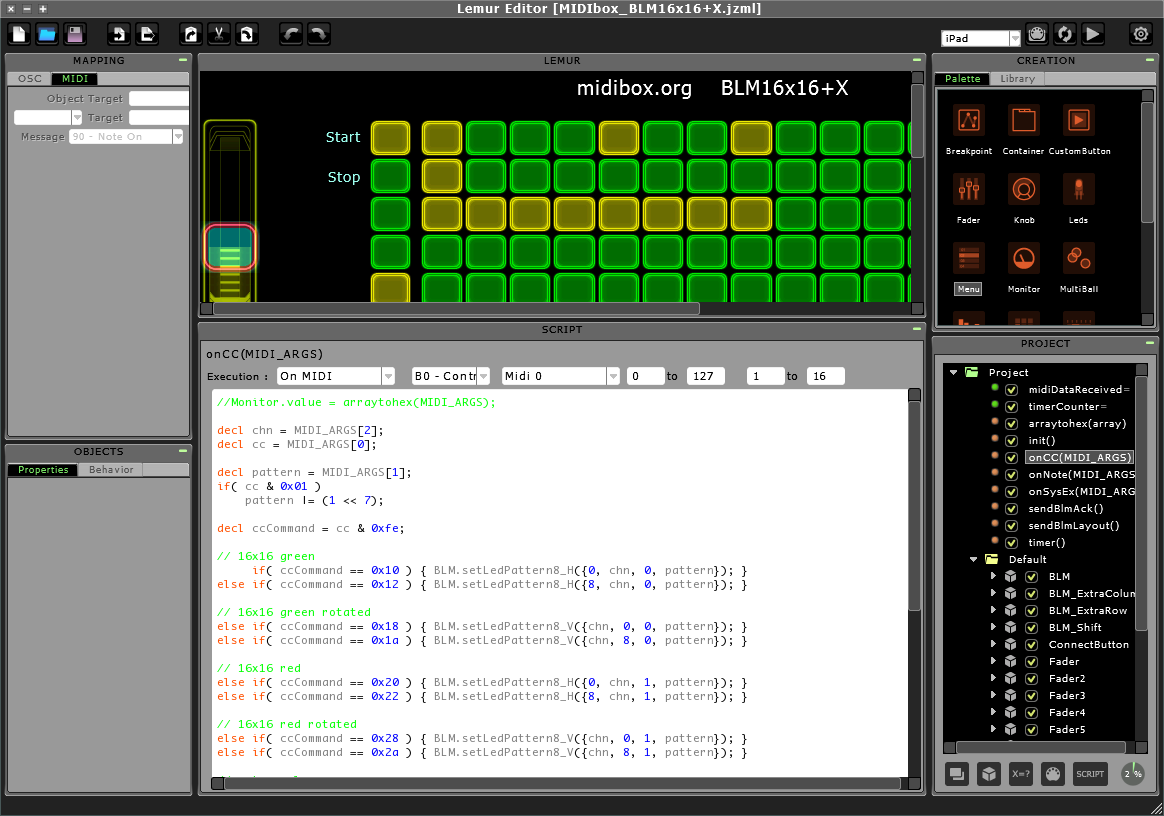
In distance to TouchOSC the controllers are fully programmable with an easy to learn script language.

And in distance to OSC it’s also possible to work with MIDI at low-level -> means: at bit basis (e.g. a MBSID Editor is feasible)! :slight_smile:

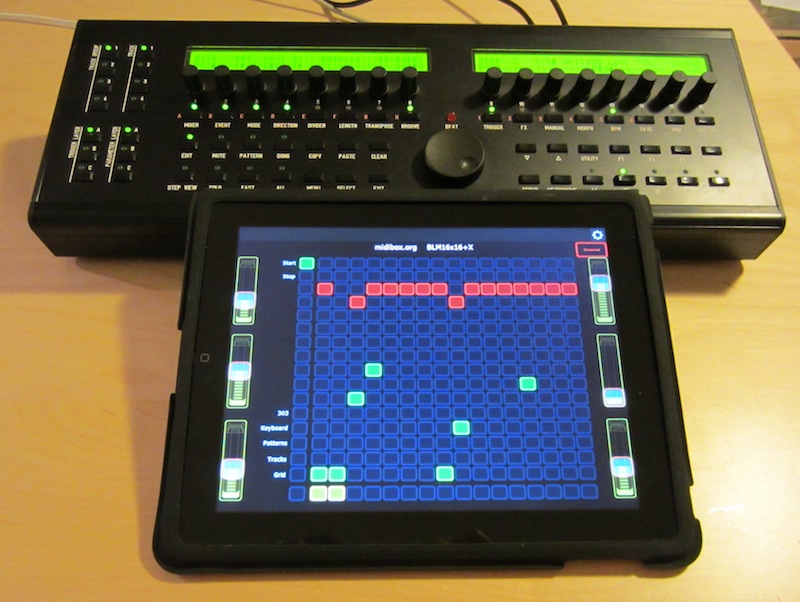
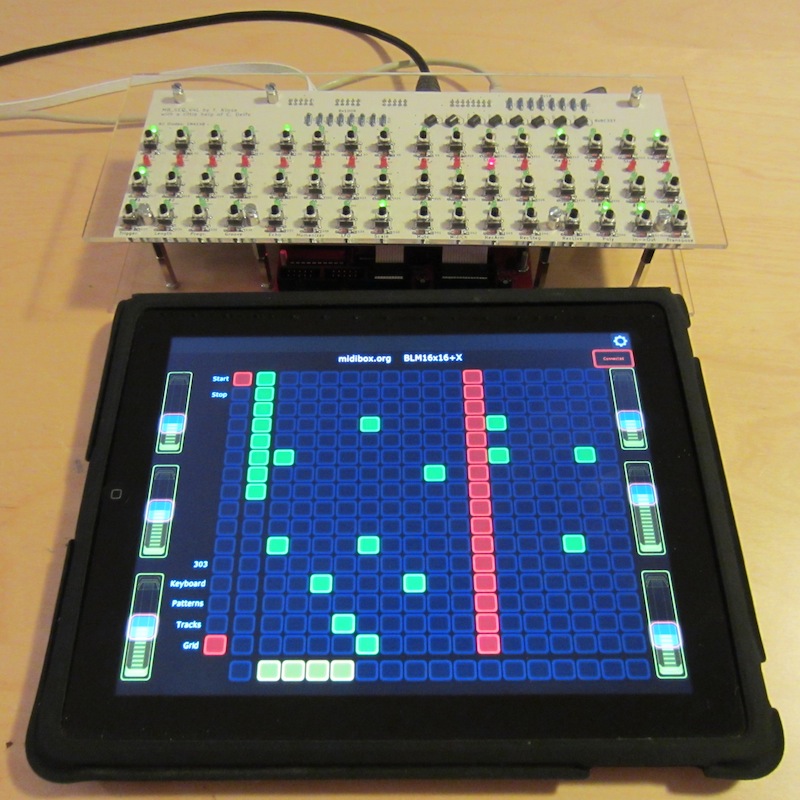
Within a couple of hours I was able to implement a complete BLM16x16+X emulation:

The user interface feels much better than the Juce implementation, and due to the easy to use Lemur Editor it’s possible for everybody to customize the user interface! :slight_smile:

So, if you own an iPad, and already bought Lemur, just install this template:

http://www.ucapps.de/midibox_blm/MIDIbox_BLM16x16+X_v1_002.zip

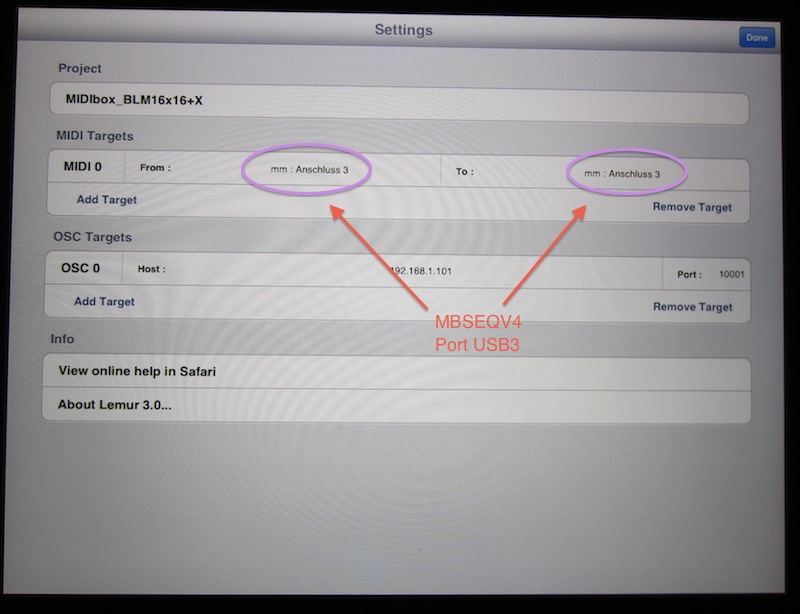
Thereafter start the Lemur Daemon for a MIDI<->OSC connection, and on MBSEQV4 configure the BLM port (MIDI->Misc page)

E.g. to USB3 like I did…

This MIDI port can be select in Lemur as well:

Now you are ready for having some Multitouch BLM fun! :slight_smile:

Best Regards, Thorsten.

With the hardware BLM, my rough calculations were about $300 with a case, panel, PCB, LEDs and Livid buttons/spacers.

So, a wireless BLM for ~$500?

  • iPad multi-use = win in my book.

TK, you beat me to it! I installed Lemur for exactly that reason 2 days ago and now you have it running already, that’s just amazing :slight_smile:

I’m away from my studio for Christmas etc but the first week in January I will be rocking this out. I will also test it with my USB MIDI as well and let you know how that works.

Cheers, this is a perfect end to 2011

David

Firstly,please excuse my ignorance :slight_smile:

Would it be possible to run this under android?

The reason I ask is on ebay there are some cheapo touchscreens going for around £80gbp,now I know they are not up to ipad standards but I am having to pull in the reins on my spending a bit.

So,can anyone tell me what would need to be done to run this on android or is it a total none starter?

cheers…oh yeah,happy new year as well (in a few hours)

Paul

Firstly,please excuse my ignorance :slight_smile:

Would it be possible to run this under android?

The reason I ask is on ebay there are some cheapo touchscreens going for around £80gbp,now I know they are not up to ipad standards but I am having to pull in the reins on my spending a bit.

So,can anyone tell me what would need to be done to run this on android or is it a total none starter?

Once Lemur has been ported to Android (I’m sure that they will do this sooner or later), the template will run on this platform as well! :slight_smile:

Best Regards, Thorsten.

I uploaded v1_002 of the lemur patch (link: see first posting).

It now supports direct communication via Ethernet (OSC), so that no computer is required to pass MIDI events to the iPad!

(MBSEQ V4.055 resp. V4L.055 upwards required).

With this version, MBSEQ Lite is supported as well:

Sequences can be directly entered in Grid or 303 mode.

Patterns can be selected in a grid as well (like known from Ableton Live).

The keyboard mode allows to play a synth directly, but can also be used for recording!

Setup procedure (commands can be entered in MIOS Terminal):

(assumed that iPad IP address is 192.168.1.110):

  • set osc_remote 3 192.168.1.110

  • set osc_local_port 3 8000

  • set osc_remote_port 3 8000

  • set osc_mode 3 1

  • set blm_port OSC3

  • store

In Lemur, set the IP address of your MIDIbox with port 8000

-> done! :slight_smile:

Best Regards, Thorsten.

Firstly,please excuse my ignorance :slight_smile:

Would it be possible to run this under android?

The reason I ask is on ebay there are some cheapo touchscreens going for around £80gbp,now I know they are not up to ipad standards but I am having to pull in the reins on my spending a bit.

So,can anyone tell me what would need to be done to run this on android or is it a total none starter?

cheers…oh yeah,happy new year as well (in a few hours)

Paul

Maybe there is a future for android with TouchOSC. There is an editor for it (Windows/OSX/Linux). So i assume a compatible template could be made for it. However the editor seems to be only for iPad/iPhone atm. So not sure it will work for the Android counterpart.

Edit: It won’t work. Apperantly the next update should fix that.

Maybe there is a future for android with TouchOSC. There is an editor for it (Windows/OSX/Linux). So i assume a compatible template could be made for it. However the editor seems to be only for iPad/iPhone atm. So not sure it will work for the Android counterpart.

TouchOSC isn’t flexible enough for a BLM. The grid doesn’t allow multi colour, and each “led” has to be accessed with a single OSC packet, which would slow down the system performance of MBSEQ dramatically -> makes it unusable.

With Lemur it’s possible to decode incoming MIDI/OSC messages with scripts, and this makes the application much more powerful than TouchOSC, and finally made the BLM emulation feasible.

E.g. the whole 16x16 grid can be updated with a single OSC packet, and I’m able to define if LEDs should be accessed in vertical or horizontal direction (which helps to improve performance as well). For TouchOSC we would need to send 256 individual packets!

Accordingly, only an application like Lemur can be used for such purposes, or a selfwritten application of course.

Since I don’t own an Android device, I can’t help here…

Best Regards, Thorsten.

Thanks TK for making that clear. Since i don’t have an IOS device i had no idea that Lemur did such an complicated job. And apperantly i didn’t read your previous post mentioning touchOSC either :whistle:

Anyways hopefully there will come some kind of solution for Android too. But Liine doesn’t seem to have Android high on it’s prio list.

There’s an app for both iOS and Android that looks like it could work: http://charlie-roberts.com/Control/

Might not be bug free at current, and the Android version’s a little old, but it appears to be both open source and fully user scriptable for the interfaces.

Good news for those of us who avoid apple :wink:

Jeez, tempted to jump on that midibox-ipad-lemur-bandwagon..

Once again, congrats! Really fine project TK!

*gone hunting an ordinary ipad1+iconnect MIDI*

Note that you don’t need “iConnect” or any other MIDI hardware device.

MIDI data is transmitted through the Lemur Daemon, which is running on a computer (Mac or Windows PC).

Alternatively, MBSEQV4L can directly communicate with the iPad via Ethernet.

Best Regards, Thorsten.

Note that you don’t need “iConnect” or any other MIDI hardware device.

MIDI data is transmitted through the Lemur Daemon, which is running on a computer (Mac or Windows PC).

Alternatively, MBSEQV4L can directly communicate with the iPad via Ethernet.

Ah okay, I see!

..thought about playing live initially, so that was the mindset for “midi cabling required”..

anyway, just to recap, a direct communication would be then:

wifi(!) ipad => mobile wlanrouter(via cable)=>ethernet socket of LPC17/SEQ, right?

..thought about playing live initially, so that was the mindset for “midi cabling required”..

Aha I may have caused confusion mentioning the MIDI interface. Sorry if I did. You can of course just use the WiFi functionality (there’s a daemon for Lemur which you run on your computer and that does the magic of converting the WiFi connection to a virtual MIDI connection). And this functionality is great in the studio, you can sit where you like and jam on MBSeq, very cool!

Anyway, just FYI:

I tested the MIDI interface (M-Audio Uno) with cables going from iPad -> Camera Connection Kit -> M-Audio Uno -> MBSeq and that also works perfectly. Lemur immediately recognised the MBSeq! And the reason I wanted this is that I don’t trust WiFi in a live situation (I had it cause terrible problems with wireless microphones in a gig last year). I never had MIDI cables do that :slight_smile:

Hi,

can somone explain me what the app does? Is it a front end for the Midibox Seq or an emulation of it?

Btw. I would always prefer the midi cable connection over wifi especially when a clock is involved.

But I noticed that ad hoc connections between ipad and computer are way better than going over the router. Sadly adhoc connections can only be protected with WEP. Haven’t found a solution for this (but i am not so sure if there are security issues in ad hoc connections ar all).

Cheers

Markus

can somone explain me what the app does? Is it a front end for the Midibox Seq or an emulation of it?

It’s only a frontend which communicates bidirectionally with MBSEQ (running on a MBHP_CORE_STM32 or MBHP_CORE_LPC17)

The communication can be realized via the Lemur demon (-> e.g. MBSEQ connected via USB to a PC/Mac), or directly via Ethernet - MBSEQ supports both options.

Btw. I would always prefer the midi cable connection over wifi especially when a clock is involved.

I do agree, therefore I prefer to run the sequencer engine on a microcontroller instead of the iPad, because iOS can’t guarantee stable timings as well, especially once the sequencer should be synchronized to an external MIDI clock.

Best Regards, Thorsten.

Do I need a full SeqV4 lite to try this or can I do anything with just a LPC17 core?

Just finished a core :slight_smile:

Yes, you can try this without the control surface.

The configuration can be done from the MIOS Terminal as described in the ChangeLog

Best Regards, Thorsten.

Been awhile since I stopped by. TK You made a ton of progress!

I am curious now, after building v4L and the Lemur BLM, is the BLM in use with the MBSEQv4 still the way to go? or can you run the two sequencers side by side and use the one lemur BLM to switch between the two quickly? Are you now using all three together? I’m going to get an iPad sometime in the near future just for lemur with your template and after seeing the v4lite now I want to build one too.

I’m still trying to figure out this statement.

MBSEQV4L can directly communicate with the iPad via Ethernet

If I have just a router connecting the two it will work? The iPad will be wireless and the v4L will be wired to the router? Will this work with MBSEQv4 also? Things are getting crazy around here :slight_smile:

Regards

Wowww, Ableton style functionality on MBSEQ -

this looks very, very, very interesting!

To sum up:

To drive MBSEQ from Lemur app

there are several options:

  1. iPad(with Lemur) => wifi => PC(with Lemur Daemon) => USB cable => MBSEQ

  2. iPad(with Lemur) => wifi => wireless router => Ethernet cable => MBSEQ

  3. iPad(with Lemur) => Camera Connection kit => USB Midi interface (M-audio Uno, others???) => MBSEQ (obviously both midi in and out cables should be used for bidirectional communication???)

  4. Can iPad(with Lemur) be directly connected to MBSEQ USB with Camera Connection kit for USB-midi or OSC communication???

This last (4) option would be optimal solution for me if it worked.

Can it work theoretically? Has anyone tested this?

PS.

I recently thought about possible merger of

iPad Genome sequencer app and Midibox functionality.

Genome has nice concept and clear layout. Midibox

has nice real-time sequencing/arpeggio functionality.

I even wrote a concept what features I’d like

to be implemented and how, and sent that to

Genome developer, but the replied that despite

he would love to see most of my suggestions that

would require a total rewrite of Genome app -

so I throw that concept into trash as I do not

anything about programming for iPads and also

do not own Mac what is required to program for iPad.

Now it is nice to see that something similar can

be emulated connecting midibox and lemur together.