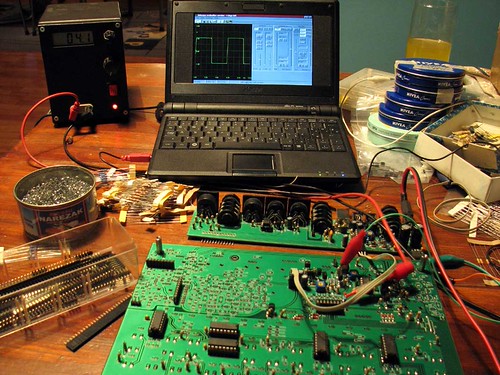
2 - you need a LPT printer port on the PC. This will be the programming port ; it is the cheapest way and the easiest too. Enable the LPT as a programmer by installing gpio.
Put 220 ohms or 1 Kohm resistors before attacking the AVR. it will prevent eventually electric disaster (cheap and efficient solution)
4 - add a resonator of 16 Mhz (the one of the x0xb0x, recycle ! ) to your programmer in order to burn high and external “fuses”
C:\Documents and Settings\m\Bureau>avrdude -p m162 -c bsd -e
avrdude: AVR device initialized and ready to accept instructions
Reading | ################################################## | 100% 0.03s
avrdude: Device signature = 0x1e9404
avrdude: erasing chip
avrdude: safemode: Fuses OK
avrdude done. Thank you.
C:\Documents and Settings\m\Bureau>avrdude -p m162 -c bsd -U flash:w:x0xb0x_full
.hex
avrdude: AVR device initialized and ready to accept instructions
Reading | ################################################## | 100% 0.05s
avrdude: Device signature = 0x1e9404
avrdude: NOTE: FLASH memory has been specified, an erase cycle will be performed
To disable this feature, specify the -D option.
avrdude: erasing chip
avrdude: reading input file “x0xb0x_full.hex”
avrdude: input file x0xb0x_full.hex auto detected as Intel Hex
avrdude: writing flash (16380 bytes):
Writing | ################################################## | 100% 6.63s
avrdude: 16380 bytes of flash written
avrdude: verifying flash memory against x0xb0x_full.hex:
avrdude: load data flash data from input file x0xb0x_full.hex:
avrdude: input file x0xb0x_full.hex auto detected as Intel Hex
avrdude: input file x0xb0x_full.hex contains 16380 bytes
avrdude: reading on-chip flash data:
Reading | ################################################## | 100% 5.98s
avrdude: verifying …
avrdude: 16380 bytes of flash verified
avrdude: safemode: Fuses OK
avrdude done. Thank you.
C:\Documents and Settings\m\Bureau>avrdude -p m162 -c bsd -U lfuse:w:0xFF:m
avrdude: AVR device initialized and ready to accept instructions
Reading | ################################################## | 100% 0.03s
avrdude: Device signature = 0x1e9404
avrdude: reading input file “0xFF”
avrdude: writing lfuse (1 bytes):
Writing | ################################################## | 100% 0.03s
avrdude: 1 bytes of lfuse written
avrdude: verifying lfuse memory against 0xFF:
avrdude: load data lfuse data from input file 0xFF:
avrdude: input file 0xFF contains 1 bytes
avrdude: reading on-chip lfuse data:
Reading | ################################################## | 100% 0.03s
avrdude: verifying …
avrdude: 1 bytes of lfuse verified
avrdude: safemode: Fuses OK
avrdude done. Thank you.
C:\Documents and Settings\m\Bureau>avrdude -p m162 -c bsd -U hfuse:w:0xD4:m
avrdude: AVR device initialized and ready to accept instructions
Reading | ################################################## | 100% 0.05s
avrdude: Device signature = 0x1e9404
avrdude: reading input file “0xD4”
avrdude: writing hfuse (1 bytes):
Writing | ################################################## | 100% 0.03s
avrdude: 1 bytes of hfuse written
avrdude: verifying hfuse memory against 0xD4:
avrdude: load data hfuse data from input file 0xD4:
avrdude: input file 0xD4 contains 1 bytes
avrdude: reading on-chip hfuse data:
Reading | ################################################## | 100% 0.03s
avrdude: verifying …
avrdude: 1 bytes of hfuse verified
avrdude: safemode: Fuses OK
avrdude done. Thank you.
C:\Documents and Settings\m\Bureau>avrdude -p m162 -c bsd -U efuse:w:0xFF:m
avrdude: AVR device initialized and ready to accept instructions
Reading | ################################################## | 100% 0.03s
avrdude: Device signature = 0x1e9404
avrdude: reading input file “0xFF”
avrdude: writing efuse (1 bytes):
Writing | ################################################## | 100% 0.03s
avrdude: 1 bytes of efuse written
avrdude: verifying efuse memory against 0xFF:
avrdude: load data efuse data from input file 0xFF:
avrdude: input file 0xFF contains 1 bytes
avrdude: reading on-chip efuse data:
Reading | ################################################## | 100% 0.03s
avrdude: verifying …
avrdude: 1 bytes of efuse verified
avrdude: safemode: Fuses OK
avrdude done. Thank you.
it is possible that it doesn’t work at the 1st time. I had problem of supply, furnishing 4,65V instead of 5 V, so i had to reburn it 3 times.