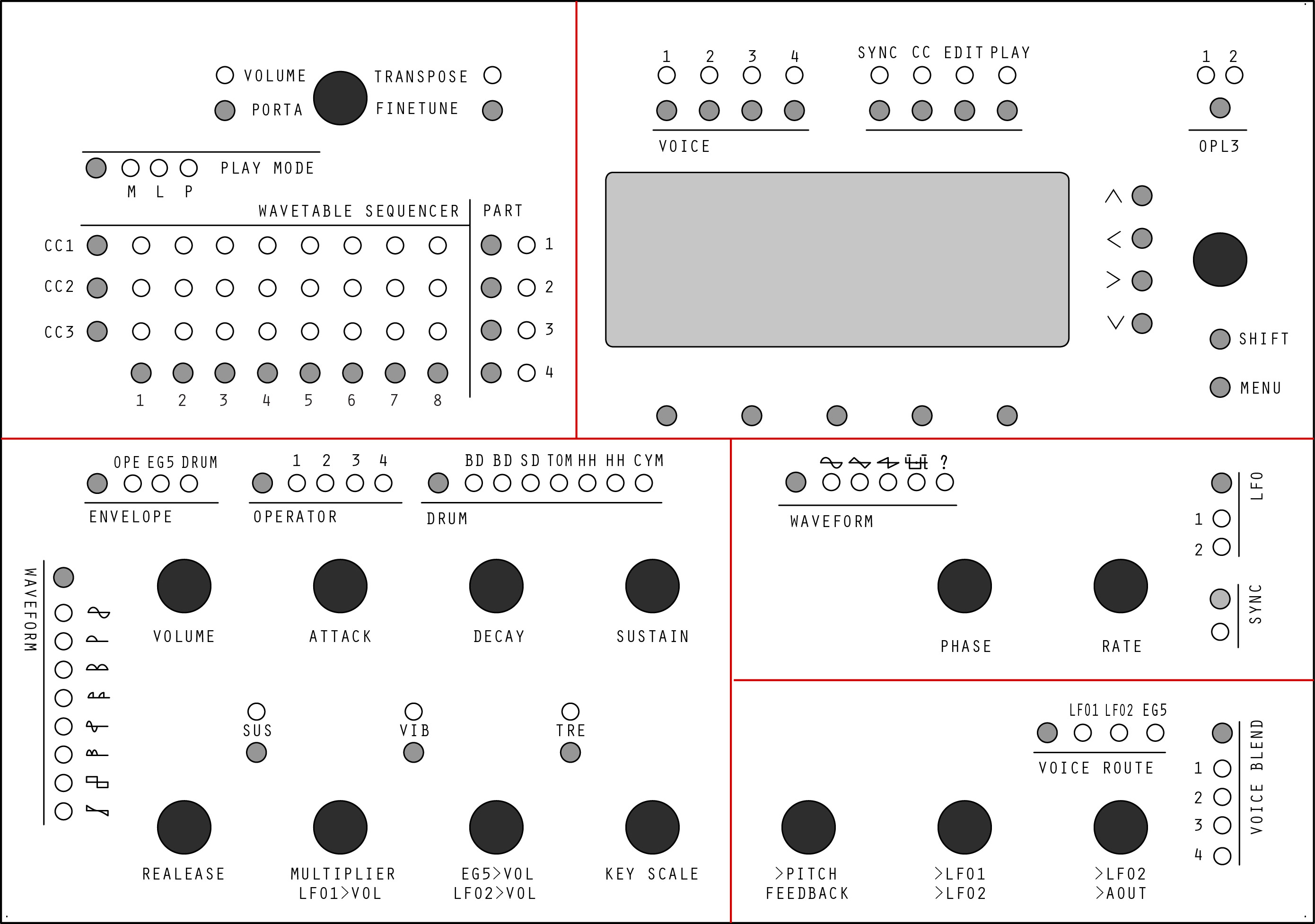
Hi again ,
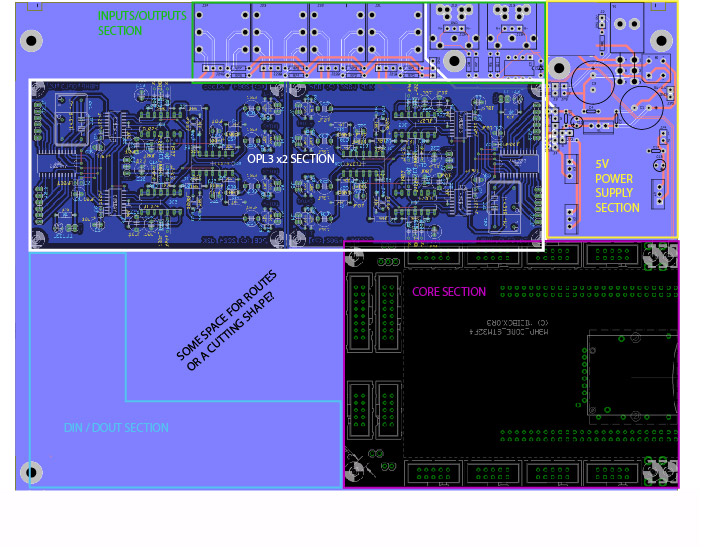
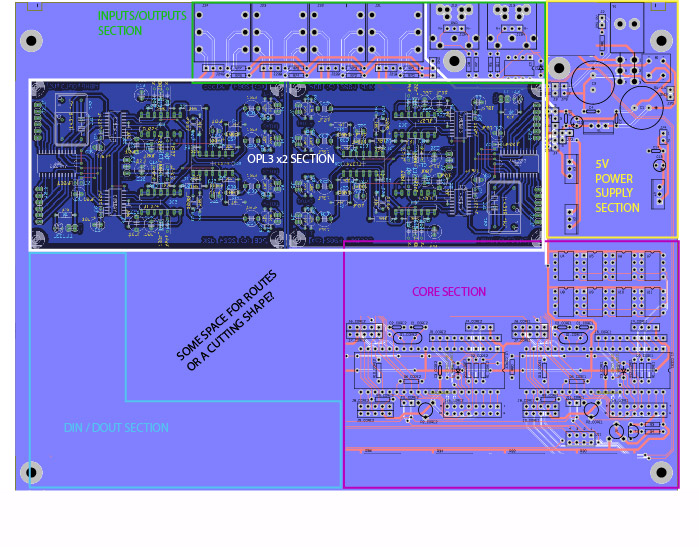
in order to explain the 2 layouts versions of base PCB, i’ve made a good-sized draw based upon MB-6582 to explain the thing.
Hope it would help.
Regards,
JK
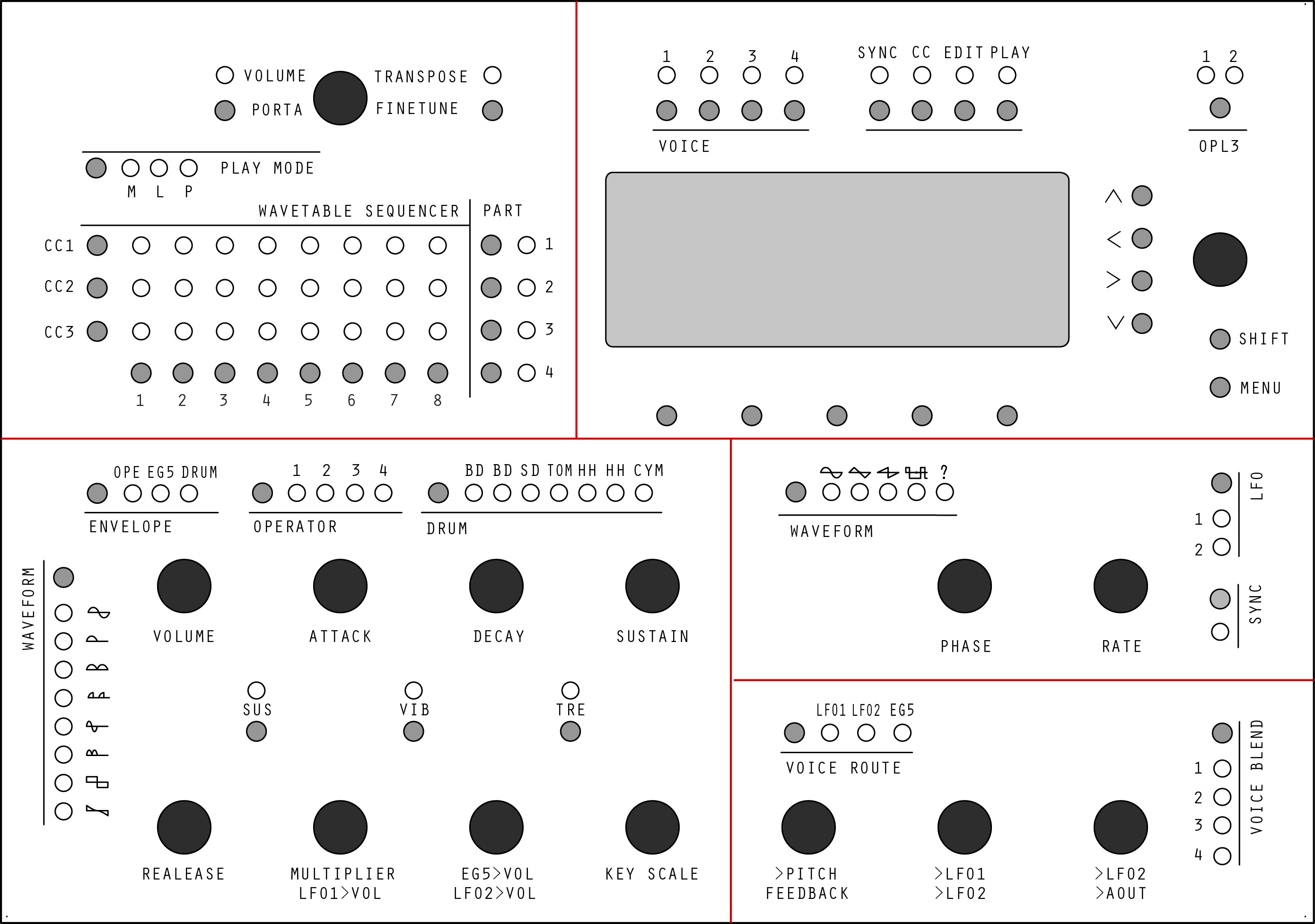
Hi again ,
in order to explain the 2 layouts versions of base PCB, i’ve made a good-sized draw based upon MB-6582 to explain the thing.
Hope it would help.
Regards,
JK
Hi there,
regarding the shift registers: best to look at examples of matrix/time multiplexing code, used in projects like MIDIbox NG, SEQ, … Of course, this more easily understandable C code can be converted to MIOS8 assembly and it would be a good first skilltest to do that and build a prototype on veroboard :-). You will find corresponding code in the MB6582 sources to drive e.g. the 8x8 LED mod matrix.
Using that matrix approach, you will require far less shift registers, and that’s how it was done by Wilba on the MB6582 and the MBSEQ…
As a general rule of thumb, you can realize an 8x8 matrix with two shift registers (8x8 pins). There are other configurations possible, of course, but at least for LED output matrices, this is recommended, as using bigger matrices, the relative “on cycle time” (load cycle) will be very short and would require certain types of LEDs or drivers…
If you don’t want to go the matrix route, your calculation is correct, you need one shift register input/output pin per led or switch. And two input pins per encoder. So that’s quite a few of shift register ICs…
Many greets,
Peter
@Hawkeye: Thank you for your answer about shift registers and matrixes .
I am planning to buy 2 Cores8 kits , a STM32F4 Board and a second OPL3 Board from SmashTV and some DIN/DOUT IC. Will send him a PM. By the way I was given an access to wiki. Thanks !!
I will try to fill it as much as possible when the design will be more “stable”.
I plan from buying a bunch of 50+/100+ new YMF262/YAC512 too . Found supplier . This way,in a near future, i would be able to provide some of these key components to the build.If some interested tell me.
I think you’re right about the veroboard prototype of the CS.I will do that. That will allow me to troubleshoot everything before making a “dead PCB” xD
Moreover than i have the desired LCD + switches,1N48,encoders and LED here. Just miss some wires, a veroboard and smashTV kits. But buying is planned for june, i should work the others parts while ^^.
Once Again , thank you all for your interest .
You may find i am like a bounded head , but in the end i find all your advices very useful and try to apply most of design notes provided trough all your comments.really.
I do not want to flood the forum in any way, i am just working much on this these days. I ask much questions that i often answer by myself while doing some researches.Sorry.
I just think relating about this could be interesting .
Why ? First because relating about my design thoughts has helped me to improve really much the things in a short time by being corrected. I would have followed wrong ways in a deep form,loosing much time elseway.
I was thinking relating about the way you make a design,the questions you ask yourself, the way you correct it, and make it evolve could be interesting to others though.
I’ll continue on making some interconnections diagrams for the Project , now that i get many much things better. ( Core interconnection , LEDs and switches matrixes to DIN/DOUT , Link between CORE8s/CORE32 and OPL3s 5V) . Will study MIOS Code of MBFM 1.4 and MB-6582. And MBFM User Manual . And this way i won’t post every 5 minutes 
Here are the questions i did not found an answer even after researching (my bad) , if someone could help… *cute dog eyes*
Big thanks,
Regards,
JK
My MBFM knowledge is limited to a sammichFM, but I’m sure the routing is also depicted graphically on the CLCD.* As I said already, this is not very intuitive and would be great if there was a more graphical depiction on OLEDs of all waves/routing/levels etc. This is more a limitation of having one encoder and 4 buttons as a control surface, but I think even with the full v1 FM CS that TK. designed it’s still tricky.
*It might be a good idea to first build basic Core/FM modules and see how the MIOS8 software works.
It’s great that you’re very motivated, and you will need that for a project like this. Expect many hours/months spent and probably one or more buggy PCBs the first time that you order. If you haven’t done PCB design before it’s a steep learning curve. If you don’t have a professional version of EAGLE you’ll have a lot of trouble designing a PCB this size. I’m not sure of a PCB design package that is free and allows for large boards.
You see straight away the benefit of 32-bit: only one Core. With two you need to work in CAN bus, MIDI implementation etc. In my opinion, it only makes sense to use the 8-bit Core for existing applications, or maybe when you need a good ADC. No one is going to stop you, and of course any new work is definitely encouraged, but from the start the technology is on the verge of obsolescence.
We have to look at history here: there are a lot of people who dream very big, only to run out of time, patience or money along the way. It’s not to say that you’ll be the same, only that if you make things easier for yourself they will have a much greater chance of success.
There’s no problem (in my view) in keeping the discussion running, it’s really a good thing to see projects and ideas flying about.
I use KiCad for all my PCB designs (except at work, where I use Altium…) It’s free and open source, and there’s no size restriction, but it’s even more poorly documented than Eagle. But once you get used to it, and you learn how to work around its limitations, there’s not much you can’t do with it.
You should definitely lay out the front panel as a matrix rather than each button/LED individually. I’m not sure how to program for that in PIC/MIOS, but in MIOS32 the BLM_X driver works very well.
I don’t know anything about the wavetable; in fact, I was going to have a wavetable feature in MIDIbox FM V2.1 and then never got around to implementing it. I believe it’s a sort of sequencer for control changes, but other than that I don’t know.
The two LFOs in the OPL3 are sine wave LFOs (or some pseudo-sine-wave, it’s hard to tell); there’s no adjustable waveform, just 1-bit global adjustable depth. The drums don’t have any other waveforms either; they’re based on normal FM voices with a few changes.
I will again urge you to start with the MIOS32 version. You will have more than enough challenges as it is.
As i wrote in another thread, i think i will stick to kiCAD for Schematics / Designs. Really like it. Good soft to share work . Having some tuts right now.
My only worry about this soft is the output files for PCB-making companies , as well as .brd files are the standard.
But i Think if you use it there is a solution =)
Edit : Latigid told me about gerber files so I definately go with KICAD
I found some stuff about the wavetable in the MIOS8 code of MBFM.Still studying. See that is not totally useless
If anybody could tell me about the right quick instruction set for PIC 18F4685 i would really love it.
I love assembly . And hates the logic who says “hey, we have much power, so we can code unoptimized way with high level language because we don’t care,we have power”
Didn’t told that any of you is thinking this way, but i often meet programmers who does.
May sound weird , i know , but i want to stick to a CORE8 version. Low level code allows to understand things deeply. And I have much spare time right now,
Be sure i’ll deal with CORE32 too. And i think after studying MIOS8 dealing with MIOS32/CORE32 will be easy as pie.
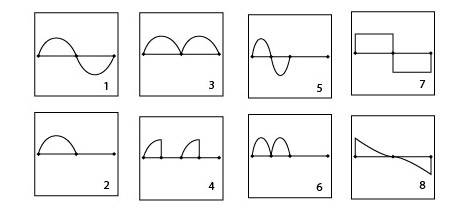
From what you’re saying the waveforms for LFO are 1 / 2 / 3 / 5 / 6 ? Same for drums?
Thanks,
Regards,
JK
I don’t understand your confusion about the waveforms. Each operator has access to the 8 waveforms shown above. The drum mode is simply the last few operators with slight differences in their connections–the waveforms those operators use are the same 8 ones above. The LFOs have nothing to do with this; they each can only produce a sine wave (picture 1 above), and the only parameter they have is a single 1-bit depth parameter. I would really recommend you learn more about the OPL3. (Did you know that three voices of the OPL3 are completely ignored in MIDIbox FM V1.4?)
HI Sauraen,
Thanks for helping me =) My confusion was coming from http://ucapps.de/midibox_fm.html
as it tells the LFO has 5 waveforms , and does not says about the drums. You answered me .
I will give a review again to YMF262 Datasheet to understand things more deeply, but the link are sometimes hard to make between hardware and software features (>more features added with soft).
The question goal was about being correct on the control surface design > (correct number of LEDs,encoders etc…)
Did not knew that issue about MBFM v1.4  .
.
I started MBFMX2 Design from TK Ctrlr virtual interface meant to drive one OPL3 . A core can drive an OPL3 and good features are coded.
As my Control surface is designed to drive one OPL3 at once, i added a switch that would allow to choose between OPL3-1 or OPL3-2 parameters.
So to me the big programming deal was about 2 things:
Do not trying to create new synthesis features or whatelse , my start point was the Control Surface Design =).
I am still not thinking that wouldn’t be such a giant deal . I may be wrong .
Anyway, thanks again for all your help
Regards,
JK
Now I understand. The LFOs you’re talking about are software LFOs implemented in the core. I was talking about the two hardware LFOs in the OPL3 (also called Vibrato and Tremolo).
I might suggest, since what you want to build is mostly two MIDIbox FM V1.4s connected together, is that you use the existing Core and OPL3 modules, and only design your front panel at first. Once you have the software working for connecting the cores, design your base PCB.
Hi all !
After making my mind agin and again , and as well as i have much work to do, decided to forget about even using a CORE8 in the MBFMX2 Design. Lesser Work is better on great projects =)
When i began my Brainstorming, thought MBFM code was only ported to CORE8. So i started my Control Surface design upon TK Ctrlr interface (to have most params on view ) designed to drive one OPL3 with a CORE8.
And thougth that i wouldn’t have to deal with any synthesis features code , just would have to make the link between the UI (matrix) and all existing features . Then link cores and access params with offset shifting.
But all of you are right. That’s kind dead-in-the-egg project . Nobody or not much people will be able to help me when riding the code , i will probably may have big problems and will finish to give up.
And that’s really more easy to code in C than in assembly, even if i love assembly. Shorter dev times etc…And will be able to design even more features with Core32 .
Have bought some protoboards, and already have a bunch of Rotary Encoders/LEDs/Swithes/Diodes. This will make CS hardware/software dev easier.
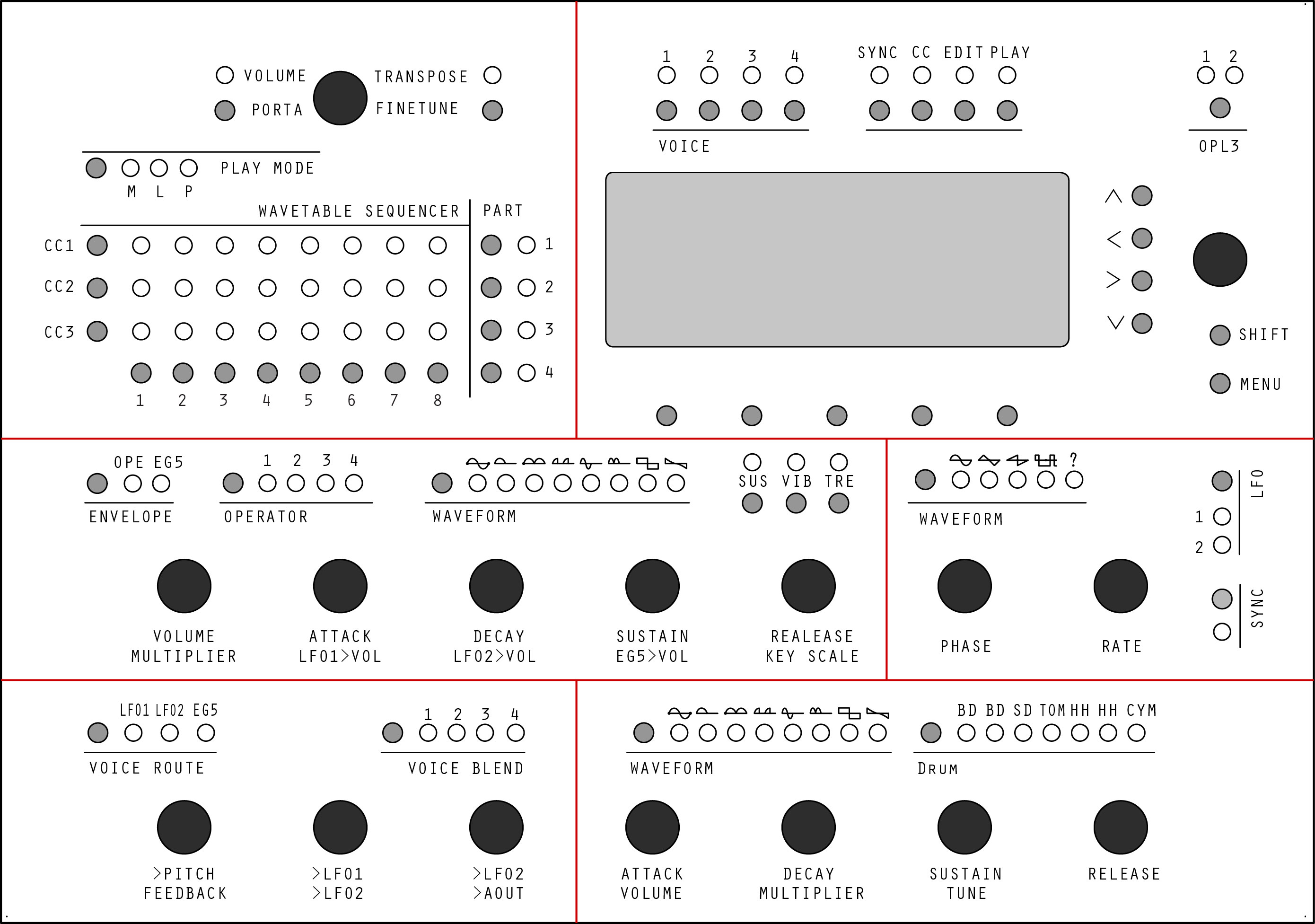
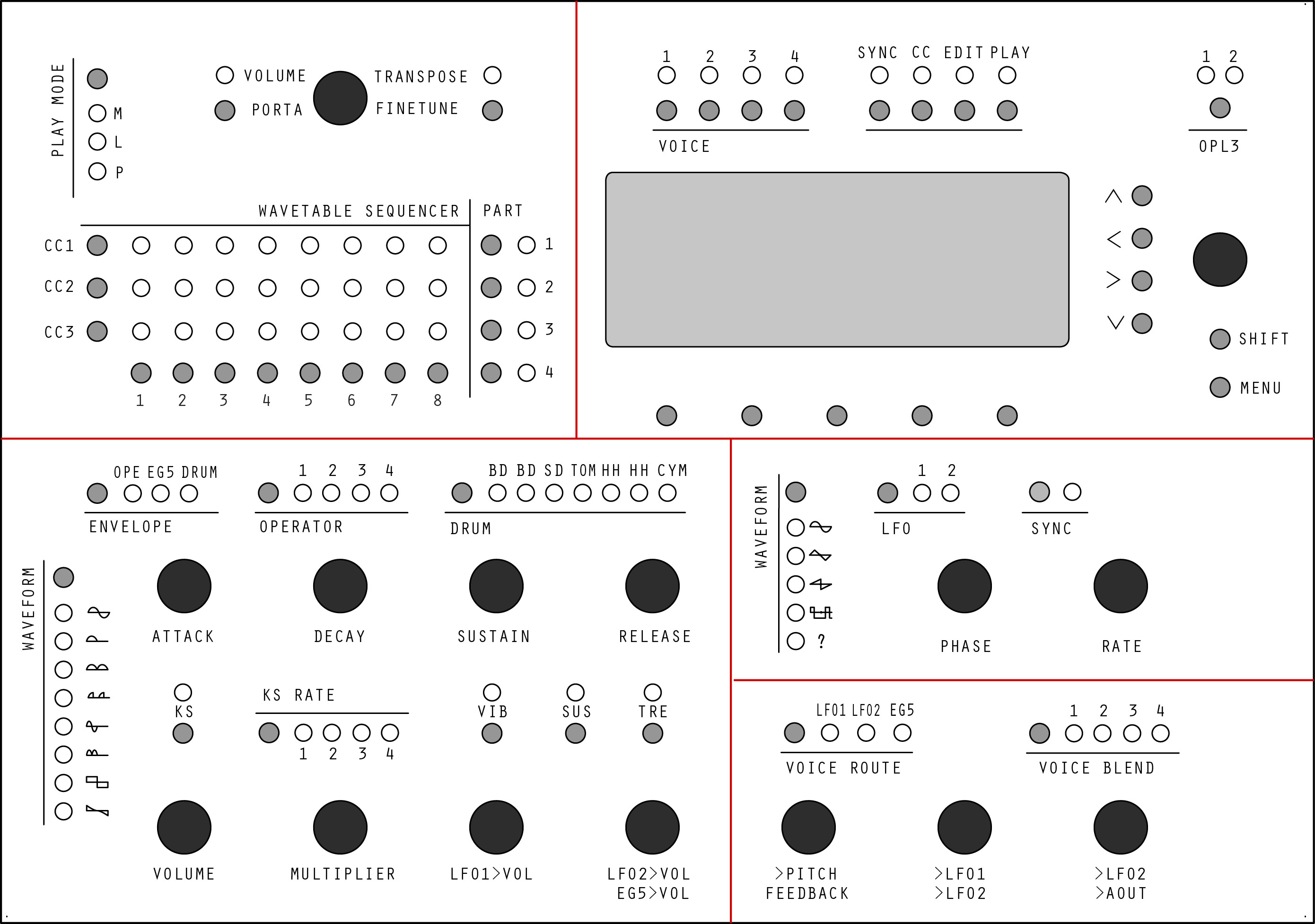
Made some corrections about the CS design . I let you see . Any advice welcome.
Best regards,
JK
Gave a SVN checkout to MIOS32 .
My eyes are now wide open ! (have i also seen a SID_V3 directory? )
Some great stuff out there. Makes me wanna code. And C code is easier to get community evolved.
Once again thanks to you all for driving me the good way. I waste less time.
Now i “officially switched” (ahah) to CORE32 i wonder a bit about displays > MBFM routing / envelopes / waveform display for example or new menu to access new features not accessible on a Control Surface
Is there any other color backlight than blue on the newhaven screen you talked about ?
Is there any 2x40LCD sized with kinda same look?
Another general question : As i see a quartz on OPL3 / TIA / AY modules , are these quartz still useful with the new core or could a PWM signal from the core may replace them?
Good saturday evening to all,
JK
Looking good and great choice with the STM32F4 core! 
For the UI, it probably makes sense to really test out in the Ctrlr editor, which settings are altered most often - and put these on the CS.
With jojjelitos help, I am (still in the ongoing looooong process of) writing a MBNG/Programma template for the Yamaha FS1r. And I find it incredibly difficult on a FM synth to isolate the most important parameters for patch programming, even if you have lots of (encoder/knob) real estate on the CS. In that respect, I’d say: rethink the dual waveform switchers (they are kind of redundant) - but try to bring on most parameters for a single edited operator (vol, attack, sustain, decay, release, keyscale, waveform, multiplier, sustain/vib/tremolo, lfo1->vol, lfo2->vol, eg5->vol) on to the encoders/switches without any further switching. Then you can easily cycle through the four operators and adjust settings -> this should work out…
If you are going for that graphical display, some things can also be nicely configured there (e.g. the algorithm selector). But prepare for a lot of work, even if it is C-based… it is not a trivial project, but you surely know that by now! :-). I haven’t seen other displays than the blue ones, but haven’t looked thoroughly. Also, it is more of a green-blue, it is really nice… There are also awesome 4x20 character OLEDs out there, I have one (also in blue) on an old E-MU sampler (as a replacement), but these are also available in different colors. So if you want to go for the (easier-to-code-for) character-based display route, take a look at these 4x20 character OLED offerings (also other manufactorers than newhaven offer these, but I’d somehow stick with them. It is a hate-love by now ;-))
Many greets and enjoy the weekend!
Peter
Based on your advice, i will try to invert Routing / Drum section in order to have a common “Waveform” part and more encoders availables, as some parameters are redundant between the 2 sections (and that’s normal)
Will add a led to the envelope selector (OP/EG5/Drum) too
Could you advice me about the quartz question for synthesis modules?
thanks in advance,
Jérôme
Hi Jérôme,
awesome! Regarding the quartzes, best ask Sauraen - he definitely has most experience around here driving an OPL3 module from a 32-bit core!
Many greets and enjoy!
Peter
Hi again,
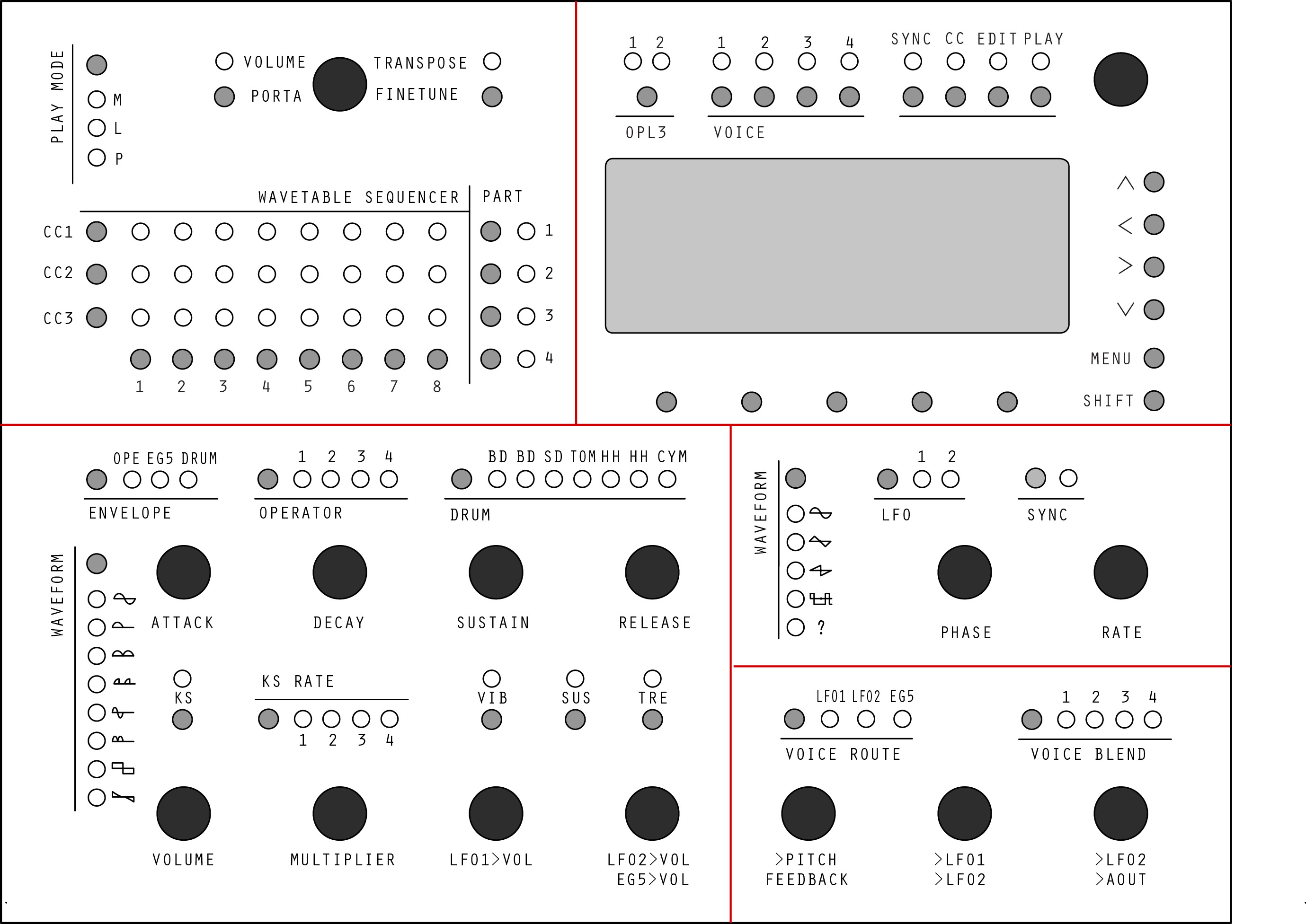
After some rework here is the last version of the frontpanel . More clear to me =) I let you see
Edit : Last hour corrections
Glad to see you’ve seen the light of STM32F4!
I would recommend a few changes on the operator portion of the front panel:
Some other thoughts:
Because the OPL3 has a number of waveforms (not just sine), you can make some pretty good sounds only on 2-operator voices; in fact I have almost a whole General MIDI patch bank completed, exclusively on 2-operator voices.I am planning to make a video this evening going over the capabilities of the OPL3 and MIDIbox FM V2.1.
Had some advices about rack format . In order to be able to fit 2 Control Surface PCB in lenght in a rack format (440mm) , i’ve reduced the general frontpanel format to 220 x 165 mm.
The PCB would be like 20mm less in lenght so 200mm width.
Here are the corrections
I think you got it backwards, Key Scale Rate is the 1-bit parameter and Key Scale Level is the 2-bit parameter.
One other thing, since switching between the operators is very common, you might want to consider having separate buttons to go to each operator, rather than one button to cycle through the four of them.
Also please consider watching the video I posted in the MBFM2.1 thread.
I will look your video from the start to the end , please be sure of the that ! So kind from you to explain so much tings . Many things to get in it i’m sure =) Just looked the 2 first minutes at the moment.
Just was finishing some things before looking at it on calm.
I’ll add the OP buttons and invert KSL/KSR.
Best regards,
Jerome