ksir
August 4, 2023, 7:47pm
41
Hello, I haven’t studied your answer in depth yet, but here is an example of declaration of my pads in ngc file
pads
EVENT_BUTTON id= 33 fwd_id=RGBLED:137 hsv=50:100:10 type=CC chn= 1 cc= 33 button_mode=Toggle label=“^std_btn”
EVENT_BUTTON id= 35 fwd_id=RGBLED:138 hsv=100:100:10 type=CC chn= 1 cc= 35 button_mode=Toggle label=“^std_btn”
Zam
August 5, 2023, 1:16pm
42
From NG user manual, .NGC config, SRIO section
| debounce_cycles=<0..65535> | This command allows to enable a debouncing mechanism for digital inputs (buttons). The number specifies the dead time in SRIO cycles at which button events will be rejected.
ksir
August 5, 2023, 9:09pm
43
thank you for your help
I tried :
#PADS EVENT\_BUTTON id= 65 hw\_id= 33 fwd\_id=RGBLED:137 type=CC chn= 1 cc= 33 button\_mode= Toggle label= "^std\_btn" bank= 1 hsv= 50:100:10 debounce\_cycles=65535 EVENT\_BUTTON id= 66 hw\_id= 35 fwd\_id=RGBLED:138 type=CC chn= 1 cc= 34 button\_mode= Toggle label= "^std\_btn" bank= 1 hsv= 100:100:10 debounce\_cycles=65535 EVENT\_BUTTON id= 67 hw\_id= 37 fwd\_id=RGBLED:139 type=CC chn= 1 cc= 35 button\_mode= Toggle label= "^std\_btn" bank= 1 hsv= 0:100:10 debounce\_cycles=65535 EVENT\_BUTTON id= 68 hw\_id= 39 fwd\_id=RGBLED:140 type=CC chn= 1 cc= 36 button\_mode= Toggle label= "^std\_btn" bank= 1 hsv= 200:100:10 debounce\_cycles=65535 EVENT\_BUTTON id= 69 hw\_id= 34 fwd\_id=RGBLED:141 type=CC chn= 1 cc= 37 button\_mode= Toggle label= "^std\_btn" bank= 1 hsv= 50:100:10 debounce\_cycles=65535 EVENT\_BUTTON id= 70 hw\_id= 36 fwd\_id=RGBLED:142 type=CC chn= 1 cc= 38 button\_mode= Toggle label= "^std\_btn" bank= 1 hsv= 100:100:10 debounce\_cycles=65535 EVENT\_BUTTON id= 71 hw\_id= 38 fwd\_id=RGBLED:143 type=CC chn= 1 cc= 39 button\_mode= Toggle label= "^std\_btn" bank= 1 hsv= 0:100:10 debounce\_cycles=65535 EVENT\_BUTTON id= 72 hw\_id= 40 fwd\_id=RGBLED:144 type=CC chn= 1 cc= 40 button\_mode= Toggle label= "^std\_btn" bank= 1 hsv= 200:100:10 debounce\_cycles=65535 #PADS EVENT\_BUTTON id= 73 hw\_id= 41 fwd\_id=RGBLED:129 type=CC chn= 1 cc= 41 button\_mode= Toggle label= "^std\_btn" bank= 1 hsv= 50:100:10 debounce\_cycles=65535 EVENT\_BUTTON id= 74 hw\_id= 43 fwd\_id=RGBLED:130 type=CC chn= 1 cc= 42 button\_mode= Toggle label= "^std\_btn" bank= 1 hsv= 100:100:10 debounce\_cycles=65535 EVENT\_BUTTON id= 75 hw\_id= 45 fwd\_id=RGBLED:131 type=CC chn= 1 cc= 43 button\_mode= Toggle label= "^std\_btn" bank= 1 hsv= 0:100:10 debounce\_cycles=65535 EVENT\_BUTTON id= 76 hw\_id= 47 fwd\_id=RGBLED:132 type=CC chn= 1 cc= 44 button\_mode= Toggle label= "^std\_btn" bank= 1 hsv= 200:100:10 debounce\_cycles=65535 EVENT\_BUTTON id= 77 hw\_id= 42 fwd\_id=RGBLED:133 type=CC chn= 1 cc= 45 button\_mode= Toggle label= "^std\_btn" bank= 1 hsv= 50:100:10 debounce\_cycles=65535 EVENT\_BUTTON id= 78 hw\_id= 44 fwd\_id=RGBLED:134 type=CC chn= 1 cc= 46 button\_mode= Toggle label= "^std\_btn" bank= 1 hsv= 100:100:10 debounce\_cycles=65535 EVENT\_BUTTON id= 79 hw\_id= 46 fwd\_id=RGBLED:135 type=CC chn= 1 cc= 47 button\_mode= Toggle label= "^std\_btn" bank= 1 hsv= 0:100:10 debounce\_cycles=65535 EVENT\_BUTTON id= 80 hw\_id= 48 fwd\_id=RGBLED:136 type=CC chn= 1 cc= 48 button\_mode= Toggle label= "^std\_btn" bank= 1 hsv= 200:100:10 debounce\_cycles=65535
doesn’t seem to work
well then test like i suggested:
Voltmeter black cable to a ground pin (core ore dinx4 module)
Voltmeter red cable to a Dinx4 Pin that is connect to a PAD.
if you dont press the PAD you should have 5V (its pulled high with the Dinx4 inbuilt pull high resistor > the 10K ones)
my suggestion is now, take one off the 10K resistor out and replace it with a 100K resistors, measure again, and see the difference.
about NG: maybe ZAM knows more… i am definitvly the wrong one for NG script
Zam
August 6, 2023, 8:58pm
45
23 hours ago, ksir said:
doesn’t seem to work
IIRC this is a global definition, not an event definition !
You have to put it only once at the beginning of your .NGC config file, it will set all SRIO to the specified value.
Check to be sure but probably max value (65535) is way to much, like 30sec for 32 shift register ! that’s a long time before being able to push a button again.
You should be able to monitor the bouncing time of the button (via midi or debug), maybe there is more than one bounce actually, you’ll see.
Set the debounce time about twice that to be safe, or whatever higher possible value without feeling some requested fast push don’t work.
ksir
December 3, 2023, 8:05am
46
Hello, first of all thank you for your previous answers.
I’m focusing on another problem for now: with the LED rings.
https://youtu.be/HyLkVeFtALw?si=gT09lbCxEwLRmHt8
I read here:
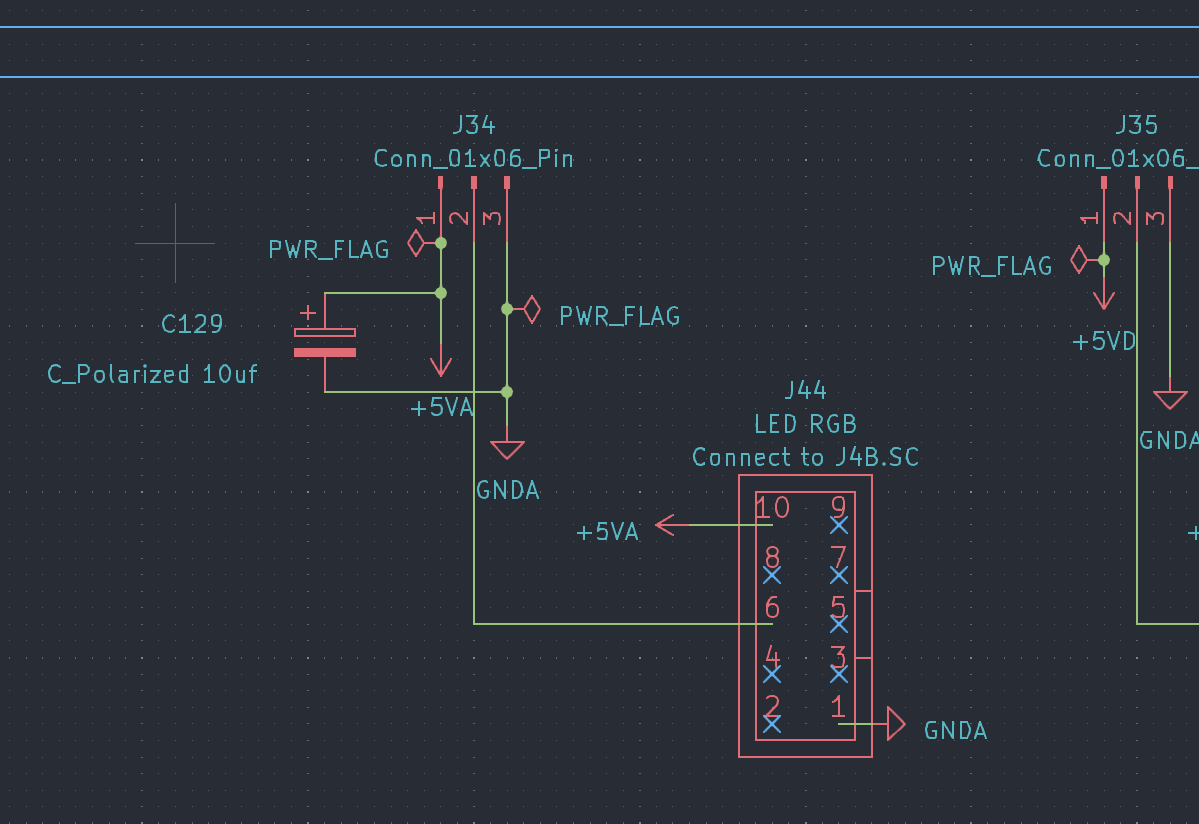
Should I add a 10uf capacitor at the input of my LED ring cards? (as in the image below) (C129)
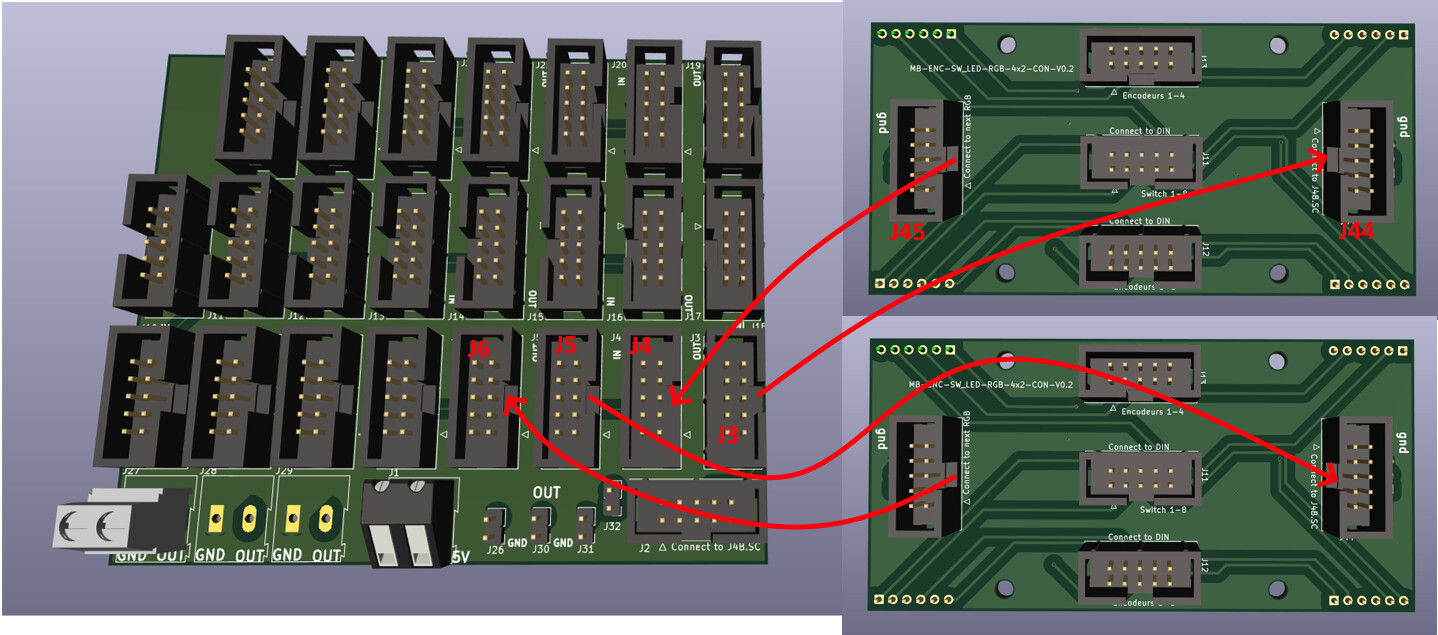
To understand my configuration see the pdfs:
LEDRING:https://drive.google.com/file/d/1XpDQBUE42IqXpXicO–B2gfIoNQDh5ga/view?usp=drive_link
“power card”:https://drive.google.com/file/d/1NJ-H-QXD-tl9rU6nbYdEh2Q4jFqjWt6b/view?usp=drive_link
I made a PCB that I call a “power card” that I supply with 5v 10 amps.
etc..
Thank you
1 Like
ksir
December 16, 2023, 12:40pm
47
I tried adding a 10uf capacitor every 128 LEDs.
the last LEDs still flicker
( just for information I specify that I modified
mios32\apps\controllers\midibox_ng_v1\src\mbng_rgbled.c
line 116 : u32 num_leds = 15; // TODO: we could make this configurable!
)
ksir
December 23, 2023, 6:54am
48
J’ai approfondi mes tests.
si j’ajoute de l’alimentation les LED clignotent
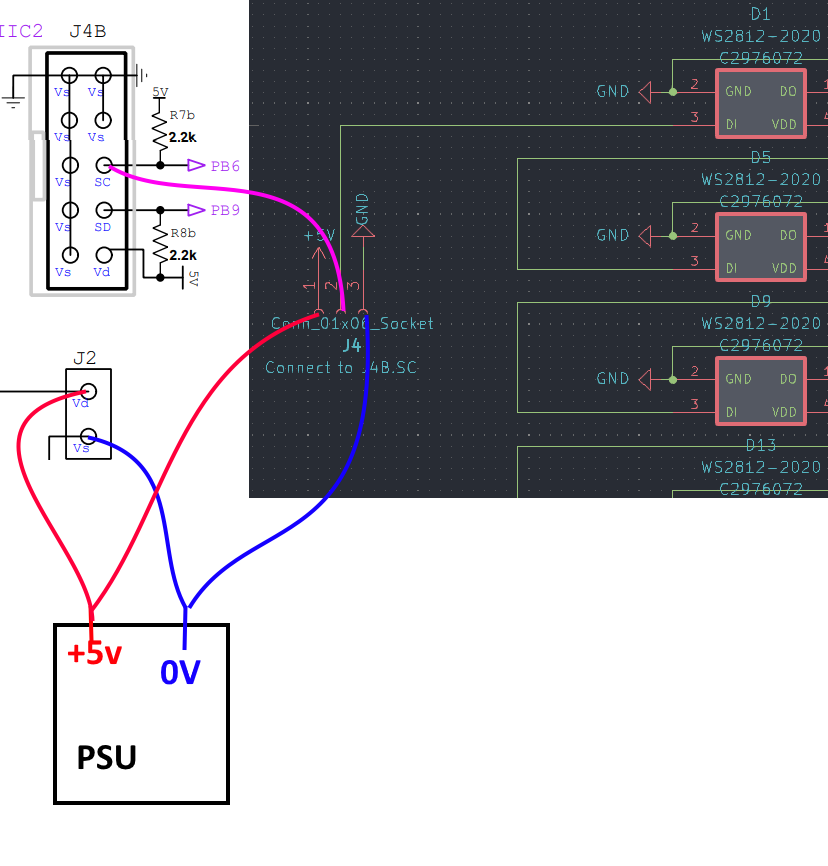
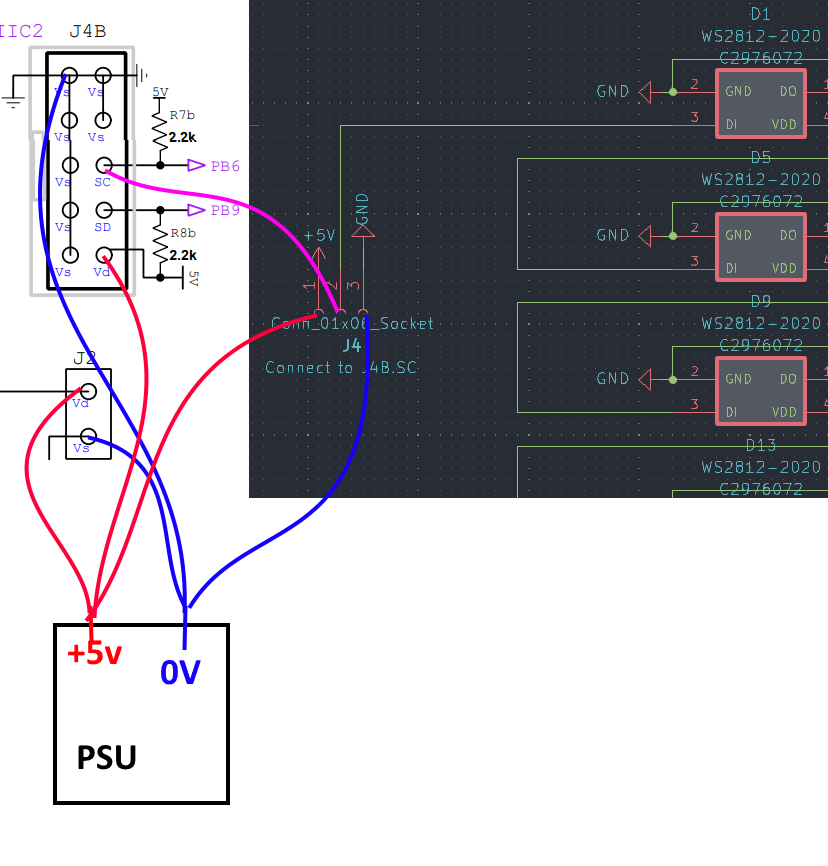
le câblage est-il correct ?
j’ai lu ici : http://www.ucapps.de/midibox_ng_manual_hw.html
Citation
L’entrée de données doit être connectée à J4B.SC, la masse à J4B.VS et +5 V à une alimentation externe.
dois-je connecter j4.vs à une alimentation 0V ? et j4b.5v à 5v psu ?
( i use this PSU : https://secure.reichelt.com/fr/fr/bloc-d-alimentation-d-coupage-ferm-50-w-5-v-10-a-mw-lrs-50-5-p202960.html?&trstct=pol_4&nbc=1 )
maybe its the Ripple off the PSU
the connections in your 2nd picture are not necessery - i guess (dont seeing the whole picture, but i think so…) — so picture 1 is correct.
by the way - its only the last LED that flickers? maybe you have to terminate the DO line on the very last LED off the Chain with a 10K resistor to 5V or Ground.
else it could be a software problem, when the software loops thru the LEDs, and when it comes to the last one it jumps to the beginning off the chain… try to programm in the ng code one more LED (which in reality not exists) - so you can be sure that this is not a software bug…
1 Like