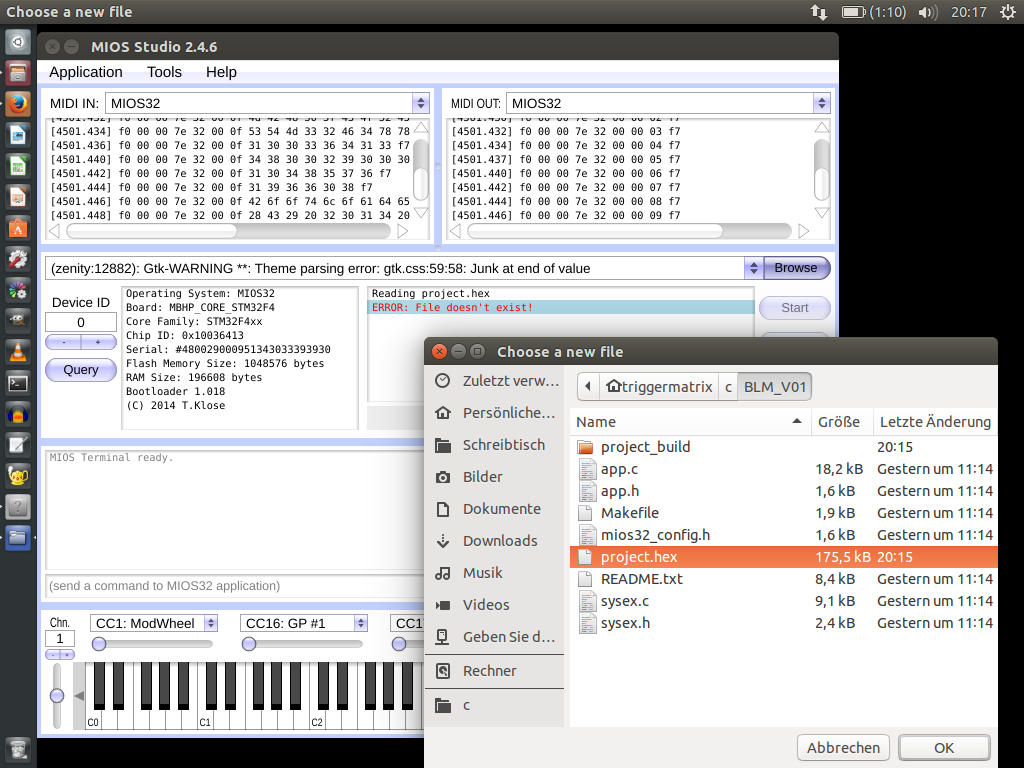
after get running the toolchain, and succesfull build a hex file
, i got problems with the mios studio, when i browse a hex file, then mios stuido says “Error file doesnt exist” “junk at end of value”
exact:
Quote
Reading (zenity:12907): Gtk-WARNING **: Theme parsing error: gtk.css:27:35: Junk at end of value
(zenity:12907): Gtk-WARNING **: Theme parsing error: gtk.css:40:48: Junk at end of value
(zenity:12907): Gtk-WARNING **: Theme parsing error: gtk.css:48:46: Junk at end of value
(zenity:12907): Gtk-WARNING **: Theme parsing error: gtk.css:59:58: Junk at end of value
(zenity:12907): Gtk-WARNING **: Theme parsing error: gtk.css:70:46: Junk at end of value
(zenity:12907): Gtk-WARNING **: Theme parsing error: gtk.css:81:58: Junk at end of value
Gtk-Message: GtkDialog mapped without a transient parent. This is discouraged.
I don’t know from where this error should come from. It seems more related to your installation (maybe a GLib incompatibility with legacy Juce builds?)
However, your snapshot shows an interesting detail: the path selection box (left to the Browse button) shows the error message instead of the file path.
Accordingly it seems that GTK tries to pass the error message to the file selection box instead of the actual selected file name.
It would be interesting what happens if you enter the (complete) path to the project.hex file directly into this box?
At least I can confirm that this is an alternative way to load a file - and it might help at your side since the file browser isn’t involved!
Best Regards, Thorsten.
P.S: that’s the reason why I prefer reliable Linux derivatives which are at least 1 year old, but still maintained - never use the latest versions, or you are in the pole position for hunting bugs!
E.g. @Work we’re using RHEL6 which was released in 2010, and we don’t plan to switch in the next 4..5 years to avoid unnecessary troubleshooting.
yes paste the complete path is working e.g.: “/home/triggermatrix/c/BLM_V01/project.hex”
i work with that workaround.
thanks,
i had problems with ubuntu 14, that i cant get fixed, so i decided to install ubuntu 15… it took several month to do this because i know i have to install the mios32 toolchain again - in the past it was everytime a time consuming process.
I’m on Ubuntu 15.10, and I have the same problem with MIOS Studio 2.4.6. After trying to load a hex file, the path selection box says:
/home/jjonas/Gtk-Message: GtkDialog mapped without a transient parent. This is discouraged.
/home/jjonas/Desktop/midibox/MBSEQv4/midibox_seq_v4_091_pre3/MBHP_CORE_STM32F4/project.hex
If you erase the top row and press enter, the hex loads (and uploads) ok.
What wasn’t mentioned in this thread yet is that MIOS Studio 2.4.0 works ok. Just though to report this in case it’s useful.
Not that I know of… version 2.4.0. just happened to be the last version of MIOS Studio I used, and it was still in my trash folder when I noticed the problem with 2.4.6.
I’ve also just hit this problem. I get the same error as @jjonas . Typing the path to the hex file directly into the box works. This is on Debian Jessie.