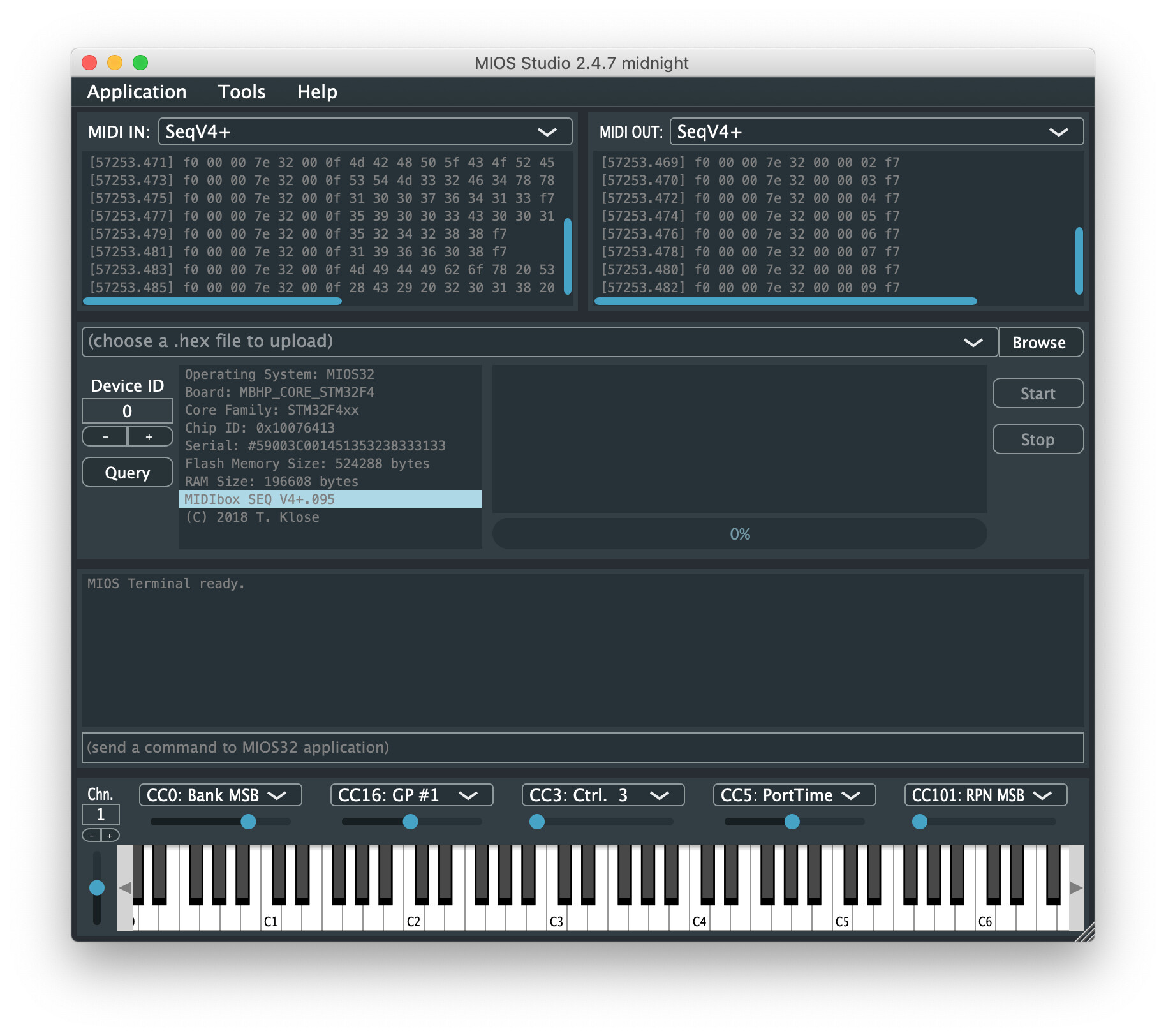
just would like to let you know, that I started to migrate MIOS Studio to the latest Juce version (5.4.3) - previously we used a pretty old one (I even don’t remember the version number) which doesn’t work properly with newer OS versions such as Windows 10. The hope is, that the update will solve these issues - if not we had no luck (I won’t spend much debug effort there…)
I know, I was expecting this answer All I can tell you is that it works under juce 5 it just needs some minor changes, xcode easily pointed it to me, but I don’t know about Windows cause I’ve got an old Seven, I mostly use a Mac for MIDIBox stuff.
Anyway, thank you for that.
This was a long journey - jumping between three computers to ensure a consistent reproducible build state in the repository (which is now hosted at Github)
I tested it under Win7 Ultimate SP1 64bit , it seems to work better, it has the same behavior as the OSX version.
When interface/midibox is connected after app launch The re-scan works, interfaces are seen but no comm, restart app then it’s ok, then same behavior as OS-X now for me.
2.4.7 was crashing or freezing when interface/midibox was disconnected and took a very long time to see the interface/midibox, it’s not the case anymore.
There’s some significant changes for me.
Tested with a MOTU Fastlane , SeqV4+ and internal MIDI SCOPE-PCI(Creamware Pulsar card)
I just tested it on a windows10 64bit with SeqV4+ and it seems to work very good/fast. But when using MIOS File Browser I still get the “Invalid response from MIOS core during read operation” when I try to download the MBSEQ_HW.V4 file..
But with my new machine I can easily pull out the SD Card so no troubles for me.
On my previous Seq I glued the SD Card inside and couldn’t reach it anymore. Only by making it an external Disk and then I only was able to upload the Seq firmware again through my GM5x5x5 to the Seq.
I while back I started creating a Dockerfile image using gcc to build apps regardless of the host machine, not specifically for juce. One of the reasons I never completely used it was because how all of the source for all samples and such were pulled in. I was getting a bit lost as to how to decouple the framework & OS from the applications is a more module fashion but I couldn’t figure out a good way to do it.
I also think moving to a lighter OS than ubuntu might be a better move. Anyway, heres the Dockerfile but instead of the SVN step you could checkout from github
FROM ubuntu:latest
LABEL Description="Image for building and debugging midibox projects"

WORKDIR /usr/local

# Build time definable environment arguments
ARG FAMILY=STM32F10x
ARG PROCESSOR=STM32F103RE
ARG BOARD=MBHP_CORE_STM32
ARG LCD=universal

# Install any needed pacakges
RUN apt update && \
    apt upgrade -y && \
    apt install -y \
# Development files
    gcc-arm-none-eabi \
    build-essential \
    subversion \
    bzip2 \
    wget \
    libgmp3-dev && \
    apt clean && \
# Grab the official midibox setup
    wget http://www.midibox.org/mios32_toolchain/gcc-arm-none-eabi-4_7-2013q3-20130916-linux.tar.bz2 -O gcc-arm-none-eabi-linux.tar.bz2 && \
    tar -xjf gcc-arm-none-eabi-linux.tar.bz2 && \
    rm gcc-arm-none-eabi-linux.tar.bz2 && \
    mkdir /home/midibox && \
    mkdir /home/midibox/local

# Grab the latest source which

WORKDIR /home/midibox

# Grab the latest source and remove everything not needed to build
RUN svn checkout svn://svnmios.midibox.org/mios32/ && \
    rm -rf /home/midibox/mios32/playground && \
    rm -rf /home/midibox/mios32/trunk/apps && \
    rm -rf /home/midibox/mios32/trunk/tools

# Internal build environment settings
ENV PATH="/usr/local/mios32_toolchain/bin:${PATH}"
ENV MIOS32_PATH=/home/midibox/mios32/trunk
ENV MIOS32_BIN_PATH=$MIOS32_PATH/bin
ENV MIOS32_GCC_PREFIX=arm-none-eabi

# Build time definable environment settings
ENV MIOS32_FAMILY=${FAMILY}
ENV MIOS32_PROCESSOR=${PROCESSOR}
ENV MIOS32_BOARD=${BOARD}
ENV MIOS32_LCD=${LCD}

WORKDIR /home/midibox/local
ADD . /home/midibox/local

VOLUME [/home/midibox/local]
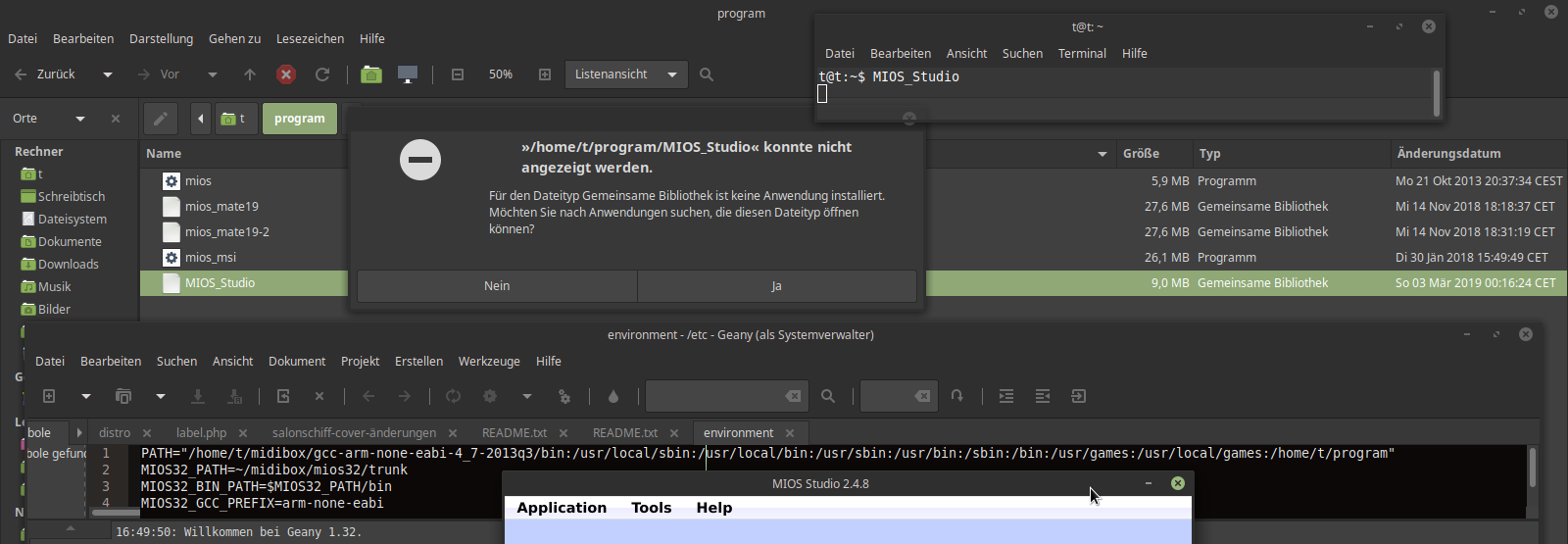
the new 2-4-8 Mios Studio “rar” file you posted, i unpacked it, i checked that it is standart marked as “als program ausführen” in the file-browser settings… but double click or try to run it from console says “keine anwendung zum öffnen von Mios Studio gefunden”
Do i have to install a Application first? which? thx.
thanks for the info! I’ve to explore Dockerfile, it promises high potential
unfortunately I don’t understand the problem, I haven’t provided the package as a “rar” file, and the binary works with various Linux installations that I tried so far. There seems to be something wrong with your OS installation (maybe you are using an expert system?), but I fear that I can’t give you more hints.
as long as you are the only Win10 user who has this problem with SD Card uploads I won’t start to analyze this.
MIOS Studio 2.4.8 is released now @ http://www.ucapps.de - let’s see if additional users report problems; the legacy 2.4.6 files are still accessible from the same page to ensure that nobody is blocked by the progress (only 64bit systems supported anymore)
the providet file “MIOS_Studio” is marked as Type “gemeinsame Bibliothek”,
while “mios_msi” (see screenswhot filebrowser) is marked as Type “Programm”,
“Programm” is executable with double click,
while “Gemeinsame Bibliothek” is not.
— booth “MIOS_Studio” (which i got from ucapps) and “mios_msi” (Built from src on my machine) are marked as “als Programm ausführen” in the Preferencys.
solution:
create a program-folder, (in for example your home folder), and add its path to your environment variables (root/etc/environment) (PATH=“/home/t/program” for example)
put the MIOS_Studio File (from ucapps), into the program-folder
then restart system.
after that its still not possible to start Mios_Studio with double click,
but you can start it with a console by Typing “MIOS_Studio”
 All I can tell you is that it works under juce 5 it just needs some minor changes, xcode easily pointed it to me, but I don’t know about Windows cause I’ve got an old Seven, I mostly use a Mac for MIDIBox stuff.