Hi Tim,
this would be a simple extension - I will add it to the next release.
Best Regards, Thorsten.

Many thanks
Hi Tim,
this would be a simple extension - I will add it to the next release.
Best Regards, Thorsten.
Many thanks
Hi,
I do not know how it happened, but I missed the fact, thah MIOS Studio has implemented liblarian functionality. It would be great if you could also add a novation nova / supernova synth - unfortunately midi implementation of this synth was never documented, but there are java classes in jsynthlib, so this should not be difficult to make it.
I also have many ideas how you can to improve liblarian, but I realize that this is not the main functionality of the MIOS Studio, so I will not pollute the thread.
Regards,
Przemek
Hi Przemek,
after my experiences with the Virus functions I think it’s better if I only support synths which I own by myself anymore - so that I can test the implementation by myself.
In long term I will probably take over the same “string based SysEx definition language” which I’m using in MIDIbox NG to simplify the customization. Then it could even be enhanced by users. 
I also have many ideas how you can to improve liblarian, but I realize that this is not the main functionality of the MIOS Studio, so I will not pollute the thread.
Thanks! 
Main intention of this Librarian is to give MIDIbox SID/FM users a reliable way to upload/download patches - everything else is nice-to-have, but will be handled with very low priority by myself.
Best Regards, Thorsten.
MIOS Studio 2.4.4 is available now
Changes:
Best Regards, Thorsten.
Just FYI: on my STM32-based MIDIbox NG v1.022, issuing the ‘help’ command in the terminal gets me an error message, see below. Not necessarily an issue, but maybe I’m the only one around with that combination?
[1242.871] help
[1243.103] Welcome to MIDIbox NG V1.022!
[1243.103] Following commands are available:
[1243.103] system: print system info
[1243.103] memory: print memory allocation info
[1243.103] sdcard: print SD Card info
[1243.105] sdcard_format: formats the SD Card (you will be asked for confirmation)
[1243.105] network: print network info
[1243.106] set dhcp <on|off>: enables/disables DHCP
[1243.107] set ip <address>: changes IP address
[1243.107] set netmask <mask>: changes netmask
[1243.107] set gateway <address>: changes gateway address
[1243.108] set osc_remote <con> <address>: changes OSC Remote Address
[1243.109] set osc_remote_port <con> <port>: changes OSC Remote Port (1024..65535)
[1243.109] set osc_local_port <con> <port>: changes OSC Local Port (1024..65535)
[1243.110] set osc_mode <con> <mode>: changes OSC Transfer Mode (0..4)
[1243.111] set udpmon <0..4>: enables UDP monitor (verbose level: 0)
[1243.111] keyboard <1|2> (or kb <1|2>): print current configuration of given keyboard number
[1243.113] set kb <1|2> debug <on|off>: enables/disables debug mode (not stored in EEPROM)
[1243.113] set kb <1|2> note_offset <0-127>: selects the note offset (transpose)
[1243.113] set kb <1|2> rows <0-16>: how many rows should be scanned? (0=off)
[1243.115] set kb <1|2> velocity <on|off>: keyboard supports break and make contacts
[1243.115] set kb <1|2> release_velocity <on|off>: keyboard supports NoteOff velocity
[1243.115] set kb <1|2> optimized <on|off>: make contacts only scanned if break contacts activated
[1243.117] set kb <1|2> dout_sr1 <0-32>: selects first DOUT shift register (0=off)
[1243.117] set kb <1|2> dout_sr2 <0-32>: selects second DOUT shift register (0=off)
[1243.119] set kb <1|2> din_sr1 <0-32>: selects first DIN shift register (0=off)
[1243.119] set kb <1|2> din_sr2 <0-32>: selects second DIN shift register (0=off)
[1243.119] set kb <1|2> din_key_offset <0-127>: selects the key offset between DIN1 and DIN2
[1243.121] set kb <1|2> din_inverted <on|off>: DINs inverted?
[1243.121] set kb <1|2> break_inverted <on|off>: Only break contacts inverted?
[1243.121] set kb <1|2> delay_fastest <0-65535>: fastest delay for velocity calculation
[1243.123] set kb <1|2> delay_fastest_black_keys <0-65535>: optional fastest delay for black keys
[1243.123] set kb <1|2> delay_fastest_release <0-65535>: opt. fastest release delay for velocity calculation
[1243.124] set kb <1|2> delay_fastest_release_black_keys <0-65535>: opt.fastest release delay for black keys
[1243.125] set kb <1|2> delay_slowest <0-65535>: slowest delay for velocity calculation
[1243.125] set kb <1|2> delay_slowest_release <0-65535>: slowest release delay for velocity calculation
[1243.127] set midimon <on|off>: enables/disables the MIDI monitor
[1243.127] set midimon_filter <on|off>: enables/disables MIDI monitor filters
[1243.127] set midimon_tempo <on|off>: enables/disables the tempo display
[1243.127] router: print MIDI router info
[1243.129] set router <node> <in-port> <off|channel|all> <out-port> <off|channel|all>: change router setting
[1243.130] set mclk_in <in-port> <on|off>: change MIDI IN Clock setting
[1243.130] set mclk_out <out-port> <on|off>: change MIDI OUT Clock setting
[1243.131] testaoutpin: type this command to get further informations about this testmode.
[1243.131] caliaout: type this command to get further informations about this testmode.
[1243.133] testlcdpin: type this command to get further informations about this testmode.
[1243.133] set dout <pin> <0|1>: directly sets DOUT (all or 0..255) to given level (1 or 0)
[1243.134] set debug <on|off>: enables debug messages (current: on)
[1243.135] set autoload <on|off>: enables autoload after filebrowser upload (current: on)
[1243.135] save <name>: stores current config on SD Card
[1243.136] load <name>: restores config from SD Card
[1243.137] show file: shows the current configuration file
[1243.137] show pool: shows the items of the event pool
[1243.138] show poolbin: shows the event pool in binary format
[1243.139] show id <element>:<id> shows informations about the given element id (e.g. BUTTON:1)
[1243.139] show hw_id <element>:<hw_id> shows informations about the given element hw_id (e.g. BUTTON:1)
[1243.141] lcd <string>: directly prints a string on LCD (can be formatted!)
[1243.141] (ERROR: string passed to MIOS32_MIDI_SendDebugMessage() is longer than 100 chars!
[1243.141] msd <on|off>: enables Mass Storage Device driver
[1243.144] reset: resets the MIDIbox (!)
[1243.144] help: this page
[1243.144] exit: (telnet only) exits the terminal
The cursor keys do a great job, thanks for that!
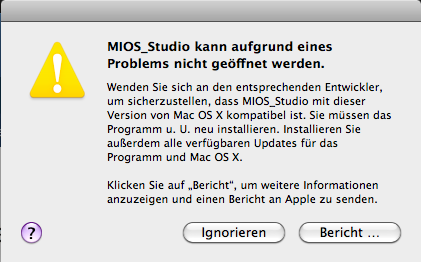
There seems to be an issue with OSX 10.6.8
Here’s what I get when I start the program:
[ms244_error.rtf](< base_url >/applications/core/interface/file/attachment.php?id=10572)
@Ilmenator: this is unrelated to MIOS Studio and has to be fixed in the MIDIbox NG application (output string too long)
/update: fixed this, the error shouldn’t appear in the next MBNG release!
@rvlt: as mentioned at the MIOS Studio page, the app is built for 10.7 and 10.8 (not for 10.6)
However, meanwhile I was able to install an older Xcode version, which allows to build for 10.5 upwards
Could you please try the new build? (same link, the old app has been replaced)
Best Regards, Thorsten.
Ah, ok, I just looked at the download link which still says it’s for 10.6-10.8
Will try the new version later.
Thank you!
Working again.
Great!
MIOS Studio 2.4.5 is available now
Changes:
Best Regards, Thorsten.
The command line parameters are fantastic, they really allow a streamlined workflow when doing intensive NG configurations.
Also allows to customise “instances” of MIOS Studio (store the parameters in a shortcut itself, or a batch file) so that MIOS Studio can do different jobs without constantly re-configuring it through the GUI.
Highly recommended! 
I’ve just bought a Mac Mini to replace the Windows XP laptop I use with my Synth rig.
The XP MIDI USB driver nightmare has forced this.
I’m new to mac but what is the best way to make a shortcut (alias) to MIOS Studio that has command line arguments?
It’s described here: http://www.ucapps.de/mios_studio.html
Special note to MacOS users: the binary, which has to be called to pass parameters, is located under MIOS_Studio.app/Contents/MacOS/MIOS_Studio
In order to simplify the access to the binary, just create following aliases (it’s assumed, that MIOS Studio has been copied to the /Applications folder):alias ms=‘/Applications/MIOS_Studio.app/Contents/MacOS/MIOS_Studio’
alias ms_batch=‘/Applications/MIOS_Studio.app/Contents/MacOS/MIOS_Studio --batch’By entering these aliases into your ~/.bash_profile, they will be available whenever a new terminal is opened.
Of course, you could create additional aliases with different arguments.
Best Regards, Thorsten.
Thanks TK that wasn’t too hard for me!
Sorry about the Mac Noob questions, but this opens MS from a terminal window but I can’t open another terminal in order to have another instance of MS. I tried:
alias ms='open -n /Applications/MIOS_Studio.app/Contents/MacOS/MIOS_Studio'
from a web hint but it doesn’t spawn a new terminal?
[edit]
nope, it’s working o.k.
Opening 2 instances of MS results in 3 terminal windows though. Would be nice to do this a bit cleaner.
Why are you using “open”? This is a different approach.
If you want to spawn without opening a terminal, then add a ‘&’ to the command (normal unix approach)
Usually this is not written into an alias, so write:
ms &
with the initially proposed alias:
alias ms='/Applications/MIOS_Studio.app/Contents/MacOS/MIOS_Studio'
(without “open”)
Best Regards, Thorsten.
Great, then there is a way of launching “ms &” from a desktop icon (without opening a terminal and typing it)?
MIOS Studio 2.4.6 is available now
Changes:
allow upload when core based MIDI merger enabled
abort upload after 16 retries if the MIDI IN connection of a PIC is not working (no additional retries)
Best Regards, Thorsten.
I’ve just started using Raspberry Pi and am wondering how feasible it is to compile MIOS Studio for this platform?
Of course it would need a serial port driver to work with the Pi’s built in UART.
It would work with Hairless Midi Serial Bridge (which works great with MIOS Studio, btw) but there’s the same issue: it needs to be built for the ARM platform and has various dependencies that make the prospect of a successful build seem a bit daunting.
I’m not that experienced with Linux so I thought I’d ask for advice.
I’ve just started using Raspberry Pi and am wondering how feasible it is to compile MIOS Studio for this platform?
Of course it would need a serial port driver to work with the Pi’s built in UART.
It would work with Hairless Midi Serial Bridge (which works great with MIOS Studio, btw) but there’s the same issue: it needs to be built for the ARM platform and has various dependencies that make the prospect of a successful build seem a bit daunting.
I’m not that experienced with Linux so I thought I’d ask for advice.
You should be able to build MIOS Studio for Pi. Not sure about the Midi Bridge. But there seems to be a sourcecode for linux.