after learning a bit about programming for MIOS and liveapi, i decided to ditch my original live control surface idea. it used no feedback of any kind from live. this new one is completely integrated into live as a custom control surface like mackie, but better than mackie in the sense that more information is exchanged, and virtually anything is mapped automatically without even thinking about it.
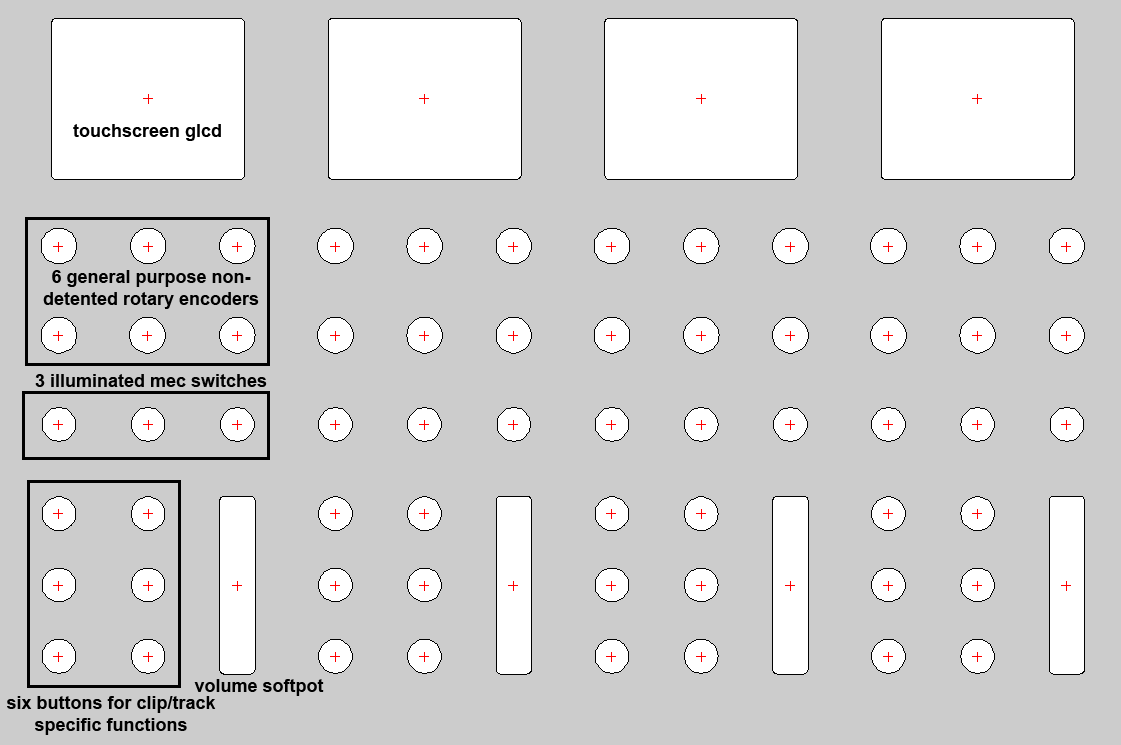
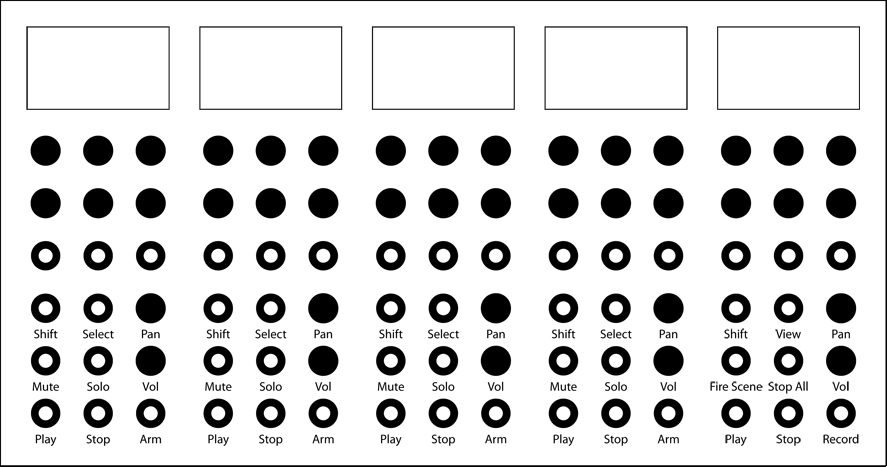
the drawing is of the bankable 4-track section of the controller. i left off the master section because i’m still working out the details on what functions i’d want to be immediately accessible. part of the reason for this thread is to get feedback from live users. i want to know if i need to make more functions immediately accessible.
the six buttons at the bottom-left of the image are dedicated clip/track controls. you can fire/stop a clip, arm for recording, and solo/mute a track. no matter what state the controller is in, these functions will always work. to the right is the volume pot. this is a softpot that uses a 20 segment led just like stribe. stryd_one had a great idea for using this for scaling. if your volume is at 80% and you touch the bottom of the pot to slide upward, the entire softpot controls only the remaining 20% of volume, giving you higher resolution. the sixth button in the group will be a modifier button allowing you to get even higher resolution. this solves issues of having to use motorfaders, saves space, and offers flexibility with volume control. it might take getting used to, but i think it would work. perhaps the button would instead put it into an “absolute” mode. or vice versa. this set 6 buttons and the volume fader are automapped to live. you will never have to enter midi map mode to gain control.
the 9 controls above that are six endless rotary encoders (detents removed) and 3 mec illuminated switches. these are “soft” controls that change based on what is going on in the controller. they also work in layers so they become more functional. this is where things start to get interesting.
with liveapi, you have the ability to monitor what’s going on in a major way. if i drop a plugin onto a track in live, the midibox is notified automatically. from there all available parameters of that control are scanned and the name and type of each parameter is gathered and sent to the midibox. even 3rd party plugins work.
when the data is dumped into the midibox, one of two things happens:
if you’ve used the control before and set up your preferences, it becomes a layer on the track you dropped it into. all control names show up on the lcd (in alignment with the proper controls) for that track and the knobs/buttons are automatically mapped to that control. you will not have to enter midi map mode, it’s all automatic. when you add more plugins, they become more layers. you can select the layers and gain direct access to whatever kind of instrument or effect you have on that track. if an instrument needs more than the 6 available knobs and 3 switches, it can get more than one layer. all parameters are sent in a relative manner so you don’t have to worry about parameter jumping or storing the values. however, values of those knobs will be put on the glcd.
if you haven’t used the control before, you have to do a simple setup. the entire control surface temporarily becomes an editor for you to set up your preferences for that plugin. you’ll get all available parameter names mapped across the entire board. from there, if things aren’t quite right (maybe it’s toggling a button that should be momentary), you can edit the control and change it as you see fit. for instance, you could store scaling preferences per control or even edit the name that shows up on the lcd. there will also be the ability to just remove a control so you don’t have to deal with it building up layers you don’t need, as well as the ability to choose what order they show up (meaning certain controls can be on the top layer, the next, etc).
once this setup has been done, you won’t have to do it again. the next time you add that plugin for any track, these preferences are recalled and it just plugs into your track.
i also want to include the ability to add your own custom setups from scratch. i see problems with certain plugins like reaktor that may not map out the parameter names properly. so instead, you will manually assign the cc’s, control type, parameter names, etc and map them the old fashioned way. of course once this is done, you can recall it later (perhaps automatically) and only do new mappings if necessary. none of the automapping features will use cc’s, so there will be plenty available for programs that don’t want to play nice.
as far as track layers go, there are two more things i want to add. if possible, i want to add a clip editor (works just like it was an additional layer). the top layer will be your “favorites”. six knobs and three buttons from any instrument on the track can be selected to be on the top layer, no matter what instrument they control.
edit: i haven’t yet looked into controlling racks, so maybe that’s a good alternative.
the selection of what plugin you want to control for the moment will be done via a touchscreen glcd. stryd_one found a good deal and it should cost under $200 for five of these (four tracks + master). the master section will be very much like the track sections, with certain buttons being dedicated and others changing purpose.
the touchscreen could also be used to fire scenes in live. i am able to access track names (you’ll see the track # and track title on each glcd of the tracks), clip names, and probably scene names as well (haven’t tested that part yet), so there’s a number of options available to get data into the midibox for whatever purpose you want.
so basically i’m looking for feedback on the design. forget the actual layout and how it looks. am i overlooking anything that needs immediate control?
ultra