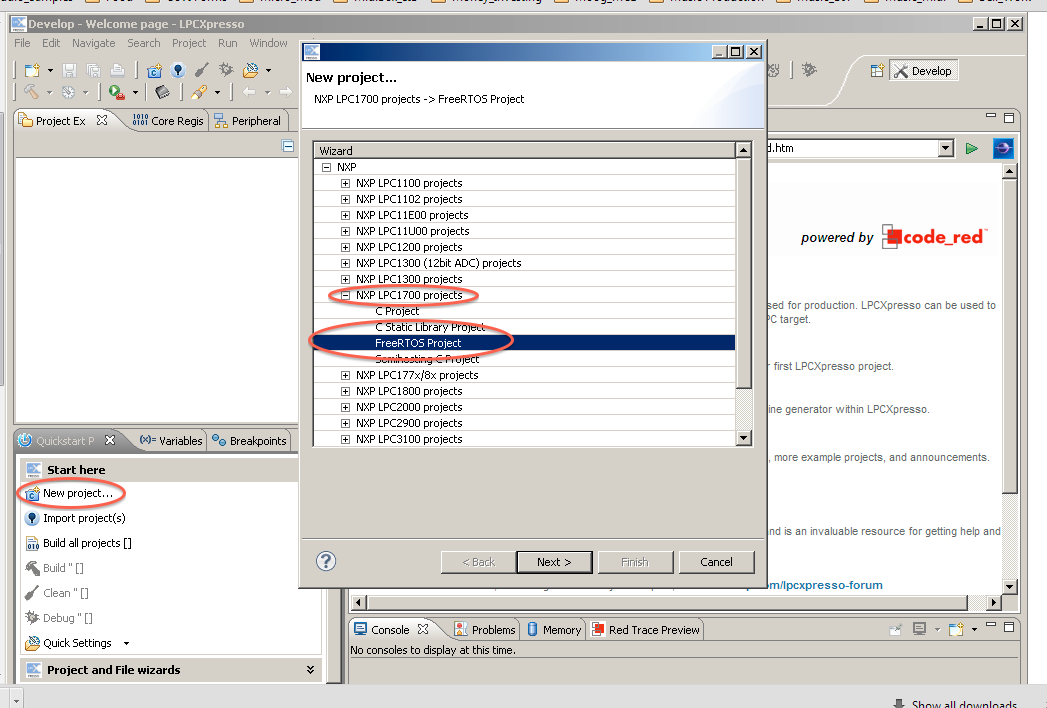
This is where I seem to struggle with the Midibox projects due to my lack of experience with micro-controllers and programming… My only other experience is with the stereoSID I built a few years back… I have all my boards made and now I am trying to install the MIOS32 bootloader on the LPC1769… Trouble is I am not seeing the FreeRTOS Project listed in the drop down for new project (see below as per the instructions)… Do I have DL this from the FreeRTOS site and import to the LPC developer program? Also I have DL’d the latest version of the LPCExpesso Developer Program…
The IDE has been changed, so that my installation guide doesn’t match with the current version anymore.
I don’t think that you’ve to download FreeRTOS or any other additional resources (see the linked thread), because you only want to flash a prebuilt binary.
Okay older version of IDE installed and all the menu options appear but after hitting the " “Program Flash” icon I get the following message…
Connect to Emulator: No compatible emulators available. They may be disconnected, not powered, already in use or not compatible with this target.
One thing I noticed using a USB port utility which shows USB ports connected, it does not show the LPCXpresso connected yet the led on the LPCX is blinking…
Do I need drivers for the LPCXpresso?
Okay I think it is the cable from my laptop to the LPCX as I borrowed it from someone and it is a multi dongled USB charging cable so me thinks it just supplies power and not data capabilities…
Fixed and loaded… Problem was the USB cable… The whole time i had a cable under my nose in my headphone bag… Five min later everything fixed after 2 hours of frustration…