Thanks for that advice. I that about that. But Live Music Business is a Ruff thing, especially to gear.
What if that wire falls off in the Truck that carries it to the Show Venue? I wanted to know “if” it is possible to flatten that a little bit IN the software to prevent of getting in trouble.
Do you Program by your own? Maybe you can answer me that… (I’m not practiced in Software at al…)
Im just asking… “IS” it possible to flatten that in software?
“flatting” is the wrong term.
You are searching for a mechanism which filters MIDI events when the fader isn’t manually touched, right?
It’s provided with the touch sensor mode.
Once you connected the touch sensor, it would send a note event whenever the fader is touched (good for testing)
Now change the touch sensor mode to the option named “Like previous, but additionally no fader event as long as sensor not pressed” -> voila! :sorcerer:
I now tested to contact the sensor T0 to fader number 1 and activated the “Like previous, but additionally no fader event as long as sensor not pressed” preset. And now it doesn’t tremble anymore.
Thats a solution to my question.
can you declare me what those other parameters are for?
PWM Steps: This defines how fast the H bridge is ‘pulsed’ to control the fader motor. If you find that your motor is sluggish then you can adjust this.
AIN Deadband: All A-to-D (analogue to digital) circuits suffer from a certain amount of ‘jitter’. The AIN deadband allows you to set a minimum amount of change in the analogue input before it is reported as a ‘move’ of the fader.
3: MF Deadband: I guess that this is the reverse of AIN deadband? only engage the motor if the input value has moved significantly. although TK will be able to confirm this??/
If you find that the faders are a bit jittery then you should be able to adjust the deadband values to counter it.
Thank you philetaylor for that explanation on the functions of the GUI.
I now have a total different question.
I realized that i will not be able to ad more Faders than 8+1 in my approach because the Midi functions are restricted in this Program i use (softwareaudioconsole). The only Midi Template that provides more than 8 Faders including the Canelstrip functions is MotorMix. (i can’t assign Functions. Instead i select a fix Template file from the manufactory…)
noooow. my shy question now is: is it possible to transfer the MM Protocol from the midibox_MM to the MF_NG?
I hope i get some answers because i can’t manage this alone. (And i try to keep my posts together because i don’t want to mess around in this forum…)
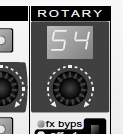
I finally decided to work with the MM V2 Application. Unfortunately SAC uses many functions by increasing the Rotary Selector Rotary. (well thats hard to describe witch one i mean… please, see attachment photo. )
So basically what i need to do is by pressing a Button i need a possibility to set the right Selection of Mode first.
So for a Sample: if i want to activate my Compressor i need to Virtually turn the Selector Rotary first to the “Comp Mode” and then press the Button 5. (in Normal use of MMv2 thats the Select Chanel 5 Button)
How can i do that in my Software? And is that Selector Rotary defined as “MM_VPOT” in the Application?
Thanks a lot for any Help
best regards
novski
edit: changed .tif to .jpg for easy view.
[SAC CM MM Help.rtf](< base_url >/applications/core/interface/file/attachment.php?id=9862)
As you may have read in this thread before I’m building a Midibox MMv3 on LPC17 Core. Thorsten was so courteous to lift it in to 32bit architecture.
But now I’m stucked in a problem.
My Controller simulates a MotorMix Hardware. This Controller has in reality 9 encoders. Eight on each Channel and one JogWeel for Menu purposes.
My Software can receive fixed Messages not so as most other programs where the user can program the Software-button to a Midi-value..
To control everything i need to jump virtually in to a Menu by increasing the JogWeel then i can select by pressing buttons according to a channel.
I managed to do that so far. And it works stable.
My problem occurs when i want to assign a LED to one of those Virtual Buttons… Because as soon as i reassume to default menu the LED doesen’t stay lit.
I found out that thats because the Feedback from the software, sends (of course) the new information for the Display and the according Buttons in the default Menupoint.
Im now searching for a solution witch recognizes the first feedback and sets the LED but ignores the following for certain time.