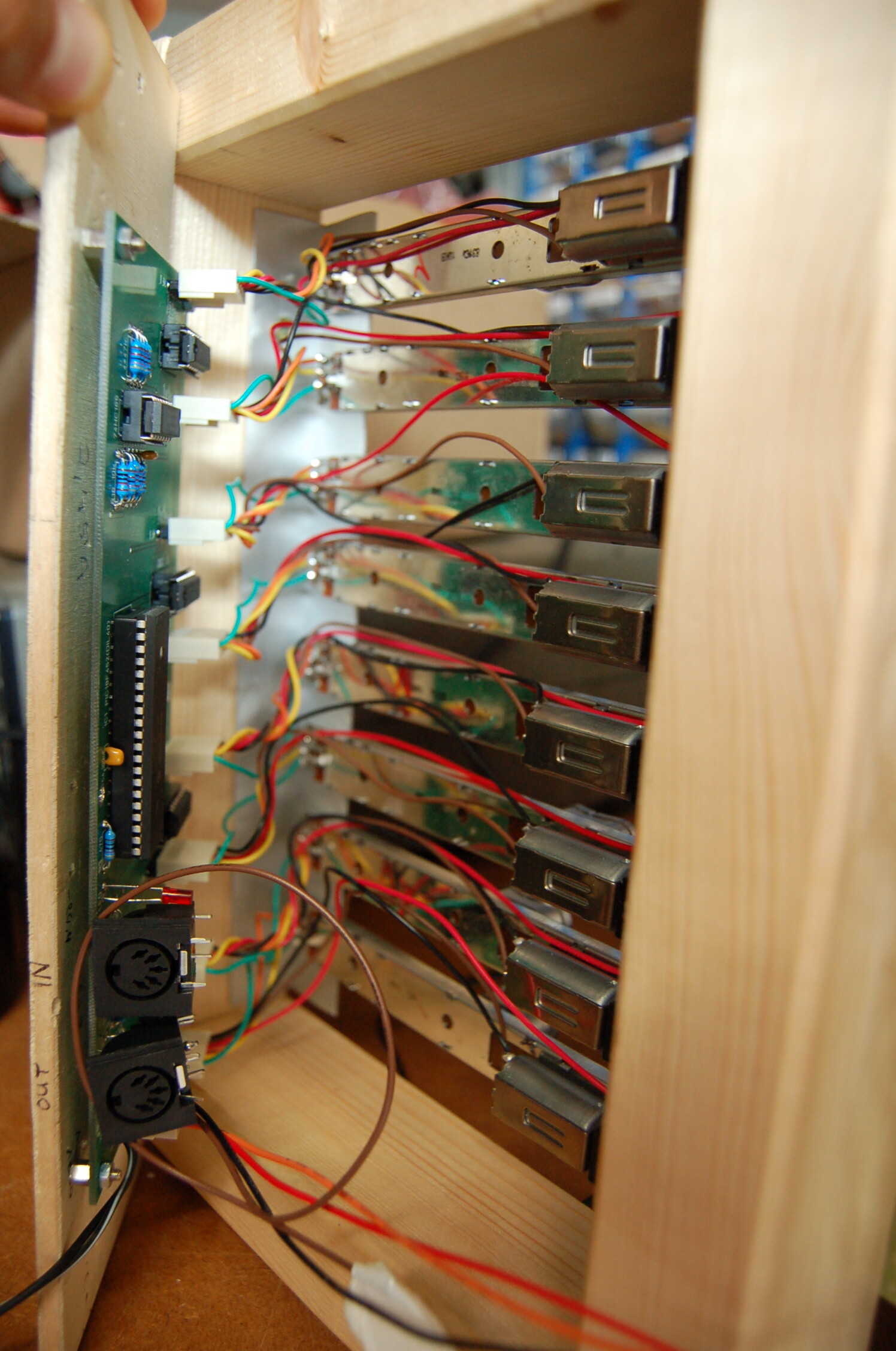
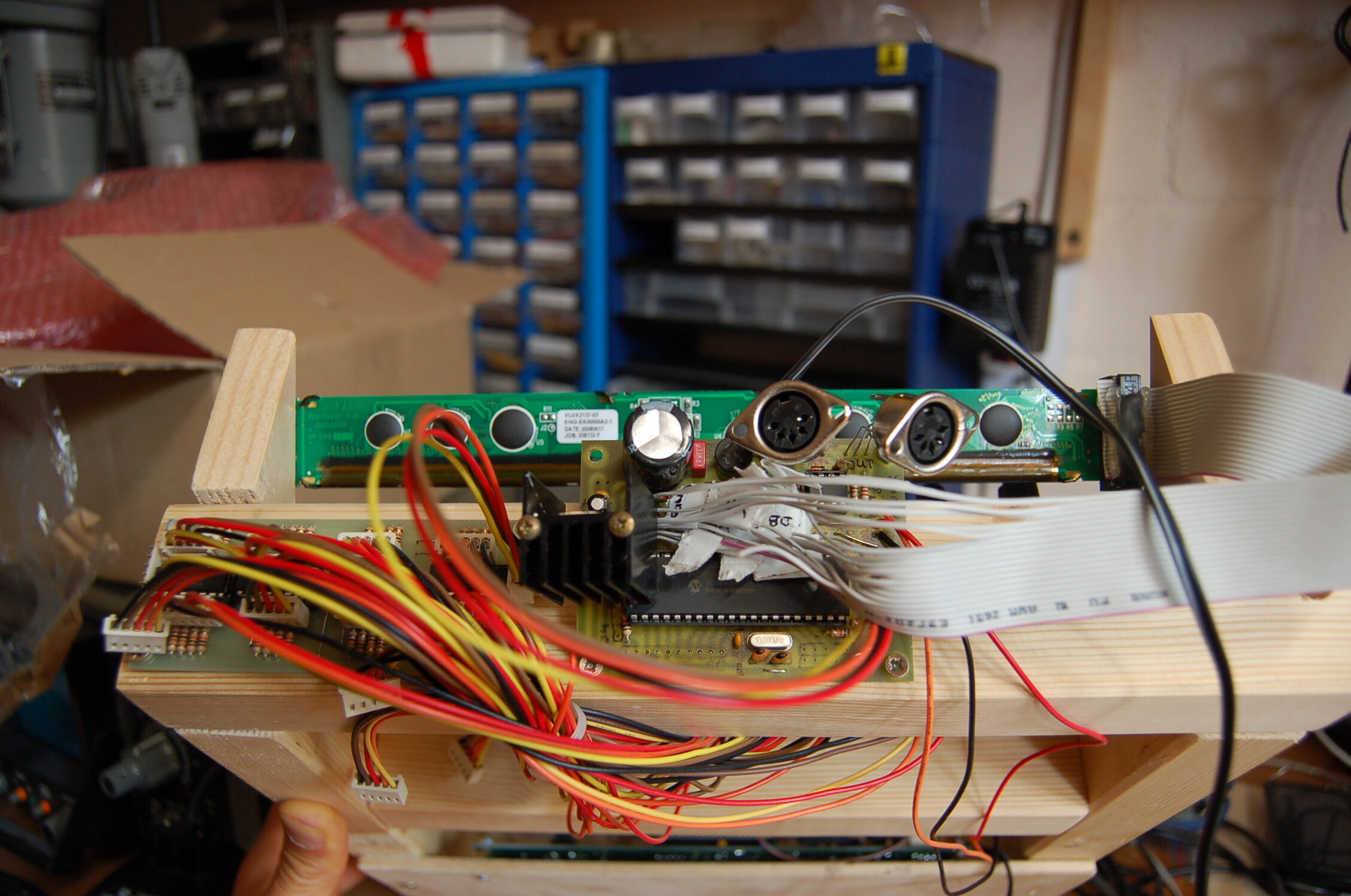
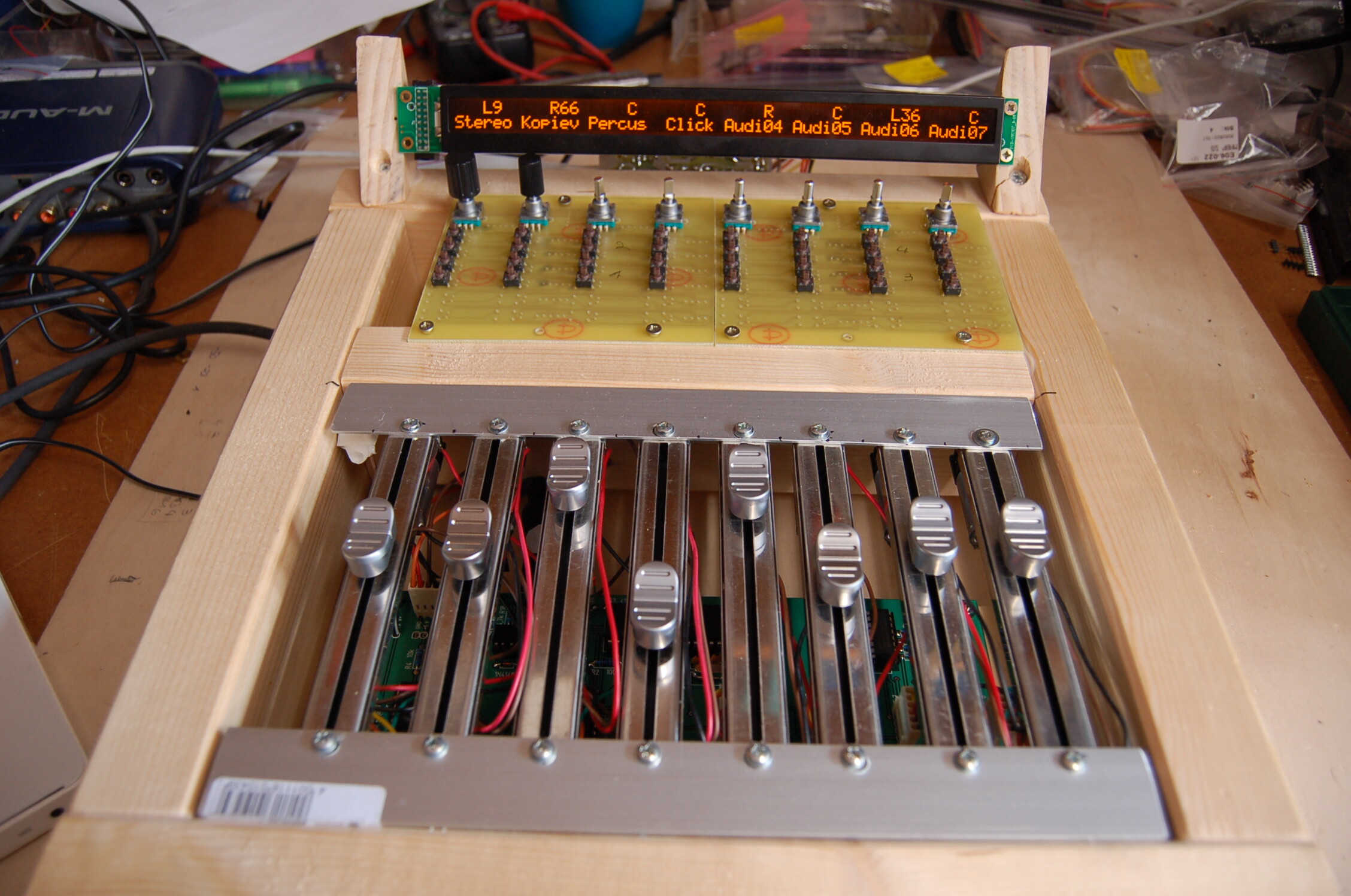
Upcoming MBHP_MF_NG module

Dear Forum members,

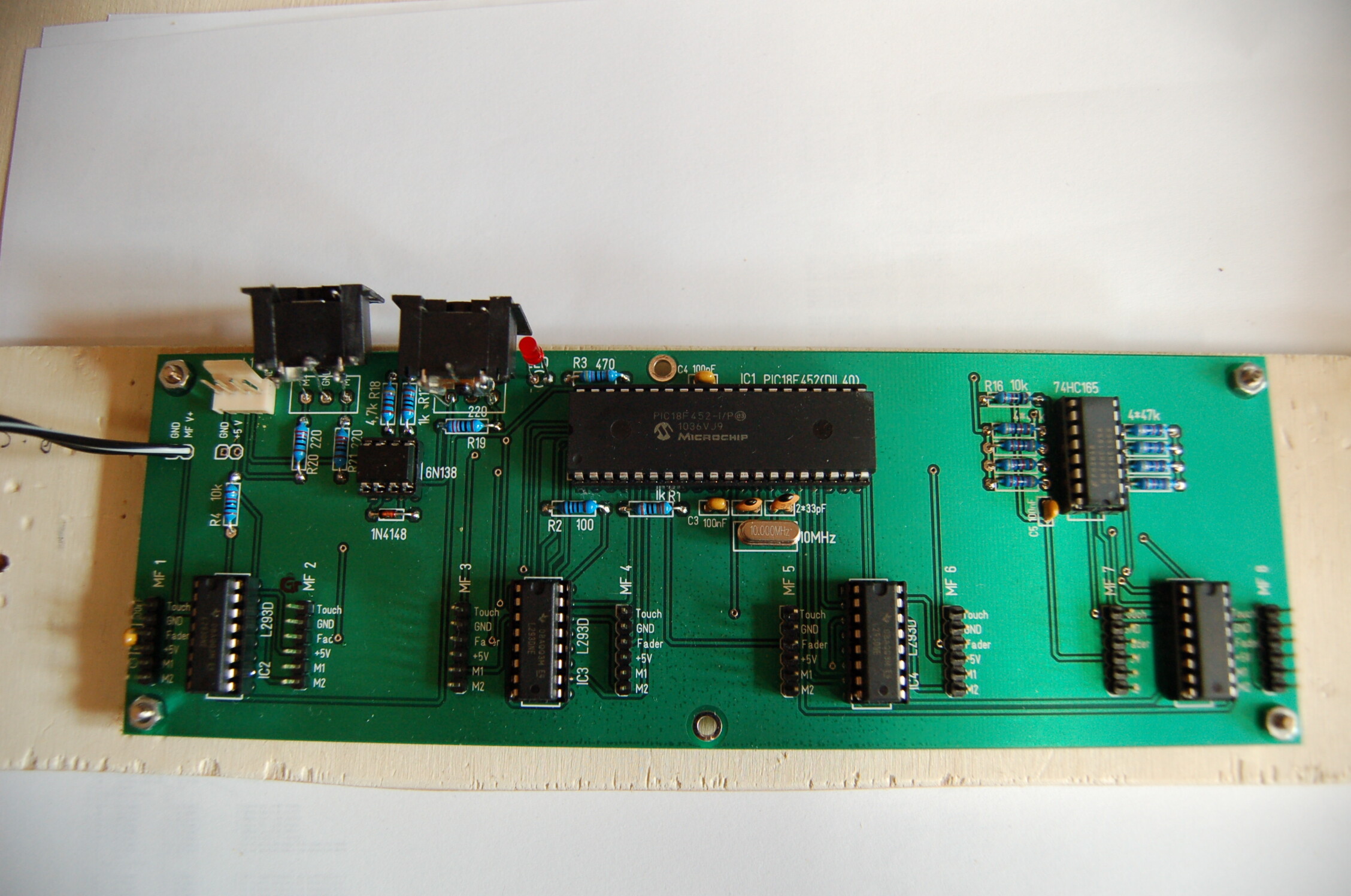
in the meantime I got my first prototype PCBs for my MBLC.

After many sleepless nights I succeeded to get it running, I am very happy!

In this post I just want to refer to the topic of this thread, the MF V3 module and its implementation.

Since I´m an absolute beginner to Midibox I write this from a novice point of view…

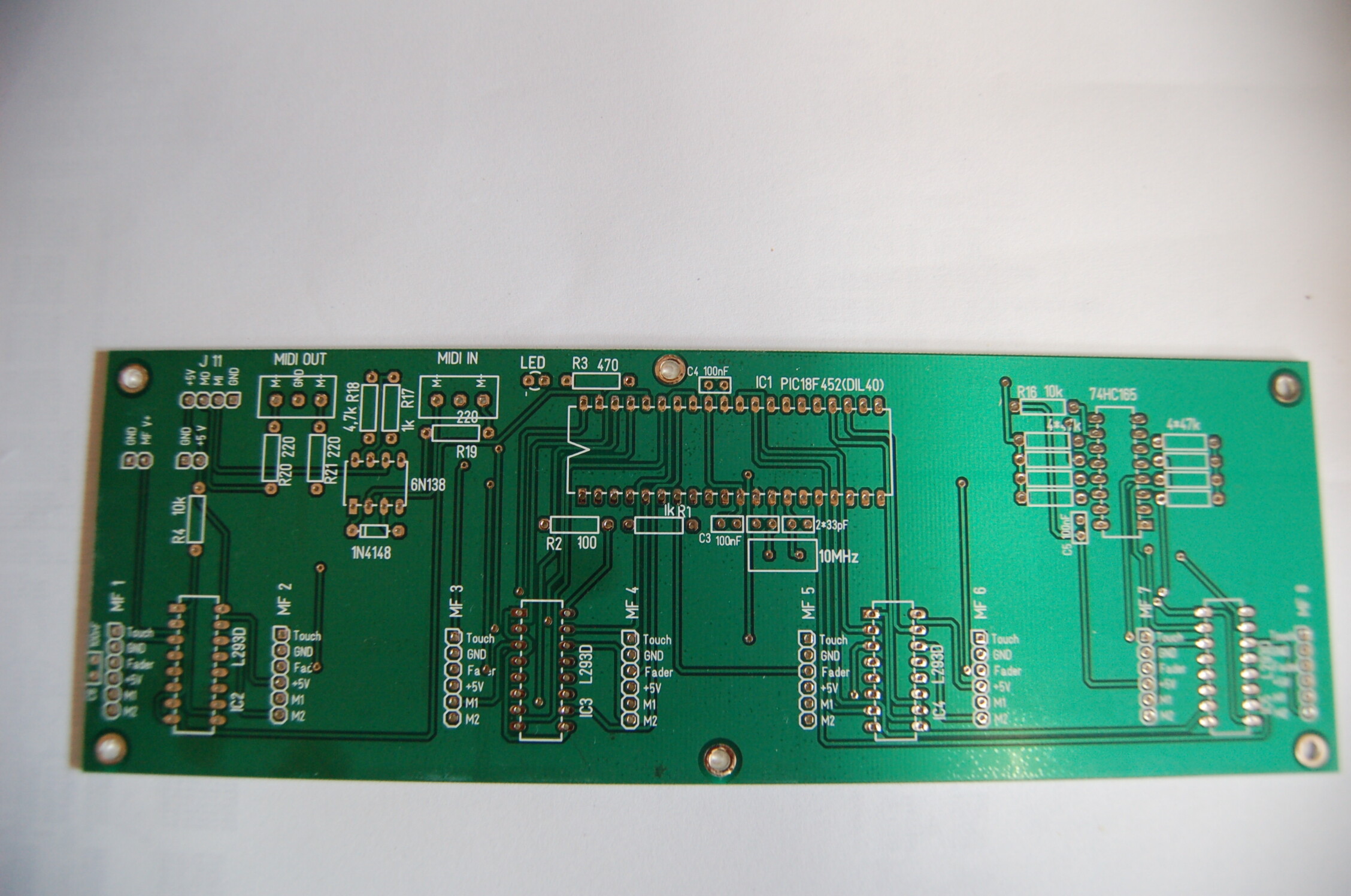
The design of my PCB I posted earlier has a mistake but I fortunately figured it out before I had it fabricated so now it´s perfect. The power for the Motorfaders comes from an external PSU (around +10V), the +5V for the Logic comes from J11 of the Core8 PCB. Just connect “+5V” and GND of J11 on both boards (Core8 and MF V3).

Connect MIDI IN and Out (J13 and J12) of MF V3 to your MIDI interface and start MIOS Studio on your PC. First change the ID of your PIC to 1 (if it´s not done yet), then upload the newest MIOS on the PIC, thereafter upload the MF V3 application. Now with the integrated Calibration Tool of MIOS Studio you can, well, calibrate your faders, but even more important, set the MIDI merger to “Midibox Link Forwarding Point”!

Now disconnect the MIDI OUT to your interface but connect the MIDI OUT of the Core8 to your interface. Connect “MO” of J11 on MF V3 to “MI” of Core8 (which ID is 0). Now you have to set the Core8 as the “Midi Link Ending Point”. I thought it could be done by changing the main.inc within the MBLC application:

;; initialize the integrated MIDI merger

movlw MIOS_MIDI_MERGER_MBLINK_EP

call MIOS_MIDI_MergerSet

But this didn´t work for me. Instead I had to run Serge’s MIDIbox64e Editor and do the setting there. Well, at least it works now…

In the end the chain looks like this:

MIDI OUT Interface -> MIDI IN MF V3 (ID1); “MO” MF V3 -> “MI” Core8 (ID 0); MIDI OUT Core8 -> MIDI IN Interface

The advantage about the two different IDs is that it´s possible to upload apps on the Core8 without affecting the MF V3. Still you can to run the Calibration Tool (select ID 1) for the faders. In this chain it´s not possible do an upload on MF V3 though, but once it´s running you won´t do that anyway…

I hope this might be of help for someone, since it took me lots of trial and error to find out, but it was definately worth it.

Thanks everybody, especially TK of course!

Emre
great tutorial, every info is correct and well explained - I really appreciate this! :slight_smile:

best regards, thorsten.

That´s the least I could do as my little share of contribution to this place!

There is more to come, but it will take me a few weeks. Since it doesn´t belong in this thread it´s gonna be in the HUI section though…

Cheers, Emre

Dear Forum members,

in the meantime I got my first prototype PCBs for my MBLC.

After many sleepless nights I succeeded to get it running, I am very happy!

In this post I just want to refer to the topic of this thread, the MF V3 module and its implementation.

Since I´m an absolute beginner to Midibox I write this from a novice point of view…

The design of my PCB I posted earlier has a mistake but I fortunately figured it out before I had it fabricated so now it´s perfect. The power for the Motorfaders comes from an external PSU (around +10V), the +5V for the Logic comes from J11 of the Core8 PCB. Just connect “+5V” and GND of J11 on both boards (Core8 and MF V3).

Connect MIDI IN and Out (J13 and J12) of MF V3 to your MIDI interface and start MIOS Studio on your PC. First change the ID of your PIC to 1 (if it´s not done yet), then upload the newest MIOS on the PIC, thereafter upload the MF V3 application. Now with the integrated Calibration Tool of MIOS Studio you can, well, calibrate your faders, but even more important, set the MIDI merger to “Midibox Link Forwarding Point”!

Now disconnect the MIDI OUT to your interface but connect the MIDI OUT of the Core8 to your interface. Connect “MO” of J11 on MF V3 to “MI” of Core8 (which ID is 0). Now you have to set the Core8 as the “Midi Link Ending Point”. I thought it could be done by changing the main.inc within the MBLC application:

;; initialize the integrated MIDI merger

movlw MIOS_MIDI_MERGER_MBLINK_EP

call MIOS_MIDI_MergerSet

But this didn´t work for me. Instead I had to run Serge’s MIDIbox64e Editor and do the setting there. Well, at least it works now…

In the end the chain looks like this:

MIDI OUT Interface -> MIDI IN MF V3 (ID1); “MO” MF V3 -> “MI” Core8 (ID 0); MIDI OUT Core8 -> MIDI IN Interface

The advantage about the two different IDs is that it´s possible to upload apps on the Core8 without affecting the MF V3. Still you can to run the Calibration Tool (select ID 1) for the faders. In this chain it´s not possible do an upload on MF V3 though, but once it´s running you won´t do that anyway…

I hope this might be of help for someone, since it took me lots of trial and error to find out, but it was definately worth it.

Thanks everybody, especially TK of course!

Emre
Hi, that’s a nice design you have there, congratulations !

May I ask where you were able to source the 2x55 char lcd from and how much you paid for it? These seem to be very rare beasts …

May I ask where you were able to source the 2x55 char lcd from and how much you paid for it? These seem to be very rare beasts …

Well spotted… that I would be interested in as well!

Well spotted… that I would be interested in as well!

… looks to me like the fader knobs and display from an M-Audio controller

… looks to me like the fader knobs and display from an M-Audio controller

The fader knobs look like http://www.m-audio.com/images/global/media_hqpics/ProjectMix_top.jpg

but the color of the LCD is more yellow on the M-audio. This looks very pretty.

Does anyone know whether the various 2x55 LCDs are have HD44780 controllers? The Mackie HUI

schematic I found on the net did not specify the LCD.

Veermaster, please let us know if you have found a source for the elusive LCDs …

Alex

Since the beginning of my researches on how to make a my own custom midibox one of the biggest part was which LCD to use. I wanted my box to be as compact as possible so I soon realized I would need to source these 55x2 Displays. I was thinking of maybe buying a used C4 from ebay and cannibalize it. I also asked at different Mackie repair services how much a spare display would be and was offered one for varying prices inbetween €150-250!

In the end I saw the M-Audio using a similiar display and asked the manufacturer (Varitronix) if they would sell it to me. Well, they can´t because it is a custom layout they are not allowed to sell to anybody else. But they offered me to design a similiar display if only I would buy >500 units a year, hmmm…

Then I asked a friend who is working at a studio supplier and tech service if he could get them for me and this is how it happened!

Yes, these are the original displays used in the “Project Mix I/O”, and I could try and ask if he could get some more, but they are not cheap. I payed €90,- but I really wanted them… They don´t use the HD44780 but a different controller, nevertheless they work out of the box (well, with some customization in lc_hlp.inc).

Cheers, Emre

I was thinking of maybe buying a used C4 from ebay and cannibalize it.

I had that thought before, but then I am not sure if I could successfully extract the displays without breaking them

and make them work with a Midibox. It would also feel wrong to break up a working piece of equipment for parts.

Unfortunately, broken Mackie controls show up on Ebay quite rarely and at still quite high prices.

Yes, these are the original displays used in the “Project Mix I/O”, and I could try and ask if he could get some more, but they are not cheap. I payed €90,- but I really wanted them… They don´t use the HD44780 but a different controller, nevertheless they work out of the box (well, with some customization in lc_hlp.inc).

Cheers, Emre

Thanks for the info. EUR90 is quite steep, but not insanely so. The cheapest alternative I have found was to use 4 DOGM 2x16 displays at $65 (so about 45 EUR) which are also quite compact

at 230mm width total. The downside is that the display is then 64 characters wide and the display code had to be changed.

Best,

Alex

Well the alternative would be something like this: cheaper and even more practical, especially when you would like to break up with the “parallel channels” paradigm.

(This is taken from the programmer’s section of the forum, and it’s an implementation by TK.)

The cheapest alternative I have found was to use 4 DOGM 2x16 displays at $65 (so about 45 EUR) which are also quite compact

at 230mm width total.

Best,

Alex

But these need an additional backlight module each which again raises the price…

Well the alternative would be something like this: cheaper and even more practical, especially when you would like to break up with the “parallel channels” paradigm.

(This is taken from the programmer’s section of the forum, and it’s an implementation by TK.)

Could you please provide a link, this looks very nice indeed!

Cheers, Emre

EDIT: Just found the link:

http://discourse.midibox.org/t/topic/15329

I really like the whole concept, just one PCB for faders, and it’s looking so easy! Thanks for sharing, can’t wait to built my own ‘little home console’

But these need an additional backlight module each which again raises the price…

… naaa… OLEDs don’t need backlight - Do you have a backlight for your LEDs too? :frantics:

… naaa… OLEDs don’t need backlight - Do you have a backlight for your LEDs too? :frantics:

I didn´t mean the OLEDs but the DOGM Displays, but I agree my post can be misunderstanding.

Cheers, Emre

I didn´t mean the OLEDs but the DOGM Displays, but I agree my post can be misunderstanding.

Cheers, Emre

Ordering from Mouser in the US, the cheapest DOGM 2x16 display is $11.41 and the backlight is $2.86.

More if you want white, blue or RGB. The $65 was 4 displays and backlights including shipping within the US.

Alex

That indeed is a very good price. Thanks for the tip, if only I knew earlier… :slight_smile:

Emre

Just to be on the safe side:

Is it ok to power the motorfaders directly with a 7,5V switching psu and take the same source to power the Core8 (which has the 7805 bringing the 7,5V down to 5V). I know a dropout voltage of at least 2V is needed so that shouldn´t be a problem, I just ask if there is any other problem when powering both sections by the same switching psu that I don´t know of…?

Thanks in advance, Emre

It’s no problem, to power them from the same PSU (BTW: This is the way it’s done on TK’s shematic too).

What I’m not sure in your question: “Power directly” - Do you mean without a regulator on the “motor side”? If yes, this would be possible too but you can’t “tune” the voltage then, which is very assumable to be needed, for the control-regulation to work smoothly (adjusting the speed of the motor).

Greets, Roger

EDIT:

I wouldn’t design limitations from the beginning. You’re not sure until testing, if 7.5V will be enough for your faders. Better allow the circuit to run up to 10V on the motor side.

It’s no problem, to power them from the same PSU (BTW: This is the way it’s done on TK’s shematic too).

What I’m not sure in your question: “Power directly” - Do you mean without a regulator on the “motor side”? If yes, this would be possible too but you can’t “tune” the voltage then, which is very assumable to be needed, for the control-regulation to work smoothly (adjusting the speed of the motor).

Greets, Roger

EDIT:

I wouldn’t design limitations from the beginning. You’re not sure until testing, if 7.5V will be enough for your faders. Better allow the circuit to run up to 10V on the motor side.

Thank you Roger for your input!

What always worried me was the fact that the datasheet of the Alps Motorfaders says they suck up to 800mA at 10V. For eight faders that would mean max 6,4A which I didn´t know how to realize that easily. So I thought I get a strong switching PSU like

http://www.reichelt.de/Schaltnetzteile-Case-geschlossen/SNT-MW150-7-5/index.html?;ACTION=3;LA=444;GROUP=P861;GROUPID=4959;ARTICLE=85211;START=0;SORT=artnr;OFFSET=1000;SID=28VRnYOKwQARwAABPwTEE00a4566ac3afda6483845e24af133dda which has an adjustable output of 7.13 ~ 8.25V at 20A and use it to power the motors of my faders directly without any regulation inbetween. By also powering the Core8 (with regulation) I would have a load to stabilize the output voltage even when no fader is moving.

Anyhow yesterday I took off the strap/belt (?) of one of the the motors and measured current when run on 7,5V. It was just 20mA, even when I touched the motor to make it work harder (simulating it driving the fader) it only went up to maybe 30/40 mA. Still very far away from 800mA which I guess might only be reached when you fully stop the motor by force, but since later the touch function will stop the motor anyway there is no such high current to be achieved.

So in conclusion a LM317 with its max 1,5A should indeed be enough to power eight faders.

Probably everybody knew all of this before, I´m just thinking loud…

Regards, Emre

I also don’t know where these 800mA from Alps come from but I never experienced them to suck this much current.

BTW: Stopping the motor without touch is possible (e.g. something lies on the desk and the fader can’t move further). For this case, I’ll place a PTC-Resistor into the motor-power feed.

Greets, Roger