understanding the .ngc code

Hi!

I made the same mistake recently.

If it helps, i found some on aliexpress which seems compatible with MidiBox_NG:

https://fr.aliexpress.com/item/32233300972.html?spm=a2g0w.12010612.8148356.5.58bf27a8d5IkVL

I ordered a pair as samples 2 days ago. I don’t expect them soon but i’ll keep you updated when they arrive.


Thomas


5 hours ago, totoRaymond said:

Hi!

I made the same mistake recently.

If it helps, i found some on aliexpress which seems compatible with MidiBox_NG:

https://fr.aliexpress.com/item/32233300972.html?spm=a2g0w.12010612.8148356.5.58bf27a8d5IkVL

I ordered a pair as samples 2 days ago. I don’t expect them soon but i’ll keep you updated when they arrive.


Thomas


thanks thomas, i ordered the correct ones in the beginning, i got sent totally different things. I found some on ebay after got them coming tomorrow.


I have managed to set up bome’s midi translator tonight and try a few things out as I built my mb_mf but the 10mhz crystal wont be here until next week.

The correct sysex string for the oled coming from my daw software is this

F0 00 01 06 16 12 00 00 00 73 74 72 69 6E 67 73 F7

this hex is ascii for strings: 73 74 72 69 6E 67 73

the header is different to what the pdf told me, however I will try this out next week as a command from mios studio.


I did see there was another thread asking TK if it was possible to map these sysex commands to individual oled displays but there was no follow up on this and I did post on that particular thread the other day to see if it had been resolved.  As i know the strings involved in generating the “track name” on the display it will allow me to use this on each new track.  i am hoping that when TK pops in again this weekend he may take 5 mins just to answer on this.

I have most of the .ngc code down now and have been busy writing things ready to test next week. Most of the casework has been designed and i will cut it on the cnc machine and laser cutting system in work next week as well.


only a few holdups now!!

Thorsten you crazy german genuis dude. what do you say??? sysex strings of track names to the displays…?? thanks

It’s getting late now but… Can I apply two different sysex strings to a toggle switch?

For example

    Select track 1= F0 00 01 06 16 E0 18 10 F7

Deselect track 1= F0 00 01 06 16 E0 18 01 F7

The switch is in the last 10/01 at the end of the string.


Having a look through the info in the morning. If I find what I need I will share how to apply it


(EDIT) just found this in “First steps”


 Surprise me! 

Our last experiment with a single button ends with a small surprise: change the EVENT_BUTTON statement to:  EVENT_BUTTON id=1  fwd_id=LED:1  button_mode=OnOnly \ type=SysEx stream=“0xf0 0x00 0x00 0x7e 0x32 0x00 0x0d 0x40 0x57 0x6F 0x77 0x21 0xf7” \ lcd_pos=1:1:1 label=“Button #%3i: %3d”  …and have a look at the MIOS Terminal while pressing the button… ;-)  Ok, this demonstration should also show you, that it’s possible to send SysEx streams, and that multiple lines in the configuration file can be concatenated to a single command with the backslash () character.  This needs to be expanded for a dual function toggle switch so it needs an on & off string.


I would use it in this aspec to send my string:  EVENT_BUTTON id=1  fwd_id=LED:1  button_mode=Toggle \ type=SysEx stream=“0xf0 0x00 0x01 0x16 0xE0 0x18 0x10 0xf7” 

I need to apply a “Toggle On/Off” state to the string so it has an on and off event stream.


Planning on spending the day reading through the rest of code info i printed out to see if there is anything in there to explain a dual sysex stream feature on a button event.

Hello

You can do it this way:

event\_button id=1 fwd\_id=sender:1 range=0:127 button\_mode=toggle event\_sender hw\_id=1 id=1000 fwd\_id=led:1 type=SysEx stream="0xf0 0x00 0x01 0x16 0xE0 0x18 0x10 0xf7" if\_equal=0 event\_sender hw\_id=1 id=1001 fwd\_id=led:1 type=SysEx stream="0xf0 0x00 0x01 0x16 0xE0 0x18 0x01 0xf7" if\_equal=127

Best

Zam

1 Like

20 minutes ago, Zam said:

Hello

You can do it this way:

event_button id=1 fwd_id=sender:1 range=0:127 button_mode=toggle event_sender hw_id=1 id=1000 fwd_id=led:1 type=SysEx stream=“0xf0 0x00 0x01 0x16 0xE0 0x18 0x10 0xf7” if_equal=0 event_sender hw_id=1 id=1001 fwd_id=led:1 type=SysEx stream=“0xf0 0x00 0x01 0x16 0xE0 0x18 0x01 0xf7” if_equal=127

Best

Zam

Hey many thanks Zam, I hadn’t got the the event_sender section yet, I will go through it now and get some lines down to try this week.

I am still hoping thorsten come in to let me know about the sysex from my daw to the oled, The code is amazing and I understand a lot of it, for me its just a couple of functions that have been asked about before but have never been answered or havent been followed up on.

The code above is really clear in its function for me and i can apply this method for other things as i go and make changes.

By the way I really liked thy automation system you made for your console, really good.

let me know if this is correct

event_button id=1 fwd_id=sender:1 range=0:127 button_mode=toggle

event_sender hw_id=1 id=1000 fwd_id=led:1 type=SysEx stream=“0xf0 0x00 0x01 0x16 0xE0 0x18 0x10 0xf7” if_equal=0

event_sender hw_id=1 id=1001 fwd_id=led:1 type=SysEx stream=“0xf0 0x00 0x01 0x16 0xE0 0x18 0x01 0xf7” if_equal=127

ok so looking at this

event_button id=1  #This is the event (button press) id=1 this is the first button on shift register 1=D0
 
fwd_id=sender:1 #this forwards the event_button id

range=0:127 midi value range

button_mode=toggle button type

event_sender hw_id=1 #this is the event id that was forwarded to the sender

id=1001  #this gives the event an id (could this be a number say 01 then the second 02?)

fwd_id=led:1 this turns on the dout led 1 on shift register pin 1

type=SysEx stream=“0xf0 0x00 0x01 0x16 0xE0 0x18 0x01 0xf7”  # this is the transmitted sysex stream

if_equal=127  # this is the on off state of the toggle button either off=0 or on=127

one other thing, on some functions i need to have 4 different sysex coming from one button press, one after the other, could i just expand the sysex string, or would i make a table that it would step through?

I will put an example of the correct full strings here later to show the events. That will make it easier to understand.

When you select a different button the daw sends a some sysex out before the full string.

So using bome’s midi translator it shows this string

when you move to another channel from the one you are on

MIDI IN [Bome MIDI Translator 1 Virtual In]: 90 4E 00
MIDI IN [Bome MIDI Translator 1 Virtual In]: 90 4F 7F
MIDI IN [Bome MIDI Translator 1 Virtual In]: 90 4A 00
MIDI IN [Bome MIDI Translator 1 Virtual In]: 90 4D 00
MIDI IN [Bome MIDI Translator 1 Virtual In]: 90 4B 00

This is the string to select the channel

MIDI IN [Bome MIDI Translator 1 Virtual In]: 90 18 7F ( sysex header= F0 00 01 06 16 )

This is the string when you deselect

MIDI IN [Bome MIDI Translator 1 Virtual In]: 90 18 00

Now we select a different channel:

MIDI IN [Bome MIDI Translator 1 Virtual In]: 90 03 00
MIDI IN [Bome MIDI Translator 1 Virtual In]: 90 4E 00
MIDI IN [Bome MIDI Translator 1 Virtual In]: 90 4F 7F
MIDI IN [Bome MIDI Translator 1 Virtual In]: 90 4A 00
MIDI IN [Bome MIDI Translator 1 Virtual In]: 90 4D 00
MIDI IN [Bome MIDI Translator 1 Virtual In]: 90 4B 00

This is the select string

MIDI IN [Bome MIDI Translator 1 Virtual In]: 90 19 7F

This is the string when you deselect this channel

MIDI IN [Bome MIDI Translator 1 Virtual In]: 90 19 00


And once again when you move to the previous channel

MIDI IN [Bome MIDI Translator 1 Virtual In]: 90 4E 00
MIDI IN [Bome MIDI Translator 1 Virtual In]: 90 4F 7F
MIDI IN [Bome MIDI Translator 1 Virtual In]: 90 4A 00
MIDI IN [Bome MIDI Translator 1 Virtual In]: 90 4D 00
MIDI IN [Bome MIDI Translator 1 Virtual In]: 90 4B 00

The first channel that was selected

MIDI IN [Bome MIDI Translator 1 Virtual In]: 90 18 7F


And deselect as before

MIDI IN [Bome MIDI Translator 1 Virtual In]: 90 18 00 


Hello

If you need more toggle steps use a map for value

MAP 1 2 3 4

in event button range=map1 the button value will toggle 1,2,3,4,1,2,3…

and 4 sender with contitional if_equal=1… if_equal=4


i think i made a mistake you have to separate the fwd_id led (otherwise led will get the sysex and not the button value)


event\_button id=1 fwd\_id=sender:1 range=0:127 button\_mode=toggle event\_sender hw\_id=1 id=1000 type=SysEx stream="0xf0 0x00 0x01 0x16 0xE0 0x18 0x10 0xf7" if\_equal=0 event\_sender hw\_id=1 id=1001 type=SysEx stream="0xf0 0x00 0x01 0x16 0xE0 0x18 0x01 0xf7" if\_equal=127 event\_sender hw\_id=1 id=1002 fwd\_id=led:1:0 if\_equal=0 event\_sender hw\_id=1 id=1003 fwd\_id=led:1:1 if\_equal=127

Best

Zam

1 hour ago, ssp said:

let me know if this is correct

event_button id=1 fwd_id=sender:1 range=0:127 button_mode=toggle

event_sender hw_id=1 id=1000 fwd_id=led:1 type=SysEx stream=“0xf0 0x00 0x01 0x16 0xE0 0x18 0x10 0xf7” if_equal=0

event_sender hw_id=1 id=1001 fwd_id=led:1 type=SysEx stream=“0xf0 0x00 0x01 0x16 0xE0 0x18 0x01 0xf7” if_equal=127

ok so looking at this

event_button id=1  #This is the event (button press) id=1 this is the first button on shift register 1=D0
 
fwd_id=sender:1 #this forwards the event_button id  no!!! it forward the button value to the sender event with hw_id 1

range=0:127 midi value range

button_mode=toggle button type

event_sender hw_id=1 #this is the event id that was forwarded to the sender NO this is the sender event with his ID

id=1001  #this gives the event an id (could this be a number say 01 then the second 02?)

Have a look at id= and hw_id= there is difference

when using same hw_id you better use id out of the hardware range (1-256) to a avoid cross forwarding because an event without hw_id definition with take the id definition as hw_id too

then it’s up to your logic to choose a comprehensive patern

fwd_id=led:1 this turns on the dout led 1 on shift register pin 1

type=SysEx stream=“0xf0 0x00 0x01 0x16 0xE0 0x18 0x01 0xf7”  # this is the transmitted sysex stream

if_equal=127  # this is the on off state of the toggle button either off=0 or on=127

This is the input condition for the sender to be active, meaning sending the sysex

Best

Zam

Hi,

finally found time to go through this thread… :wink:

First of all: the SysEx string contains an “illegal” value: 0xE0
Values >= 80 should not be sent, because they will be interpreted as a new MIDI status.

Second: you could simply toggle between the two values 0x10 and 0x01, and insert it into the SysEx string via ^val:

EVENT_BUTTON id=1 range=0x10:0x01 button_mode=toggle type=SysEx stream="0xf0 0x00 0x01 0x16 0x10 0x18 ^val 0xf7"

Best Regards, Thorsten. 

Hey TK


Just now, TK. said:

Second: you could simply toggle between the two values 0x10 and 0x01, and insert it into the SysEx string via ^val:

of course…my bad

Best

Zam


Thanks for calling ini TK

Im learning a lot in a short time so yep I am making the odd mistake here and there , but i have everything written down as well. Lots of things to try next week when its all assembled and put together.

The guys have been just nudging me in the right direction rather than all out doing it for me which is great as it is making me think.


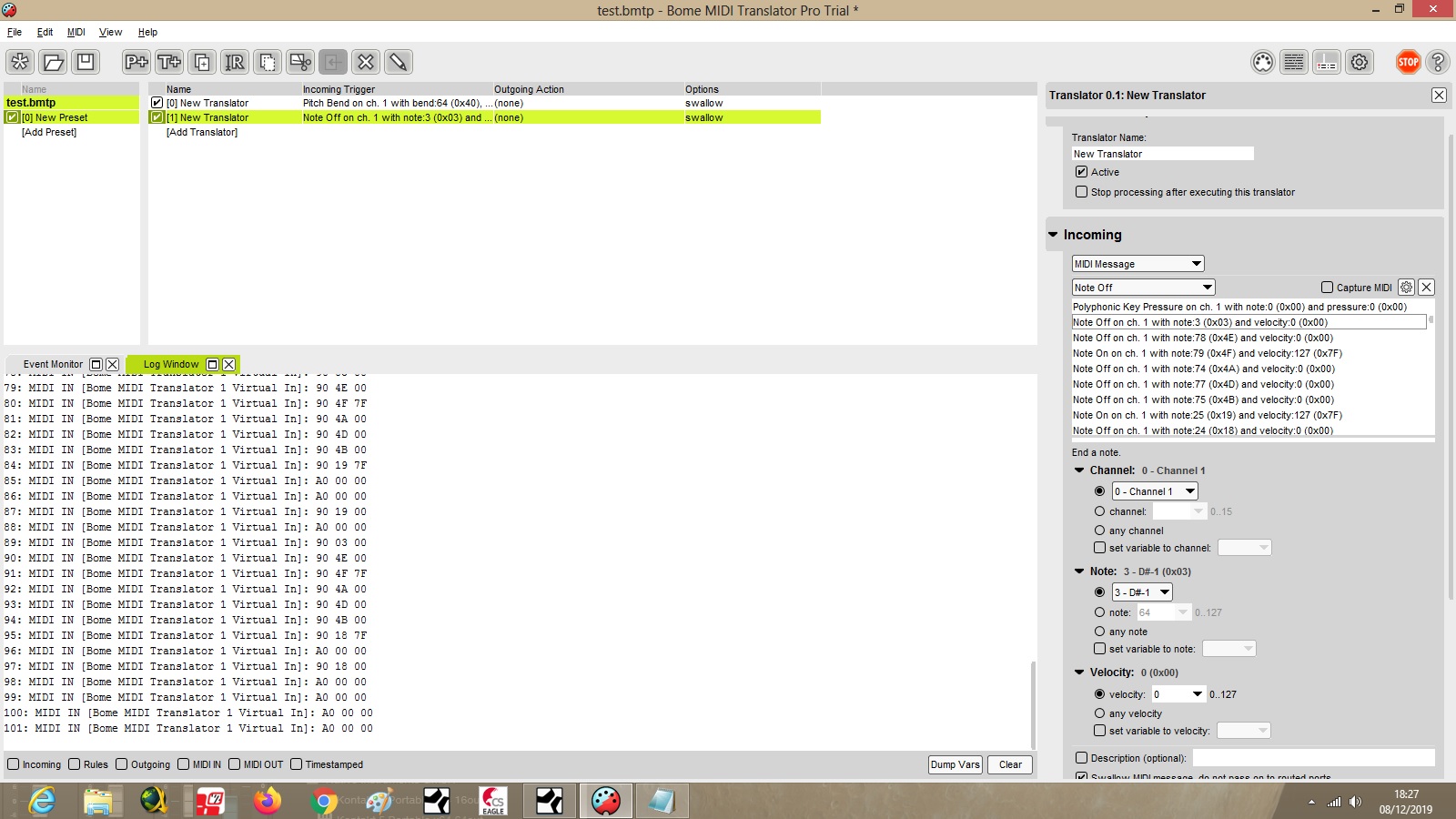
here is a screen shot of bome translator capturing the commands from the daw software.

lots to try out, but you can see the captured events on the left in the translator on the right


Just now, TK. said:

Hi,

finally found time to go through this thread… :wink:

First of all: the SysEx string contains an “illegal” value: 0xE0
Values >= 80 should not be sent, because they will be interpreted as a new MIDI status.

Second: you could simply toggle between the two values 0x10 and 0x01, and insert it into the SysEx string via ^val:

EVENT_BUTTON id=1 range=0x10:0x01 button_mode=toggle type=SysEx stream=“0xf0 0x00 0x01 0x16 0x10 0x18 ^val 0xf7”

Best Regards, Thorsten. 

The event 0xE0 was a misstype by me sorry about that, this was basically an example sysex string not the actual string


As much as i thought i had learned i see there is still a lot more to learn!! man next week is going to be crazy!

Finished building the first mb_mf NG and hooked up a fader, all worked first time. Calibration is great through mios studio. Would have been great if it had the ability to have a lcd attached. Just waiting for the other pcbs to arrive now so I can get on with the ngc code learnings and trial!!

Thorsten I was wondering if the issue of receiving sysex channel names forwarded to the oled had been resolved? I did ask this in relation to a thread where it had been asked a few years ago.  The channel name is sent from my daw via sysex and the text is ascii converted to hex as explained in this thread. Can you update me on this or if it is possible? Thanks

Could you please provide a link to the details?

Here an example how text messages can be received and forwarded to a LCD:

EVENT_RECEIVER id= 1 \
               type=SysEx stream="0xf0 0x11 0x22 0x33 0x44 ^cursor ^txt"

A more complex example (defining individual cursor positions) in the Logic Control Template:

# LCD Messages
# Note: we use ^txt56 instead of ^txt, so that the cursor will jump 
# to the next line after the 56th character has been reached
# Use map=1 to map the cursor positions over a 2x80 LCD
EVENT_RECEIVER id= 5 \
               type=SysEx stream="0xf0 0x00 0x00 0x66 ^dev 0x12 ^cursor ^txt56" \
               range=map1

# X cursor positions are defined in MAP1
# spread message over two 2x40 LCDs
MAP1 2 3 4 5 6 7 8 \
      12 13 14 15 16 17 18 \
      22 23 24 25 26 27 28 \
      32 33 34 35 36 37 38 \
      42 43 44 45 46 47 48 \
      52 53 54 55 56 57 58 \
      62 63 64 65 66 67 68 \
      72 73 74 75 76 77 78

If this doesn’t work for you, I might add an firmware enhancement - but in this case I need concrete information about the content of the SysEx string.

Best Regards, Thorsten.