SwinSID Review

Hello everybody,

I’d really like to build this one (finally got the 16f88). Could someone please tell me if it is possible to burn the 16f88 with JDM?

I’ve seen http://www.ucapps.de/mbhp/mbhp_burner_16f88_adapter.pdf, but,

Is that adapter specifically made for MBHP_Burner, or can it be used with JDM?

I’d thank very much anyone who could confirm me this before I start building the module, which I want to  incorporate to my MidiBox64.

Pablo.

You don´t need for this project a 16f88! You need a (or two)  Atmega 8515 as PSU.

Yep swinsid is atmel and yep that adapter is good for a jdm.

Sorry I asked offtopic. I must have been too sleepy when making this post. I meant to post it in the Midimerger 16f88 thread.  ::slight_smile:

So offtopic it was that I couldn´t find your answer.  :-[ Heh!

Thanx stryd. Cya

zzzzzLOLzzwhat?! hey whatnow? oh… zzzzzzzzzzzzzzzzzzz ;D

hello

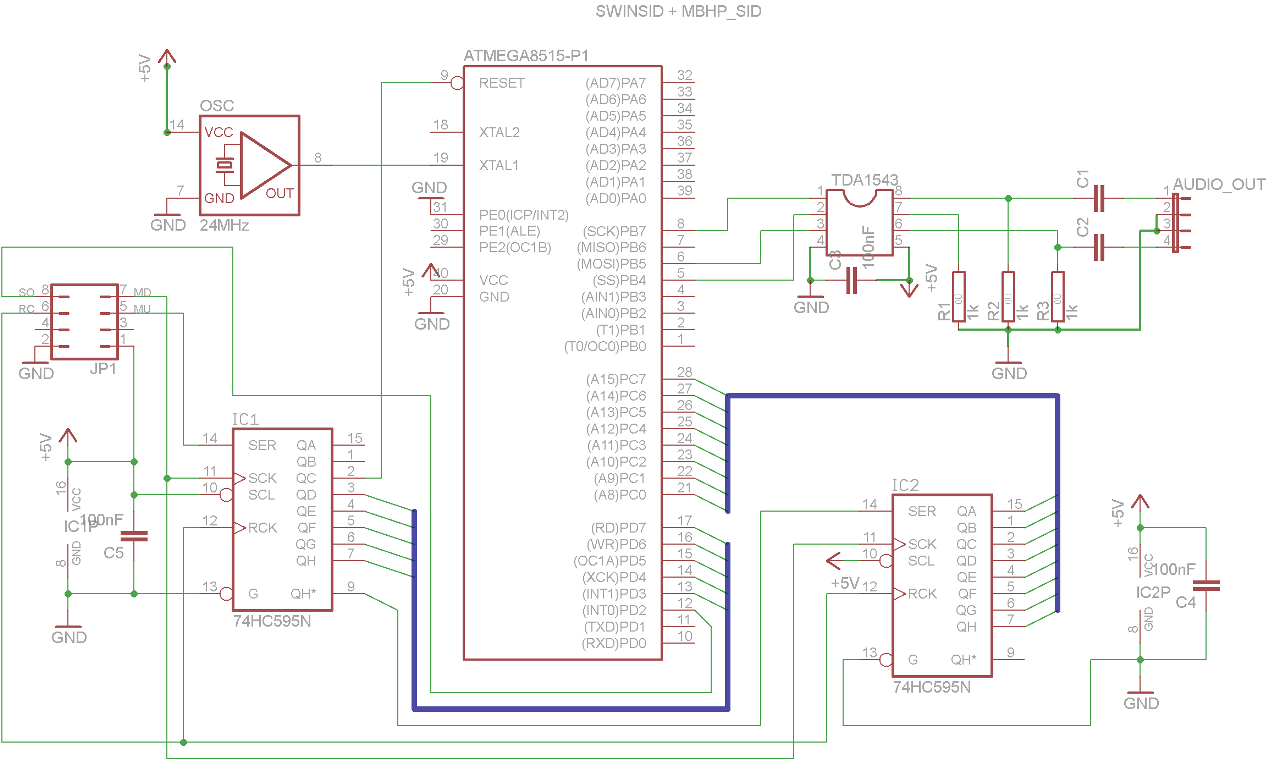
I build mbsid + swinsid today. im using pic18f452 with midibox_sid_v1_7303c setup_6581.hex firmware and SwinSIDX2.hex for atmega, but when I play some notes on my keyboard, i just hear some noises sound from my speaker. I build based on swinsid schematic combined with mbhp_sid_v3 schematic. any sugestion please…

sorry for my english…

B.R

The sid_v1_FW does not support the SwinSID IMO, does it ? In the V2_FW you have an option for this.

SwinSID works fine with MBSID V1, only difference: V2 allows to access the additional SwinSID registers

Best Regards, Thorsten

this is the schematic i’ve made. Iam glad if somebody correct it

thanks

B.R

Check your fuse bits configuration to enable external clock source - AVR have to run with 24MHz. SwinSID plays short 1KHz test tone during startup, when the frequency is lower then your clock frequency is wrong. Are you using TDA1543, not TDA1543A? (TDA1543A won’t work). If you still have problems, attach sound output recordings here.

Hi swinkels

sorry for late reply, im just back from holiday. Im using TDA1543, i buy it from futurlec.com. I dont able to re-program the fuse bit config. im using pony prog with stk200 simplified. It always show “device missing or invalid”. Please tell me how can I re-program it? are stk200 need external vcc? and what fuse bit should i tick? here I attached the recorded testone. and sorry for my english..

thanks before it

[testone2.rar](< base_url >/applications/core/interface/file/attachment.php?id=4198)

I’m using simplified STK200 with success but heard that it doesn’t work with some mainboards. STK200 doesn’t need any power source but you AVR should be running while programming.

Please post all further technical questions in this thread:

http://www.midibox.org/forum/index.php/topic,9386.90.html

Here You will find my tip with setting fuse bits.

HI

I’ll try on my friend PC tommorow.  :wink:

Thanks

B.R

Finaly writing the fuse bit work using HP P3 pc  ;D. But the output sound litle bit noisy. I think its my power suply problem. I’ll find new good power supply after my mb swindsid frontpanel finished… :wink:

Thanks all for the help..

B.R.