MIDI merge with LPC17

It’s neither a MIOS Studio issue, nor a MIDIO128 firmware issue, as exactly the same setup is working at my side.

It’s of course important that the PIC based core uses a different device ID so that it won’t be mixed up with the LPC17 core during a Query, but Johnc already considered this (PIC configured for device id 1)

I need more log files to find out the root cause.

Please do following three tests:

  1. connect an IN/OUT pair of your MIDISPORT 2x2 to OUT1/IN1 of the LPC17 module (a common bidirectional connection, nothing special here)

Select the appr. ports of your MIDISPORT interface in MIOS Studio and press the Query button -> is the LPC17 core regognized?

  1. remove your MIDISPORT (not required for next tests), and select the IN/OUT port of your LPC17 core in MIOS Studio again.

Enter following commands in MIOS Terminal:

set router 1 IN2 all USB1 all
set router 2 USB1 all OUT2 all
router
save DEFAULT
[/code]


"set router .." will change the setup of Node 1 and 2 remotely, the "router" command will output the current connections, "save DEFAULT" will store the changes in the .MIO file

Please post the complete terminal output here which is print when these commands are entered. I especially need to know the complete router setup.


Now connect your PIC core to IN2/OUT2 of the LPC17 core.

Is the Query button working now?


If not: enter following command in the MIOS terminal:
[code]  
set midimon on  

Now each incoming and outgoing MIDI message will be printed by the MIOS terminal as well (*)

Press the Query button and post the log messages here.

  1. enable the MIOS terminal based MIDImon as above, and power-cycle the PIC core - does it send a SysEx message during startup?

Print the terminal output here

Next instructions once I got the logfiles and once I know in which direction the troubleshooting has to be continued.

Best Regards, Thorsten.

(*) just to highlight: the MIOS terminal based MIDImon, which is actually running on the LPC17 core, doesn’t print SysEx messages send/received from USB1 or MIDI1 (IN1/OUT1) to avoid a clash with MIOS Terminal messages.

This might be confusing - and thats the reason why I recommend to test this with IN2/OUT2!

JTk

I am out of town thrum Sunday and will do the tests when I return

Johnc

It’s neither a MIOS Studio issue, nor a MIDIO128 firmware issue, as exactly the same setup is working at my side.

It’s of course important that the PIC based core uses a different device ID so that it won’t be mixed up with the LPC17 core during a Query, but Johnc already considered this (PIC configured for device id 1)

I need more log files to find out the root cause.

Please do following three tests:

  1. connect an IN/OUT pair of your MIDISPORT 2x2 to OUT1/IN1 of the LPC17 module (a common bidirectional connection, nothing special here)

Select the appr. ports of your MIDISPORT interface in MIOS Studio and press the Query button -> is the LPC17 core regognized?

  1. remove your MIDISPORT (not required for next tests), and select the IN/OUT port of your LPC17 core in MIOS Studio again.

Enter following commands in MIOS Terminal:

set router 1 IN2 all USB1 all

set router 2 USB1 all OUT2 all

router

save DEFAULT

“set router ..” will change the setup of Node 1 and 2 remotely, the “router” command will output the current connections, “save DEFAULT” will store the changes in the .MIO file Please post the complete terminal output here which is print when these commands are entered. I especially need to know the complete router setup. Now connect your PIC core to IN2/OUT2 of the LPC17 core. Is the Query button working now? If not: enter following command in the MIOS terminal:

set midimon on

Now each incoming and outgoing MIDI message will be printed by the MIOS terminal as well (*)

Press the Query button and post the log messages here.

  1. enable the MIOS terminal based MIDImon as above, and power-cycle the PIC core - does it send a SysEx message during startup?

Print the terminal output here

Next instructions once I got the logfiles and once I know in which direction the troubleshooting has to be continued.

Best Regards, Thorsten.

(*) just to highlight: the MIOS terminal based MIDImon, which is actually running on the LPC17 core, doesn’t print SysEx messages send/received from USB1 or MIDI1 (IN1/OUT1) to avoid a clash with MIOS Terminal messages.

This might be confusing - and thats the reason why I recommend to test this with IN2/OUT2!

TK,

I’m reviewing the tests you prescribe and have a question. I am running the LPC on its USB port. If I understand test #1, I am to plug the USB midiman 2x2 into a USB port on the computer and connect the midi in and out to the LPC. Since you didn’t ask how the LPC is being powered, it is not a problem for the LPC and midiman to be both USB connected to the same pc.

Sorry if this is a dumb question, but I don’t want to blow anything. I have enough problems already.

Thanks.

johnc

Yes, you can connect both modules with your PC during this test, the power consumption is low and shouldn’t cause a problem.

Best Regards, Thorsten.

Per your data request;

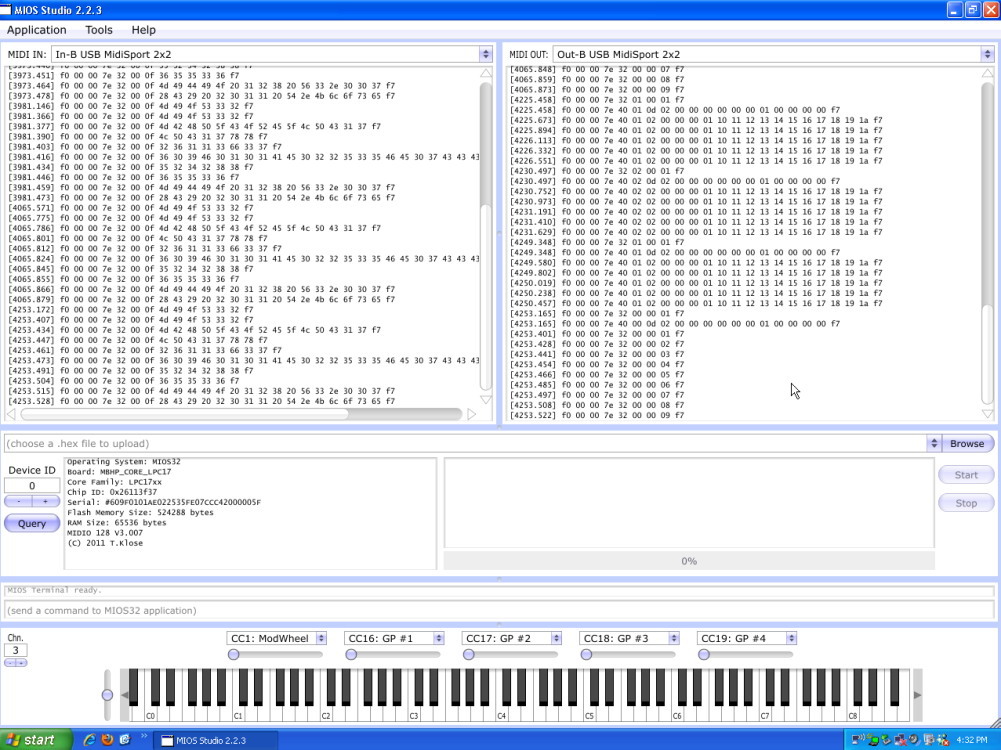
  1. connect an IN/OUT pair of your MIDISPORT 2x2 to OUT1/IN1 of the LPC17 module (a common bidirectional connection, nothing special here)

Select the appr. ports of your MIDISPORT interface in MIOS Studio and press the Query button -> is the LPC17 core regognized?

Yes! See screen print 1

  1. remove your MIDISPORT (not required for next tests), and select the IN/OUT port of your LPC17 core in MIOS Studio again.

Enter following commands in MIOS Terminal:

set router 1 IN2 all USB1 all

set router 2 USB1 all OUT2 all

router

save DEFAULT

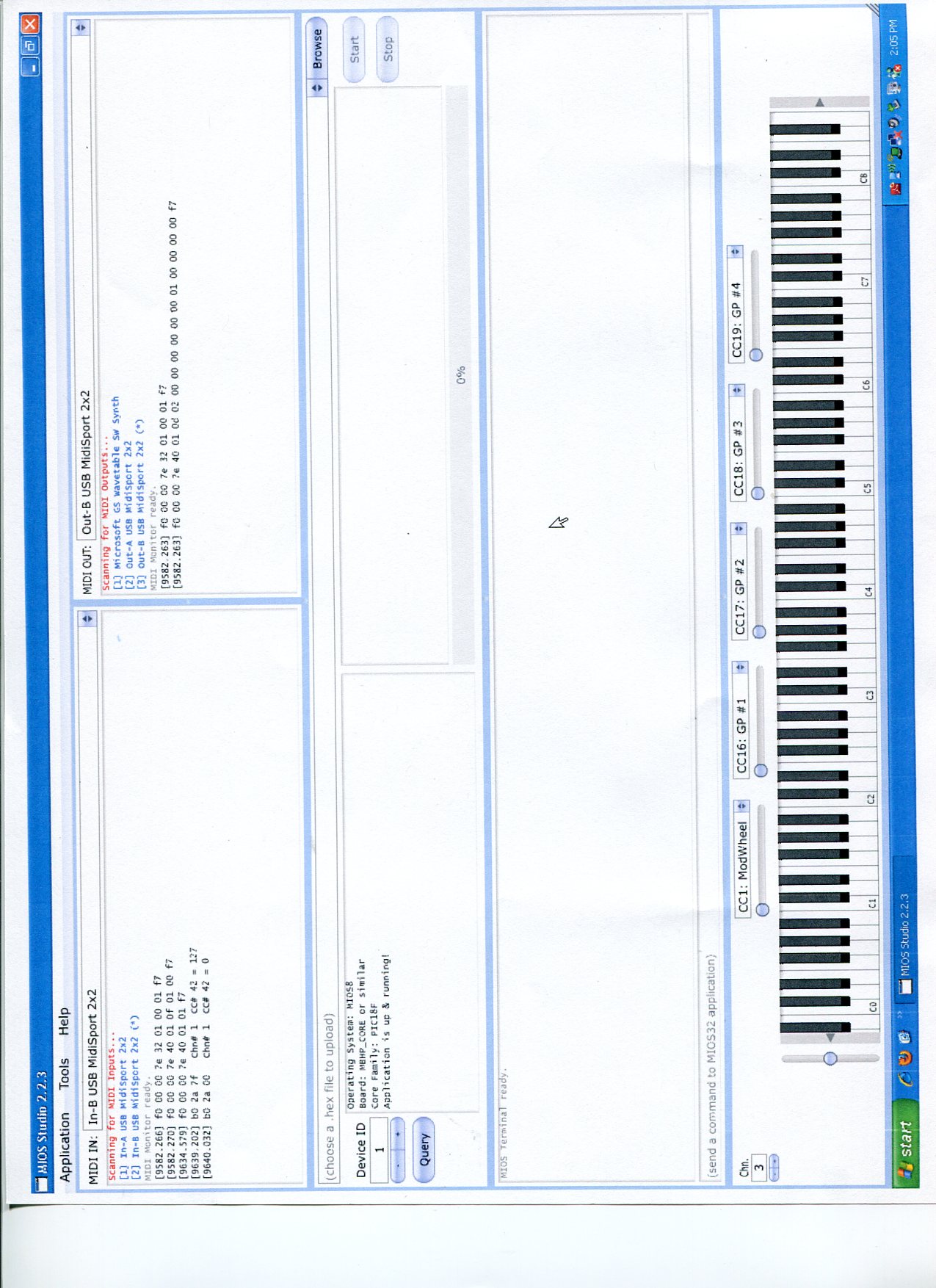
“set router ..” will change the setup of Node 1 and 2 remotely, the “router” command will output the current connections, “save DEFAULT” will store the changes in the .MIO file

Please post the complete terminal output here which is print when these commands are entered. I especially need to know the complete router setup.

See Screen print 2

  1. enable the MIOS terminal based MIDImon as above, and power-cycle the PIC core - does it send a SysEx message during startup?

Print the terminal output here

See screen print 3

Note.

  1. The screen prints of the terminal log continue on each screen print.

  2. The midimon did show the pic8 start up string with the power on cycle test.

  3. The query of the pic8 never worked.

  4. What is the midi clock item showing on the terminal log in step 1. Which ports does it refer to?

hopefully the screen prints are readable, if not I’ll redo them.

The step 3 screen prints are on the next post.

Johnc

Per your data request;

  1. connect an IN/OUT pair of your MIDISPORT 2x2 to OUT1/IN1 of the LPC17 module (a common bidirectional connection, nothing special here)

Select the appr. ports of your MIDISPORT interface in MIOS Studio and press the Query button -> is the LPC17 core regognized?

Yes! See screen print 1

  1. remove your MIDISPORT (not required for next tests), and select the IN/OUT port of your LPC17 core in MIOS Studio again.

Enter following commands in MIOS Terminal:

set router 1 IN2 all USB1 all

set router 2 USB1 all OUT2 all

router

save DEFAULT

“set router ..” will change the setup of Node 1 and 2 remotely, the “router” command will output the current connections, “save DEFAULT” will store the changes in the .MIO file

Please post the complete terminal output here which is print when these commands are entered. I especially need to know the complete router setup.

See Screen print 2

  1. enable the MIOS terminal based MIDImon as above, and power-cycle the PIC core - does it send a SysEx message during startup?

Print the terminal output here

See screen print 3

Note.

  1. The screen prints of the terminal log continue on each screen print.

  2. The midimon did show the pic8 start up string with the power on cycle test.

  3. The query of the pic8 never worked.

  4. What is the midi clock item showing on the terminal log in step 1. Which ports does it refer to?

hopefully the screen prints are readable, if not I’ll redo them.

The step 3 screen prints are on the next post.

Johnc

See step 3 screen prints below.

TK, how do you embed a .JPG photo within a post?

TK,

screen shots didn’t go through. here they are again

TK,

screen shots didn’t go through. here they are again

TK,

New thing to report.

I hooked up a DIN4X to the pic8 core, and with the LPC and PIC8 still hooked up as in test 2 and 3, with the midimon enabled, moving a stop or key shows up on the mios studio display.

So Pic 8 output is being routed to IN2 and to USB1

Johnc

TK,

Just noticed this:

with the router setup same as for the step2 tests, using in2 and out2, DIN’s connected to the LPC and the pic8,

Looking at the mon on the cs, moving a key on the LPC caused the USB1 to blink and the OUT1 to blink. moving a switch on the pic8 caused the usb1 and the IN2 to blink.

Shouldn’t the mon show USB1 and OUT2 to blink for DIN inputs to the LPC.

the mios terminal confirms the setup.

Johnc

Shouldn’t the mon show USB1 and OUT2 to blink for DIN inputs to the LPC.

Your question isn’t detailed enough to answer it correctly, but your observations are correct and I don’t really see a problem here.

I think that I found the error (at your side): the PIC based core is configured for device ID 2

Accordingly you’ve to select this device ID to query this core - it seems that you are using device ID 0 instead!

Best Regards, Thorsten.

Your question isn’t detailed enough to answer it correctly, but your observations are correct and I don’t really see a problem here.

I think that I found the error (at your side): the PIC based core is configured for device ID 2

Accordingly you’ve to select this device ID to query this core - it seems that you are using device ID 0 instead!

Best Regards, Thorsten.

TK,

Now I’m really confused!

The pic8 core has a 1 on it, as setup by smash tv. I connected the core 8 to the midiman 2x2 and ran mios studio2.2.3. see attached screen print. So mios studio will query the core and recognize it, without the LPC in the picture. You say it is configured for id=2. I don’t understand. if mios studio recognizes it as id=1, isn’t it configured correctly.

This is the core8 I used to run the tests.

I have 3 core8’s, id=0, ID=1 and id=2. I didn’t use the id=0 core because the LPC was on id=0. The core with id=2 is a more recent core and has the j8/J9 connection in a different place whereby my cables to the DIN4x were short, so I settled on the core8 with ID=1.

With the core8, ID=1 in place I ran all the tests, changing the core8 ID to 0, 1, 2, 3 to be sure it wasn’t mis-marked. the LPC was set on id=0 wherein it was recognized. I queryied the core 8 with a variety of id’s when it was diasey chained as we discussed, the router setup as you prescribed, and in no case would mios studio recognize the core8, including with the ID =1.

evidently the core 8 is working, as with the midimonitor enabled on mios terminal, pressing down stop keys shows input from the DIN4x attached to the core8, and the core8 startup string also shows.

So if in fact the core8 is configured as id=2, what do I do the change it, knowing that mios studio recognizes it as core=1.

If I have not done everything as you prescribed, please say so and I’ll do it again. Or if you have some other test, I’ll do it. If you need a diagram of the connections, or photos of the cores, etc. I will do that to. We seem to be close to a solution. Please help me resolve it.

With the router setup as you described in your earlier email, using USB1 and IN2 and OUT2, and the LPC and core8 connected together, the midimonitor in mios studio shows midi messages coming from the DIN’s on the LPC as well as the DIN’s connected to the core8. With the cs active, the monitor on the cs did not respond as I feel it should. inputs from the core 8 caused the USB1 and IN2 to blink. Inputs to the DIN’s connected to the LPC, make the USB1 and OUT1 blink, rather then OUT2. Is this correct? if I’m not explaining the clearly, please say so and I’ll try to do better.

johnc

With the cs active, the monitor on the cs did not respond as I feel it should. inputs from the core 8 caused the USB1 and IN2 to blink. Inputs to the DIN’s connected to the LPC, make the USB1 and OUT1 blink, rather then OUT2. Is this correct? if I’m not explaining the clearly, please say so and I’ll try to do better.

DINs connected to LPC17 will send MIDI events to the MIDI port which has been configured in the DIN page - the output port(s) can be configured for each pin individually.

Could you please explain, why you expect that a DIN pin handled by the LPC17 core sends to OUT2?

Did you configure the pin accordingly?

Anyhow, I don’t think that this detail is really relevant to debug SysEx communication.

As following snapshot is showing, your PIC base core sends “F0 00 00 7E 40 02 01 F7” when powered on.

![LPC step 3B.jpg](

)

This means, that the core is configured for Device ID 2, and not 1

Could it be, that you used two different PIC cores during debugging without mentioning it?

Please do the tests again with a single PIC based core, otherwise it’s impossible for me to clarify (remotely) that all data paths are working.

And please also add another test: Loopback OUT2->IN2 with a MIDI cable.

MIOS Studio device ID should be configured with 0 for this test.

Enable the LPC17 based MIDI monitor (“set midimon on”)

Show me a log where you are sending some MIDI Notes with the virtual keyboard, and where you are pressing the Query button.

I would like to see the MIOS Terminal output as well as the MIDI IN/OUT monitor output of MIOS Studio.

Best Regards, Thorsten.

TK,

DINs connected to LPC17 will send MIDI events to the MIDI port which has been configured in the DIN page - the output port(s) can be configured for each pin individually.

Could you please explain, why you expect that a DIN pin handled by the LPC17 core sends to OUT2?

Did you configure the pin accordingly?

Yes, I understand, the LPC is following the config in the .mio file.

2

As following snapshot is showing, your PIC base core sends “F0 00 00 7E 40 02 01 F7” when powered on.

"

yes, I understand! Evidently in swopping cores around, i left the ID=2 in place. The re-test are all with the same core.

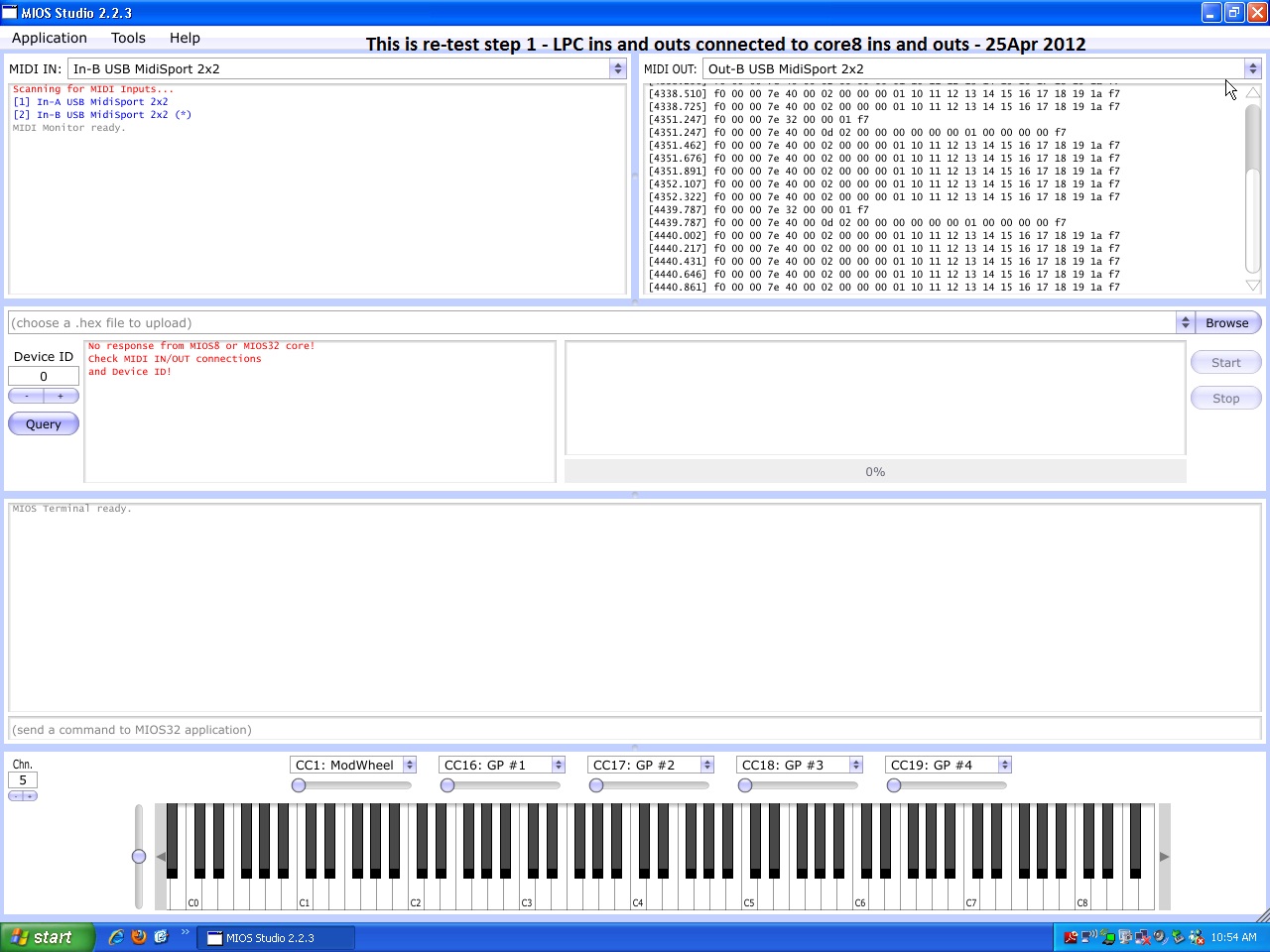
  1. REtest results:

retest 1 - See attach below (Retest 1 LPC.jpg). No the query of the LPC did not work.

retest 2 - See attach below (Retest 2 LPC.jpg)

Retest 3 - See attach below (Retest 3 LPC.jpg)

Note the last entries on the terminal log. When i moved stop tabs that are connected to the DINS on the Core8, the entries appeared on the log, even though mios studio would not query the core. something I also noticed is that when I moved stop tabs connected to the matrix on the LPC, the entries appeared on the midi in list at the left top of the mios studio display.

  1. With the LPC and core8 connected together, mios studio will query the Core 8, but not find it.

Hope this helps.

After the retesting, I did some testing;

  1. changed the router back to USB1 all OUT1 all

IN1 all USB1 all

the midi cable connections, IN1, OUT1 on the LPC to out and in on the pic8.

A query of id=1, connected with the PIC8. Great!

A query of id=0, got nothing.

I changed the cable connections to; IN1, OUT2 on the LPC to out and in on the core 8, Queried the id=0 (LPC) and it worked.

I looked at the mio file for the LPC and the IN1 port and OUT1 ports are used throughout, at the appropriate places, of course. this matches with the router configuration.

My assumption has been that the router config has control of where the midi signals go. Evidently thats not the case. I don’t know what this means, but here it is anyway.

Side question - should the midi merge on the pic8 be enabled, or disabled?

Thanks for all the help!

johnc

the midi cable connections, IN1, OUT1 on the LPC to out and in on the pic8.

A query of id=1, connected with the PIC8. Great!

A query of id=0, got nothing.

Of course, you have to select Device ID 1 in MIOS Studio whenever you want to establish the communication with a(ny) core which is assigned to this ID

My assumption has been that the router config has control of where the midi signals go. Evidently thats not the case. I don’t know what this means, but here it is anyway.

The router just forwards the MIDI stream, no modification of the data takes place, and this for very good reasons.

In other words: with the router configuration you are using the MIDIO128 application (running on the LPC17 core) acts like a common MIDI interface, and therefore you also have to setup MIOS Studio like of you would contact the PIC core through your normal MIDI interface.

I (wrongly) assumed that this was clear enough…

On the other hand I’m surprised that you never tried this during the tests. Could it be that you mixed up the PIC core with device ID 1 and 2 multiple times and always tried the same device ID?

However… finally SOLVED! :thumbsup:

Side question - should the midi merge on the pic8 be enabled, or disabled?

should be disabled!

Best Regards, Thorsten.

Of course, you have to select Device ID 1 in MIOS Studio whenever you want to establish the communication with a(ny) core which is assigned to this ID

The router just forwards the MIDI stream, no modification of the data takes place, and this for very good reasons.

In other words: with the router configuration you are using the MIDIO128 application (running on the LPC17 core) acts like a common MIDI interface, and therefore you also have to setup MIOS Studio like of you would contact the PIC core through your normal MIDI interface.

I (wrongly) assumed that this was clear enough…

On the other hand I’m surprised that you never tried this during the tests. Could it be that you mixed up the PIC core with device ID 1 and 2 multiple times and always tried the same device ID?

However… finally SOLVED! :thumbsup:

should be disabled!

Best Regards, Thorsten.

TK,

Please re-read my post.

Mios studio recognized the LPC with one midi cable configuration,and the PIC8 with a different cable configuration, It wasn’t just changing the id from 0 to 1!

Since the router was set up using IN1 and OUT1, I was expecting that mios studio would recognize either device by only changing the ID# for the query. No cable changes. Is my expectation in error?

If what I described with the cable changes is the way it should work, then I suspect that the cable arrangement that matches the router config. is the correct arrangement for operation.

Also, I was expecting MIOS studio to list the PIC8 as well as the LPC in the device lists, I guess thats not correct either.

Addressing the comments in your post:

The router just forwards the MIDI stream, no modification of the data takes place, and this for very good reasons.

In other words: with the router configuration you are using the MIDIO128 application (running on the LPC17 core) acts like a common MIDI interface, and therefore you also have to setup MIOS Studio like of you would contact the PIC core through your normal MIDI interface.

I understand that, I was expecting to see the pic8 in the device list of mios studio, as it appears when using the midiman 2x2. with the hardware arrangement I am using, mios studio shows only one midi device in the MIDI in and out device list.

On the other hand I’m surprised that you never tried this during the tests. Could it be that you mixed up the PIC core with device ID 1 and 2 multiple times and always tried the same device ID?

Actually, The results of the retest are the same for the original test. What I did was experiment with the prescribed setup, changing the ID, and also trying the other Core8’s(different ID’s)suspecting a hardware issue and forgot to change it back before doing the screen dump. What I didn’t do when experimenting with the different setups was to try different cable arrangements, and that was based on my assumption that the router configuration in the LPC MIO file governed what the cable connection needed to be so I didn’t even consider changing them.

Please understand that I am aware that quite a few people are reading this post, many just like me (somewhat inept) who are struggling with the new hardware, and trying to understand how to use it. Many with expectations based on experience with the basic pic8, midiox, and other software, and are looking for parallels inbetween the new and old devices. I ask a lot of questions, and provide a lot of input simply for varification that my understanding is correct, or, that I am misinterpreting, or have false expectations. I hope you accept my comments as constructive and not critical in any way. The forum has been a God send to me, without which I could never have had any success with midibox, in any of its varied forms. My focus has been on midio128 for the PIC8 and now for the LPC, and I value greatly you attention to my unique situation.

I attribute my continued participation in the forum to the simple premise that has persisted all along, that “no question is dumb or stupid” and worthy of an answer. I am sure that my questions have many times provoked a “thats a stupid question” comment, but no one ever said it, and I am thankful for that.

Thanks again for you resourcefulness, creativity, and ingenuity and willingness to share your talents with us in the form of “Midibox”.

Thanks,

johnc

Johnc

Mios studio recognized the LPC with one midi cable configuration,and the PIC8 with a different cable configuration, It wasn’t just changing the id from 0 to 1!

Since the router was set up using IN1 and OUT1, I was expecting that mios studio would recognize either device by only changing the ID# for the query. No cable changes. Is my expectation in error?

If what I described with the cable changes is the way it should work, then I suspect that the cable arrangement that matches the router config. is the correct arrangement for operation.

In the first configuration the LPC17 core isn’t recognized because you enabled the MIDI merger of the PIC based core.

As recommended at the end of my last post, the MIDI merger should be disabled!

It causes a feedback loop (MIOS Studio->LPC17->PIC->LPC17->MIOS Studio) for any SysEx command which is not processed by the PIC itself (and therefore not filtered)

In the second configuration the PIC based core isn’t recognized because it doesn’t receive the Query request.

In this configuration it probably doesn’t receive any MIDI event (as you haven’t configured the MIDI router accordingly), therefore you also don’t have a feedback loop here and LPC17 can be addressed.

Anyhow, disabling the MIDI merger will do the trick. It was a nice feature for serial MIDI chains, but now you are using a point-to-point connection to your PC through the LPC17 core. In such a configuration the merger causes an unwanted feedback loop.

Also, I was expecting MIOS studio to list the PIC8 as well as the LPC in the device lists, I guess thats not correct either.

There is no device list, only a list of MIDI IN ports, and another of MIDI OUT ports, which are maintained by your computer.

Best Regards, Thorsten.

In the first configuration the LPC17 core isn’t recognized because you enabled the MIDI merger of the PIC based core.

As recommended at the end of my last post, the MIDI merger should be disabled!

It causes a feedback loop (MIOS Studio->LPC17->PIC->LPC17->MIOS Studio) for any SysEx command which is not processed by the PIC itself (and therefore not filtered)

In the second configuration the PIC based core isn’t recognized because it doesn’t receive the Query request.

In this configuration it probably doesn’t receive any MIDI event (as you haven’t configured the MIDI router accordingly), therefore you also don’t have a feedback loop here and LPC17 can be addressed.

Anyhow, disabling the MIDI merger will do the trick. It was a nice feature for serial MIDI chains, but now you are using a point-to-point connection to your PC through the LPC17 core. In such a configuration the merger causes an unwanted feedback loop.

There is no device list, only a list of MIDI IN ports, and another of MIDI OUT ports, which are maintained by your computer.

Best Regards, Thorsten.

TK,

Live and learn.

I will disable the midi merger on the pic, and move on.

Thanks alot!

johnc

TK,

My project continues!

Of the three core8’s that I have, two are old one 5 years + the other almost 10 years old. The one with ID=2 is new with latest boot loader and mios. The only one that will be recognized by mios studio 2.2.3 when wired to the router on the LPC is the latest one with the id=2. With it I can query the lpc id=0, change the query id to2 and it will pull up the core8. could the fact that the old cores have a long past version of mios and the boodloader have anything to do with my problems?

Currently, having strange response from the matricies for the keyboards. Playing middle c (note 60) and monitoring with midiox, the note 60 message is shown with the correct channel, but about 12 other notes also show, all with channel 1. i’m looking for wiring problems.

johnc

Yes. As always in troubleshooting, everyone assumes you are not using an outdated OS version. The same goes here. You should update to the latest OS version.

Best, ilmenator

Yes. As always in troubleshooting, everyone assumes you are not using an outdated OS version. The same goes here. You should update to the latest OS version.

Best, ilmenator

yes, you are so correct.

At this point, the LPC and the pic8 are talking, and everything seems to be working fine. I was getting some strange din input messages along with the correct one coming from the keyboard stop tab matrices. when I pushed a stop tab down, a midi message for the correct note came thru, but also 5 other note on/off messages ckame through, always on channel 1, even if the actual stop being set was on channel 3. I noticed it mostly when several stops were set, and one additional was pressed. If all stops were off, and one was pressed, only one note on/off message came through. Any suggestions?

johnc

Is a “stop” the equivalent of a “key” on the keyboard?

A SysEx transfer issue at port OUT1 and OUT2 has been fixed in MIDIO128 V3.007:

MIDIO128 V3.007


o corrected SysEx output for LPC17

Best Regards, Thorsten.

TK,

What problems were corrected?

I am having a problem with communications inbetween devices.

The LPC encodes the SAMS sense contacts (DIN matrix), message goes out usb1 to jOrgan on the pc, jOrgan sends out via USB “on” message thru the LPC OUT1 to the pic8 which decodes the message and drives the SAMS magnet. The router is set properly, and the .mio file appears to be correct. Using mios studio as a test, the pic8 can be keyed using the keyboard on the respective channels set up for the messages to the PIC8 and all magnets checked out. also the jOrgan output monitor shows the messages going out.

Any suggestions?

Johnc

Some how, messages from jorgan don’t get to the pic8.